Office Laminating Machines: The Heat Settings People Overlook
Many buyers compare speed, size, and price when choosing office laminating machines, but often miss one critical factor: heat settings. The wrong temperature can cause bubbling, curling, weak seals, or damaged documents. This guide explores the heat controls people overlook, helping information-driven readers understand how proper settings improve lamination quality, machine performance, and everyday office efficiency.
What heat settings really mean in office lamination
At a basic level, office laminating machines use heat and pressure to bond a plastic film around paper, cards, signs, certificates, teaching materials, menus, and other business documents. While that sounds simple, lamination quality depends on a controlled relationship between temperature, film thickness, paper stock, adhesive chemistry, and feed speed. Heat settings are the point where these variables meet.
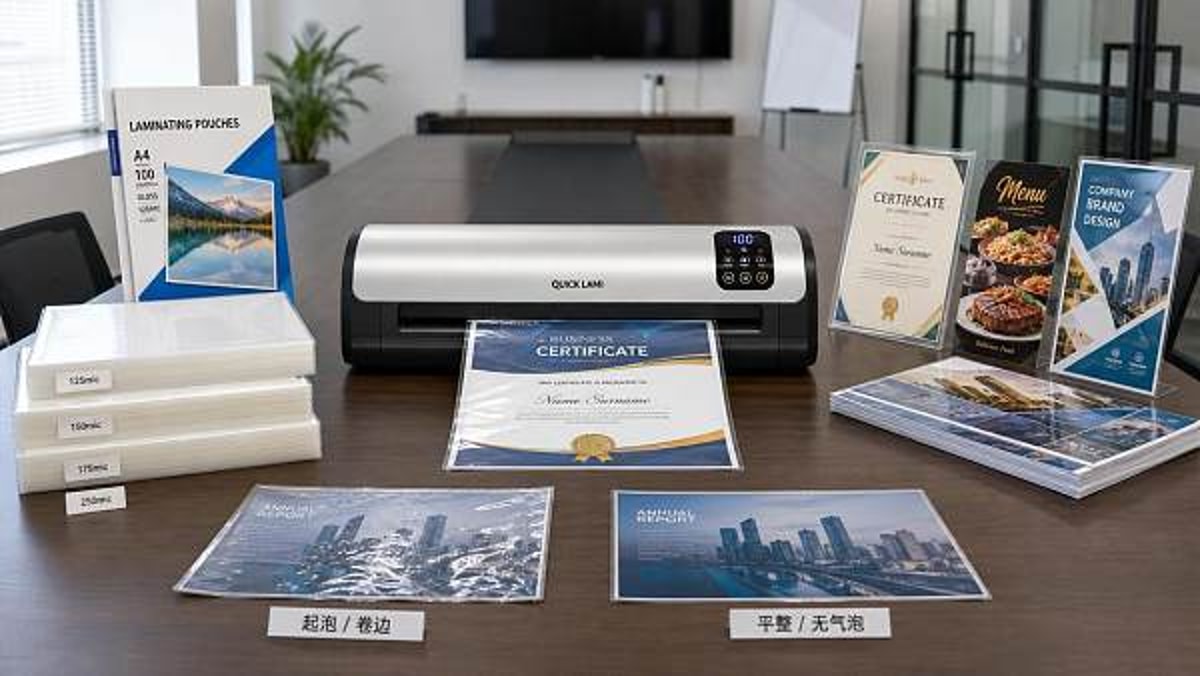
In practice, heat settings determine whether the adhesive inside a laminating pouch or roll activates evenly. If the temperature is too low, the film may not fully seal, leaving cloudy patches, silvering, open edges, or an easily peeled surface. If the temperature is too high, the film can wrinkle, distort colors, create trapped air bubbles, or curl the finished sheet. For offices that laminate every day, that means wasted supplies, repeated work, and inconsistent presentation.
This is why experienced users do not treat office laminating machines as one-button devices. They understand that heat is not only a technical specification; it is a quality control tool. The better the temperature control, the easier it is to produce clean, flat, durable output across different document types.
Why the industry pays attention to temperature control
Across commercial environments, lamination is often linked to presentation, durability, hygiene, and information protection. Hotels laminate back-of-house instructions, event signage, and food service references. Schools protect teaching aids and frequently handled materials. Corporate offices preserve ID sheets, compliance notices, sales visuals, and reusable display cards. In each setting, the final appearance reflects operational standards.
For this reason, heat settings matter beyond the machine itself. They affect brand consistency, user productivity, and replacement cost. In a sourcing context, Global Commercial Trade and similar B2B intelligence platforms emphasize practical operating factors because commercial buyers increasingly evaluate equipment based on total performance rather than only purchase price. A laminator that saves time but damages pouches or produces uneven output can become more expensive over time than a slower but better-controlled machine.
The market has also shifted toward mixed-use environments. Many offices now need one of the more flexible office laminating machines that can handle standard paper one day, heavier signage the next, and occasional specialty media after that. As use cases broaden, temperature control becomes even more important because fixed-heat models may struggle with variation.
The heat variables people most often overlook
When users think about laminator heat, they often reduce the issue to “hot enough” or “too hot.” In reality, several smaller variables shape the result.
Film thickness changes heat demand
A 3 mil pouch usually needs less heat than a 5 mil or 10 mil pouch. Thicker film requires more energy for the adhesive layer to activate consistently across the surface. If an office switches film thickness without adjusting settings, poor sealing is common. Many document failures blamed on machine quality are actually mismatch problems between pouch thickness and temperature.
Paper type affects heat absorption
Standard copier paper behaves differently from glossy prints, heavy cardstock, coated sheets, or ink-rich graphics. Dense or coated media can alter how heat transfers through the pouch. Glossy marketing prints may require a more careful setting to avoid warping, while heavier inserts may need slightly more heat or a slower pass for proper adhesion.
Feed speed and heat work together
Some office laminating machines let users adjust speed as well as temperature. Even if a machine reaches the correct heat, a fast feed rate can reduce the amount of time the pouch spends under the rollers. That can lead to incomplete bonding. The reverse is also true: a slower speed at high temperature may overcook the film. Temperature should always be interpreted with dwell time in mind.
Warm-up stability matters
Many users start laminating as soon as the indicator light changes. However, not all machines stabilize at operating temperature immediately. In lower-end office laminating machines, the first few passes can differ from later ones if the heating system fluctuates. In busy offices, this creates inconsistency that users may misread as random defects.
Ambient conditions influence results
Humidity, room temperature, and document storage conditions can subtly affect lamination. Paper kept in damp storage may release moisture when heated, increasing the chance of bubbles or haziness. In cooler office areas, film may need slightly more adjustment time to run consistently.
A practical industry overview of heat-related performance
For information-driven readers comparing office laminating machines, the table below shows how common operating conditions connect to heat management and output quality.
Where correct heat settings create the most value
The value of well-managed heat settings becomes clearer when viewed by application rather than by machine feature alone. Not every department uses office laminating machines in the same way, and not every laminated item has the same quality tolerance.
Front-facing business materials
Reception signs, visitor instructions, branded tabletop notices, and event inserts need visual clarity. In these cases, even minor bubbling or edge curl makes materials look low quality. Stable heat control protects brand presentation and reduces reprints.
High-touch operational documents
Safety checklists, warehouse references, kitchen charts, cleaning procedures, and classroom tools are handled repeatedly. These items need stronger seals, especially at the edges. A machine with better heat adjustment helps prevent peeling during extended use.
Mixed-media office environments
Shared offices often laminate different materials with little warning: HR forms, promotional prints, certificates, instructional cards, and temporary signs. Flexible office laminating machines with adjustable heat are better suited to these settings because they reduce the risk of one setting being forced onto every job.
Commercial hospitality and education settings
Hotels, training centers, and educational institutions often have high standards for both appearance and durability. Here, the overlooked heat setting becomes part of broader equipment reliability. It supports operational smoothness, lowers waste, and helps maintain professional visual standards across departments.
How to evaluate office laminating machines beyond basic specifications
For readers researching products, a better comparison framework includes more than speed and sheet width. The goal is to understand how well a machine manages real operating variation.
This evaluation approach is especially useful for B2B buyers, facilities teams, and administrative managers who need dependable results across departments. A machine that can adapt to varied operating conditions usually delivers better long-term value than one built only for simple, occasional use.
Practical guidance for getting better results from heat settings
Even the best office laminating machines require informed operation. The following practices help reduce common defects and improve consistency.
- Match the setting to pouch thickness instead of using one default level for every task.
- Run a test sheet when switching from plain paper to glossy prints or heavy stock.
- Allow extra stabilization time after warm-up, especially for the first batch.
- Store pouches and paper in dry, controlled conditions to reduce moisture-related defects.
- Clean rollers according to the manufacturer’s instructions, since residue can affect heat transfer and finish quality.
- Monitor output over longer runs because internal temperature behavior may shift after repeated passes.
These steps sound simple, but they often separate a frustrating laminating process from a reliable one. In commercial settings, small improvements in setup reduce waste across hundreds of documents over time.
Common signs that heat settings need adjustment
Users do not need advanced technical training to recognize heat-related issues. A few visible signs usually point to the source of the problem. Cloudiness and poor edge sealing often suggest insufficient heat. Tight curl, warping, or distorted film usually suggest too much heat. Isolated bubbles may indicate trapped air, uneven roller pressure, or media moisture, but they can also appear when the chosen setting does not suit the material.
If the same pouch type performs differently throughout the day, the issue may be thermal consistency rather than incorrect selection alone. This is one reason why better office laminating machines emphasize stable heating systems, not just faster warm-up claims.
Conclusion: a small control with a large operational impact
Heat settings are easy to overlook because they seem secondary to speed, size, and price. Yet in daily use, they often decide whether office laminating machines produce professional results or recurring waste. For information-driven readers, the key takeaway is clear: temperature control is not a minor feature. It is central to finish quality, seal strength, media compatibility, and equipment efficiency.
Whether you are reviewing options for a school office, corporate department, hotel operations team, or multi-use commercial workspace, pay close attention to how a laminator manages heat across different materials. The best decision is usually the one that supports consistent output, not simply the one with the most visible headline specification. In a market where presentation and durability matter, understanding heat settings helps turn office laminating machines into dependable business tools rather than occasional problem sources.
Search News
Hot Articles
Popular Tags
Need ExpertConsultation?
Connect with our specialized leisureengineering team for procurementstrategies.
Recommended News
 May 04, 2026PU Leather Journals: Why Some Covers Peel Too SoonPU leather journals can look elegant and affordable, but why do some peel so quickly? Discover the real causes, warning signs, and smarter buying tips before you choose.● Institutional Buyer
 May 04, 2026Retractable Badge Reels: The Small Item That Fails FirstRetractable badge reels fail faster than many workplace accessories. Learn what causes breakage, how to source durable options, and how to cut replacement costs.● Institutional Buyer
 May 04, 2026Id Card Holders Wholesale: Hard Shell or Soft Vinyl?Id card holders wholesale guide: compare hard shell vs soft vinyl for durability, cost, branding, and daily use to choose the best bulk option for offices, schools, events, and more.● Institutional Buyer
 May 04, 2026Office Laminating Machines: The Heat Settings People OverlookOffice laminating machines perform best when heat settings match pouch thickness, paper type, and speed. Learn how proper temperature control reduces bubbles, curl, waste, and rework.● Institutional Buyer
 May 04, 2026Custom Printed Lanyards: Which Material Holds Up Best?Custom printed lanyards: discover which materials last longest, keep logos sharp, and deliver better value for events, offices, schools, and premium commercial use.● Institutional Buyer
 May 04, 2026Why Wholesale Spiral Notebooks Vary So Much in Paper FeelWholesale spiral notebooks can look alike yet feel completely different. Learn what paper weight, fiber, coating, and sourcing standards mean for writing quality and smarter bulk buying.● Institutional Buyer
 May 04, 2026Binding Machines Wholesale: Small Price Gaps, Big Quality RisksBinding machines wholesale buyers face hidden quality risks behind small price gaps. Learn how to compare durability, compliance, and total cost before you order.● Institutional Buyer
 May 04, 2026Custom Printed Planners That People Actually Keep UsingCustom printed planners that people actually keep using—learn how to choose the right format, materials, and branding to boost retention, usability, and long-term brand value.● Institutional Buyer
 May 02, 2026Wholesale chef coats that hold shape after repeated industrial washingWholesale chef coats that stay sharp after repeated industrial washing. Compare fabrics, stitching, and supplier standards to choose durable uniforms that protect brand image and reduce replacement costs.● Institutional Buyer
 May 02, 2026What makes non slip chef shoes comfortable for 12-hour shiftsNon slip chef shoes for 12-hour shifts should deliver lasting support, cushioning, breathability, and grip. Learn what buyers and chefs should compare before choosing.● Institutional Buyer
 May 02, 2026Kenya Marathon Record Break Sparks Carbon-Plate Shoe Export Surge to AfricaKenya Marathon Record Break sparks surge in carbon-plate shoe exports to Africa—urgent bilingual labeling compliance needed for EAC markets.● Institutional Buyer
 May 01, 2026Custom Hotel Uniforms: Where Fit Problems Usually StartCustom hotel uniforms often fail at the fit-planning stage. Learn where sizing issues start, how to compare suppliers, and how to avoid costly reorders with smarter sourcing.● Institutional Buyer
 Apr 28, 2026How to Shortlist an Office Supplies WholesalerOffice supplies wholesaler selection starts with the right criteria. Learn how to compare an office supplies supplier, distributor, or manufacturer for cost, quality, compliance, and scalable B2B sourcing.● Institutional Buyer
 Apr 28, 20262026 Office Supplies Supplier Trends to WatchExplore 2026 office supplies supplier trends and learn how every office supplies wholesaler, distributor, and manufacturer can improve sourcing, compliance, fulfillment, and OEM growth.● Institutional Buyer
 Apr 28, 2026What to Check Before Choosing an ExporterOffice supplies supplier and exporter checklist: compare quality, compliance, lead times, MOQ, and service to choose a reliable office supplies manufacturer or wholesaler with confidence.● Institutional Buyer
 Apr 28, 2026Can an Office Supplies Producer Improve MarginsCan an office supplies producer improve margins? Learn how an office supplies manufacturer, supplier, and exporter boosts profit through smarter sourcing, lean production, and OEM value.● Institutional Buyer
 Apr 28, 2026How Bulk Suppliers Handle Custom PackingOffice supplies supplier insights: learn how an office supplies wholesaler, distributor, or OEM manufacturer manages custom packing to reduce risk, control cost, and improve delivery.● Institutional Buyer
 Apr 28, 2026Office Supplies OEM Manufacturer Pros and ConsOffice supplies OEM manufacturer pros and cons explained for every office supplies supplier, wholesaler, distributor, and B2B buyer—compare cost, quality, MOQ, and delivery before sourcing.● Institutional Buyer
 Apr 28, 2026Who Needs an Office Supplies B2B SupplierOffice supplies supplier guide for procurement teams, distributors, and institutions. Learn when to choose an office supplies wholesaler or manufacturer for stable supply and better B2B sourcing.● Institutional Buyer
 Apr 28, 2026How to Avoid Risks With Office Supplies FactoriesOffice supplies supplier risk guide: learn how to vet an office supplies manufacturer, wholesaler, distributor, or factory for quality, compliance, OEM reliability, and on-time delivery.● Institutional Buyer
 Apr 27, 2026Office Supplies Manufacturer MOQ ExplainedOffice supplies manufacturer MOQ explained: compare an office supplies supplier, wholesaler, distributor, OEM manufacturer, and factory to reduce cost, improve flexibility, and source smarter.● Institutional Buyer
 Apr 27, 2026Distributor or Supplier for Fast ReordersOffice supplies supplier or distributor for fast reorders? Compare lead times, stock stability, and bulk supply options to choose a reliable office supplies B2B supplier.● Institutional Buyer
 Apr 27, 2026How Wholesalers Cut Office Supply CostsOffice supplies supplier and office supplies wholesaler solutions help cut costs through bulk buying, OEM options, and smarter sourcing. Compare distributors and manufacturers to save more.● Institutional Buyer
 Apr 27, 2026Office Supplies Supplier Pricing Red FlagsOffice supplies supplier pricing red flags explained: compare an office supplies wholesaler, distributor, or manufacturer, spot hidden risks, and choose a reliable B2B partner with confidence.● Institutional Buyer