Office Network Racks: Airflow Problems Start With Bad Planning
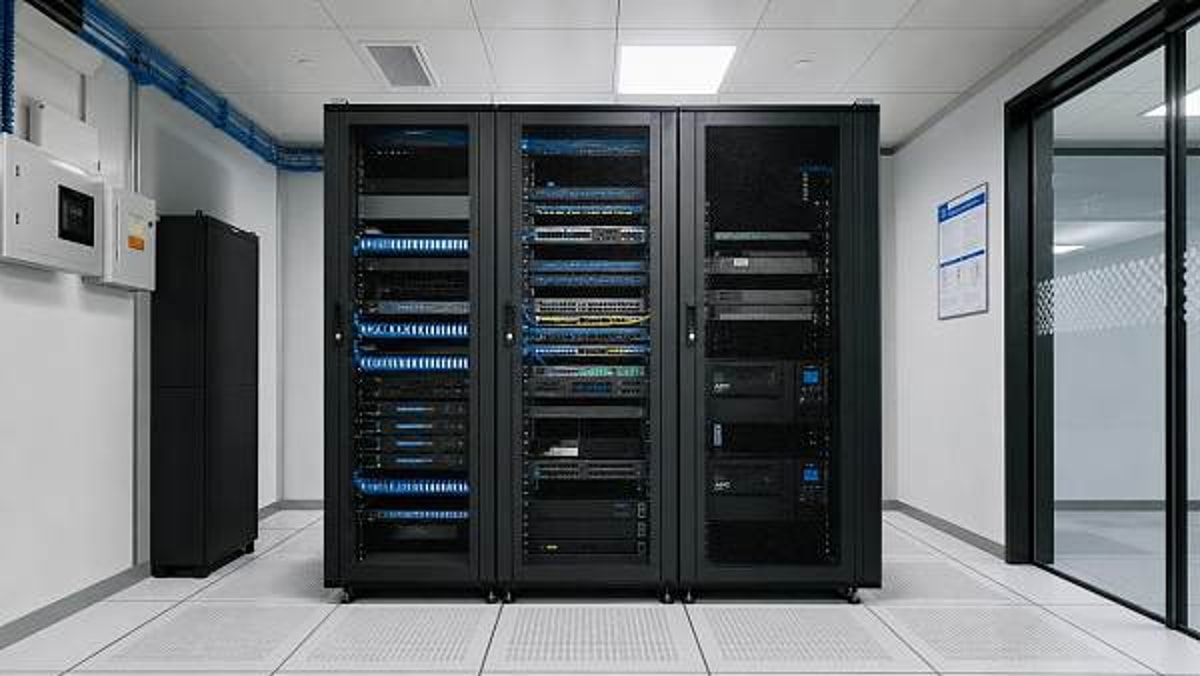
Office network racks often fail long before the hardware does—because airflow was treated as an afterthought during planning. For technical evaluators, poor rack layout can quietly trigger overheating, cable congestion, higher maintenance risk, and unstable network performance. Understanding how bad planning affects cooling efficiency is the first step toward building a reliable, scalable office infrastructure.
Why technical evaluators should use a checklist first
When reviewing office network racks, it is easy to focus on rack height, hardware capacity, or pricing before validating airflow logic. That approach creates expensive blind spots. Heat problems in office environments are rarely caused by one dramatic mistake. More often, they come from several small planning errors that interact over time: shallow cabinets, blocked intake zones, unmanaged cables, mixed equipment types, and no defined hot air path. A checklist-based evaluation helps technical teams identify those hidden risks early, before procurement and installation lock in the wrong design.
For modern offices, network racks must support switches, patch panels, UPS units, routers, firewalls, access control gear, and sometimes edge computing devices. Even if the room is not a full data center, the thermal behavior can become surprisingly complex. A structured review allows evaluators to compare office network racks not only by dimensions, but by cooling readiness, maintenance accessibility, future growth, and operational stability.
Start here: the core airflow checklist for office network racks
Before approving a rack layout, confirm these priority items. Each one directly affects airflow performance and should be treated as a pass-or-fail checkpoint rather than a nice-to-have feature.
- Verify equipment heat load, not just power count. A rack with several high-density switches can create concentrated hot spots even in a small office deployment.
- Confirm front-to-rear airflow compatibility across installed devices. Mixed airflow directions can recycle hot exhaust and undermine the entire cabinet design.
- Check perforation quality on front and rear doors. Doors that look vented but have low open-area percentages can restrict intake and exhaust.
- Measure clearance around the rack. Airflow problems often start outside the cabinet when racks are placed too close to walls, furniture, or partitions.
- Review cable entry paths and bundle volume. Large, poorly routed cable masses can block side channels and reduce cooling efficiency.
- Assess blanking panel use. Empty rack spaces without blanking panels allow hot air recirculation and reduce cooling predictability.
- Confirm fan strategy only after passive airflow is validated. Fans cannot compensate for bad planning if the air path itself is blocked.
- Check maintenance access at front, rear, and sides. Restricted service access usually leads to improvised cable moves and open doors, both of which damage airflow control.
How to judge whether a rack plan is thermally realistic
A common mistake in office network racks is assuming that if the room has air conditioning, the rack will stay cool. Room cooling and rack cooling are not the same. The room may feel comfortable to occupants while a closed cabinet traps heat around active electronics. Technical evaluators should judge thermal realism using several practical criteria.
1. Equipment density versus cabinet volume
A half-filled rack is not automatically safe. If power-dense devices are mounted in the same zone, local temperatures can rise quickly. Review the placement of switches, PoE equipment, UPS units, and appliances with internal fans. If heat-generating devices are stacked without spacing logic, airflow can stall even in a tall cabinet.
2. Intake path versus obstruction risk
The intake side must have a clear path to cooler room air. Check whether the rack front faces open space or is tucked into a corner, under a desk zone, or behind a decorative enclosure. In commercial office interiors, aesthetic fit-outs sometimes compromise functional ventilation. That tradeoff should be flagged early.
3. Exhaust path versus heat recirculation
Rear exhaust air must leave the area without being drawn back into the rack. If office network racks are installed in compact IT closets, low ceilings, or shared utility spaces, hot air can accumulate behind the cabinet. This is especially risky when the closet door stays closed for noise control or security reasons.
4. Passive design before active cooling
If a rack only works when supplemental fan units operate continuously, the underlying design may already be weak. Good passive airflow should handle the baseline load. Fans should support peak conditions, not rescue a flawed cabinet layout.
Key evaluation standards for office network racks
The table below summarizes practical decision criteria that technical evaluators can use during rack selection, site review, or retrofit planning.
Scenario-based checks: office, campus, and mixed-use commercial spaces
Not all office network racks operate in the same environment. Technical evaluators should adjust their review based on site conditions, occupancy patterns, and business continuity requirements.
Open-plan office installations
In open offices, racks may be placed in storage zones, print areas, or enclosed millwork to reduce visual impact. The main risk is aesthetic containment overriding cooling logic. Confirm door venting, acoustic treatments, and furniture integration do not choke airflow. Also verify that cleaning staff or office users cannot block vents with boxes or supplies.
Small IT rooms and branch offices
These sites often have the highest airflow risk because they rely on comfort cooling rather than dedicated environmental control. During assessment, review after-hours HVAC schedules, closet pressure conditions, and whether heat continues to build when the main office is unoccupied. Many office network racks fail overnight or on weekends when ventilation is reduced.
Educational and shared commercial environments
In smart campuses, training centers, and multi-tenant spaces, racks may carry variable loads due to AV systems, access control, or temporary devices. Planning should account for non-network equipment entering the cabinet later. If future mixed use is likely, leave thermal headroom and define cable pathways in advance.
The most overlooked planning mistakes
Many office network racks look acceptable during handover but become problematic six months later. These are the most common oversights worth flagging during technical evaluation.
- Choosing rack size based only on current device count, with no allowance for growth, cable separation, or thermal spacing.
- Placing patch panels and high-heat switches in ways that force dense cable bundles directly in front of ventilation areas.
- Assuming top-mounted fans solve everything, even when rear exhaust has nowhere to go.
- Ignoring side clearance, which limits serviceability and encourages technicians to leave doors open during normal operation.
- Installing office network racks in multi-purpose closets with cleaning supplies, paper stock, or non-IT storage that obstructs air movement.
- Failing to document airflow direction for each device, especially when adding hardware from different vendors over time.
Execution advice: what to prepare before procurement or retrofit
To move from a general review to a workable plan, technical evaluators should collect a focused set of inputs. This shortens decision cycles and reduces redesign later.
- A complete equipment list with rack units, power draw, airflow direction, and expected duty cycle.
- Basic room information, including ambient temperature range, HVAC schedule, door status, and any ventilation constraints.
- Cable count estimates for copper, fiber, uplinks, and patching growth over the next 24 to 36 months.
- Service access requirements, such as front-only, front-and-rear, or restricted access conditions.
- Operational priorities, including uptime targets, maintenance windows, remote monitoring needs, and noise sensitivity.
With those details, it becomes easier to compare office network racks on meaningful criteria: usable airflow path, cable segregation capability, accessory compatibility, and future-proofing. This is also where supplier quality matters. Buyers should favor sourcing partners that can provide detailed cabinet specifications, accessory options, real project references, and clear guidance on thermal configuration rather than generic rack dimensions alone.
Quick FAQ for technical evaluation teams
Do small office network racks really need airflow planning?
Yes. Small racks often run hotter because they are placed in tight spaces with limited ventilation and mixed-use storage conditions. Compact size does not reduce thermal risk.
Are fan trays enough to fix poor airflow?
Not by themselves. Fan trays help only when intake, exhaust, and cable routing are already planned correctly. Otherwise, they may simply move hot air around inside the rack.
What is the first warning sign of a bad rack plan?
Frequent high-temperature alerts, inconsistent switch performance, or technicians routinely opening doors to “help it cool down” are all early indicators that office network racks were not planned around airflow.
Final checklist before you move forward
If you are evaluating office network racks for a new project or upgrade, prioritize the basics in this order: define heat load, confirm airflow direction, validate cabinet ventilation, protect clear intake and exhaust zones, control cable density, and reserve room for maintenance and growth. That sequence catches the majority of hidden failures before they become operational issues.
For organizations sourcing through global commercial channels, the smartest next step is to prepare a concise technical brief covering equipment profile, site conditions, access needs, budget range, delivery expectations, and compliance priorities. Once those inputs are clear, you can compare office network racks more accurately, request better-fit solutions from qualified suppliers, and avoid paying later for preventable airflow mistakes.
Search News
Hot Articles
Popular Tags
Need ExpertConsultation?
Connect with our specialized leisureengineering team for procurementstrategies.
Recommended News
 May 04, 2026Ergonomic Office Chairs Wholesale: Comfort Claims vs Real SupportErgonomic office chairs wholesale: learn how to verify real support beyond comfort claims with fit, adjustability, durability, and compliance insights for smarter commercial buying.● Institutional Buyer
 May 04, 2026Modular Office Workstations: Flexibility Can Add Setup CostsModular office workstations can improve flexibility, but setup costs often rise through installation, power, data, and rework. Learn when the added investment truly pays off.● Institutional Buyer
 May 04, 2026Steel Filing Cabinets: Why Some Drawers Jam Too EarlySteel filing cabinets often jam early due to weak slides, poor leveling, overload, or lock issues. Discover what to check before buying and how to avoid costly drawer failures.● Institutional Buyer
 May 04, 2026Office Network Racks: Airflow Problems Start With Bad PlanningOffice network racks can fail early when airflow is ignored. Learn the key planning checklist to prevent overheating, reduce maintenance risks, and build a more reliable office network.● Institutional Buyer
 May 04, 2026Office Partitions Wholesale: Open Plan Savings, Closed Office NeedsOffice partitions wholesale helps project managers cut fit-out costs, speed delivery, and balance open-plan efficiency with private office performance. Explore smarter commercial workspace solutions.● Institutional Buyer
 May 04, 2026Conference Room Tables: Common Layout Mistakes to AvoidConference room tables can make or break meeting flow. Discover common layout mistakes to avoid and plan smarter spaces for collaboration, AV integration, and professional results.● Institutional Buyer
 May 04, 2026Mobile Pedestals Wholesale: Why Drawer Slides Matter MoreMobile pedestals wholesale buyers should look beyond price—drawer slides shape durability, load capacity, and maintenance costs. Learn what to compare before ordering.● Institutional Buyer
 May 04, 2026Height Adjustable Standing Desks: Stability Matters More Than SpeedHeight adjustable standing desks should be judged by stability, not just speed. Learn how stronger frames improve safety, user confidence, and long-term value in commercial spaces.● Institutional Buyer
 May 04, 2026Executive Office Desks: When Looks Start to Hurt FunctionExecutive office desks should do more than look impressive. Discover how to balance prestige, ergonomics, storage, and tech support for smarter office buying decisions.● Institutional Buyer
 May 04, 2026Server Cabinets Wholesale: How to Avoid Ordering the Wrong DepthServer cabinets wholesale guide: avoid costly depth mistakes by checking usable internal space, rail fit, cable clearance, and expansion needs before placing bulk orders.● Institutional Buyer
 May 04, 2026Commercial Paper Shredders and the Hidden Cost of DowntimeCommercial paper shredders do more than destroy documents—they protect uptime, compliance, and budgets. Discover how to avoid hidden downtime costs and choose smarter for busy workplaces.● Institutional Buyer
 May 04, 2026Mesh Office Chairs OEM Orders: Specs That Cause ReworkMesh office chairs OEM projects often face rework from vague specs, certification gaps, and component mismatches. Learn what to verify before production to avoid delays and protect budgets.● Institutional Buyer
 May 04, 2026Stackable Visitor Chairs That Save Space Without Looking CheapStackable visitor chairs that save space without looking cheap—discover how to choose stylish, durable seating for offices, schools, and hospitality spaces.● Institutional Buyer
 May 04, 2026What Makes Commercial Acoustic Panels Worth the Cost?Commercial acoustic panels help buyers balance cost with performance, compliance, durability, and design. Learn what makes them worth the investment across offices, schools, hotels, and more.● Institutional Buyer
 May 04, 2026Biometric Time Attendance Systems: Where Accuracy Gains FadeBiometric time attendance systems deliver stronger tracking, but where do accuracy gains fade? Explore real-world limits, privacy risks, and smarter deployment choices.● Institutional Buyer
 May 03, 2026Commercial trash cans: capacity, liners, and lid design all matterCommercial trash cans impact cleanliness, labor, and guest experience. Learn how capacity, liner fit, and lid design help buyers choose smarter, cleaner, cost-effective solutions.● Institutional Buyer
 May 03, 2026Wet and dry vacuum cleaners: when tank size slows teams downWet and dry vacuum cleaners can boost flexibility, but the wrong tank size cuts productivity. Learn how to choose capacity that reduces downtime, labor costs, and workflow friction.● Institutional Buyer
 May 03, 2026Commercial floor scrubbers: ride-on or walk-behind for large sitesCommercial floor scrubbers for large sites: compare ride-on and walk-behind models by productivity, maneuverability, labor efficiency, and cost to choose the best fit.● Institutional Buyer
 May 03, 2026Decorative room dividers that improve layout without blocking lightDecorative room dividers improve layout, define zones, and preserve natural light in modern interiors. Explore stylish, flexible solutions for commercial and hospitality spaces.● Institutional Buyer
 May 03, 2026Why wholesale ironing boards vary so much in frame qualityWholesale ironing boards vary in frame quality due to steel grade, weld strength, stability, coating, and QC. Learn what smart buyers should check before placing bulk orders.● Institutional Buyer
 Apr 30, 2026Contract furniture specs that reduce replacement cyclesContract furniture specs that cut replacement cycles: learn how durability, cleanability, compliance, and serviceable design help buyers lower lifecycle costs and protect brand standards.● Institutional Buyer
 Apr 28, 2026Luxury Furniture Materials That Age Well and Those That Do NotLuxury furniture guide for hotel furniture, custom furniture, hotel beds, hotel chairs, hotel tables, and park benches—learn which materials age well, cut lifecycle costs, and protect premium spaces.● Institutional Buyer
 Apr 28, 2026Custom Furniture Orders Go Wrong When Samples Skip Real TestingCustom furniture mistakes start when samples skip real testing. Learn how hotel furniture, hotel beds, hotel chairs, hotel tables, luxury furniture and park benches avoid costly failures.● Institutional Buyer
 Apr 28, 2026Are Park Benches With Backrests Always the Better Choice?Park benches with backrests are not always best. Explore how custom furniture choices align with luxury furniture, hotel furniture, hotel chairs, hotel tables, and hotel equipment needs.● Institutional Buyer