Height Adjustable Standing Desks: Stability Matters More Than Speed
When evaluating height adjustable standing desks for commercial or institutional use, speed is easy to compare—but stability is what determines long-term performance, user confidence, and safety. For technical assessors, a desk that wobbles under load can undermine productivity, equipment protection, and procurement value. This article examines why structural stability should take priority over lift speed when specifying reliable workplace solutions.
In procurement environments such as smart campuses, corporate offices, training centers, design studios, and hospitality back-office spaces, the wrong desk specification can create ongoing operational issues. A lift column that moves at 38 mm per second may look attractive on a product sheet, but if the frame deflects under a 60–80 kg equipment load or develops side-to-side movement at standing height, the desk will fail the real-world test.
For technical evaluators, the key question is not simply how fast a desk travels from 700 mm to 1200 mm. The better question is whether the system remains stable across its full adjustment range, over daily cycling, with monitors, docking stations, CPU holders, cable trays, and user contact applied. That distinction matters in every commercial project where lifecycle cost, safety, and end-user acceptance influence sourcing decisions.
Why Stability Is the Primary Performance Metric
For height adjustable standing desks, stability affects far more than user comfort. It influences typing accuracy, screen shake, confidence when leaning on the work surface, and the safety margin for mounted equipment. In technical assessments, a desk that performs well at seated height but becomes unstable above 1050 mm often leads to complaints within the first 30–90 days of installation.
Speed is visible during demonstrations, but instability appears during sustained use. In shared workspaces or institutional settings, users may place dual monitors, laptops, small printers, document arms, or AV control devices on the desk. A desk rated for 120 kg static load may still perform poorly if its dynamic stability under frequent movement is not adequately engineered.
The Difference Between Motion Speed and Structural Confidence
A faster lifting system can improve convenience, especially when desks are adjusted 5–10 times per day in hot-desk environments. However, most users save only a few seconds per cycle. The difference between 25 mm/s and 40 mm/s over a 500 mm travel range is often less than 8 seconds. By contrast, a desk that wobbles every time a user types creates a constant productivity penalty throughout an 8-hour workday.
Technical buyers should therefore weigh use frequency against structural performance. In fixed-user offices, adjustment speed may be a secondary consideration. In agile office layouts, speed matters somewhat more, but even there, stability remains the decisive factor because equipment security, user trust, and maintenance exposure all depend on the rigidity of the frame and lifting system.
What instability typically looks like in commercial use
- Front-to-back rocking when users rest forearms on the desk edge
- Left-to-right sway at heights above 1050–1100 mm
- Monitor vibration during typing or video calls
- Noticeable frame torsion with uneven equipment placement
- Higher noise or motor strain during movement under off-center load
The table below highlights why technical teams should compare performance priorities differently when reviewing height adjustable standing desks for commercial projects.
The practical takeaway is clear: speed is a convenience metric, while stability is a performance metric. For B2B buyers responsible for specification approval, end-user safety, and equipment protection, structural behavior under real loads should rank above fast motion in nearly every evaluation matrix.
How Technical Assessors Should Evaluate Height Adjustable Standing Desks
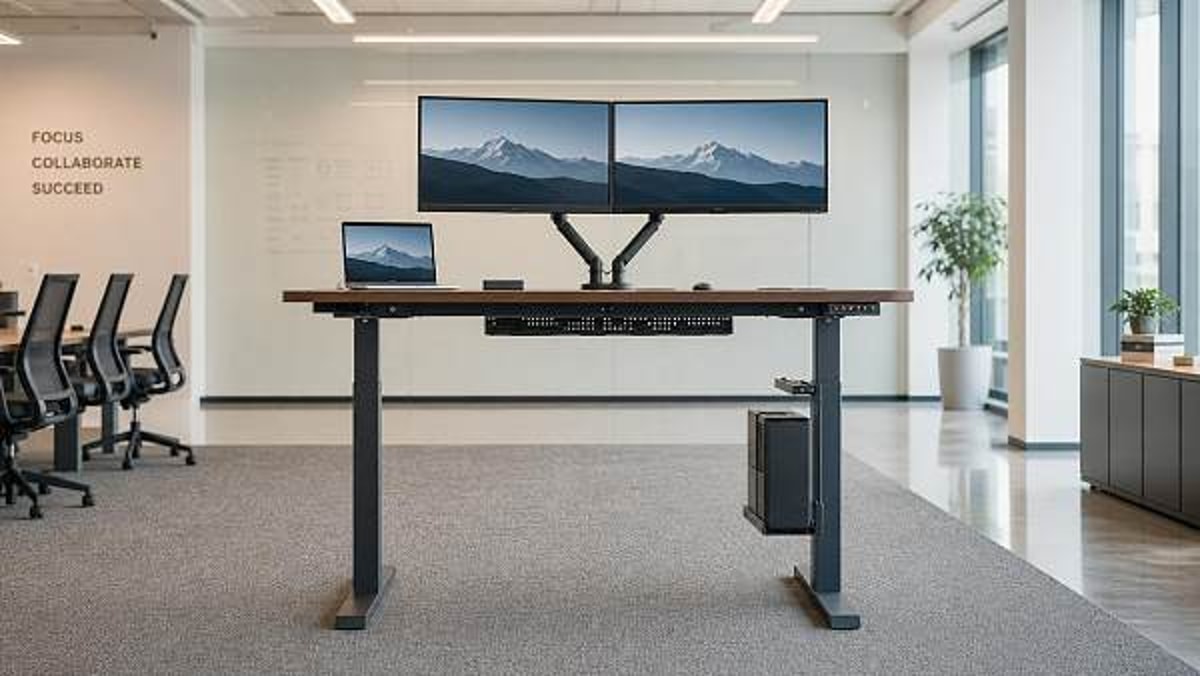
A robust evaluation process should test height adjustable standing desks as integrated systems rather than as isolated motor units. Stability depends on the interaction of lifting columns, foot design, frame cross members, desktop size, mounting accessories, and load distribution. A desk that appears acceptable with a 1200 mm top may behave very differently with a 1600 mm surface and dual monitor arm.
For commercial and institutional sourcing, technical assessors should define at least 4 categories of review: structural design, operating range, loaded performance, and serviceability. This method gives procurement teams a clearer basis for comparing quotes that may look similar on paper but differ significantly in field performance.
Key technical criteria to review
- Height range, commonly around 650–1250 mm depending on frame design
- Rated load capacity under dynamic use, not only static maximum load
- Column stage design, such as 2-stage versus 3-stage lifting legs
- Frame width adaptability for 1200 mm, 1400 mm, or 1600 mm desktops
- Crossbeam presence and its effect on lateral rigidity
- Anti-collision sensitivity and overload protection behavior
- Noise level during adjustment, often evaluated around 45–55 dB in office contexts
Why desktop size and accessories change the result
Many specification errors come from evaluating the frame without its final working configuration. A height adjustable standing desk with a 25 mm thick top, cable trough, dual monitor arm, and under-desk CPU mount can gain 20–35 kg of functional load before the user adds anything else. More importantly, monitor arms create rear leverage and can amplify visible movement by several times compared with a desk tested using evenly distributed dead weight.
This is especially relevant for education, administration, and design-intensive environments where desks support displays, conferencing equipment, or assistive technology. Technical assessors should request loaded demonstrations using realistic accessory setups instead of relying only on bare-frame performance claims.
The following comparison can help buyers screen height adjustable standing desks more effectively during prequalification and sample review.
A disciplined review process often reveals that two desks with similar speed and capacity figures can differ sharply in stability once raised above 1100 mm. That is why technical assessors should insist on test conditions that reflect actual deployment, not just catalog-level specifications.
Structural Factors That Drive Stability
The stability of height adjustable standing desks is rooted in engineering choices that may not be obvious to non-technical buyers. For assessors, understanding these variables helps separate durable commercial solutions from products designed mainly for light residential use or low-duty applications.
Column geometry and stage design
Lifting columns are central to performance. A 3-stage column typically supports a wider height range than a 2-stage column, which is useful for mixed-user populations. However, the quality of fit between telescoping stages, material thickness, and internal glide design matters more than stage count alone. Poorly controlled tolerances can introduce movement even when load ratings appear adequate.
Foot length and frame footprint
Longer feet can improve front-to-back stability, especially when users lean on the front edge or when large monitor arms shift weight rearward. In many commercial setups, foot dimensions and overall frame footprint should be reviewed alongside room circulation needs. A desk placed in tight educational or back-office layouts still needs enough base support to remain stable through daily contact.
Crossbeam design and torsional rigidity
Some height adjustable standing desks use open frame designs for legroom and aesthetics, while others include crossbeam reinforcement to improve lateral stiffness. Neither approach is universally superior, but technical teams should evaluate torsional behavior with asymmetrical loads. A desk may hold 70 kg in the center yet twist noticeably when 15–20 kg is mounted on one side.
Useful signs of better frame stability
- Minimal visible sway during typing at standing height
- Consistent movement speed under off-center loads
- Limited monitor shake when users make routine contact
- Secure fastener points and low frame flex after installation
- Stable behavior across multiple desktop sizes, not just one sample configuration
These structural details are particularly important in B2B sourcing because workstations are often deployed in batches of 20, 50, or 200 units. Small weaknesses become costly when multiplied across a full project. A single recurring issue, such as column play or frame looseness, can trigger service visits, user dissatisfaction, and avoidable procurement friction.
Commercial Use Cases Where Stability Outweighs Speed
Not every environment places the same emphasis on desk motion speed. In many commercial settings, desks are adjusted only 1–4 times per day, but they are used continuously for 6–10 hours. Under those conditions, the value of a stable platform is significantly higher than the value of shaving a few seconds off each adjustment cycle.
Corporate and hybrid offices
In corporate workplaces, users often rely on dual screens, webcam mounts, docking stations, task lighting, and organized cable management. A stable desk supports focused work and professional video meetings. Screen oscillation during typing or note-taking is one of the fastest ways to reduce satisfaction with height adjustable standing desks, even when lift speed appears competitive.
Educational and training facilities
Smart campuses and training rooms require adaptable furniture, but equipment protection is equally important. Desks may support tablets, control panels, document cameras, or compact desktop systems. In these environments, stable height adjustable standing desks reduce the risk of cable disconnection, accidental movement, and disruption during presentations or examinations.
Hospitality back-of-house and specialty commercial areas
In hospitality administration, concierge support areas, and premium retail support spaces, furniture is expected to balance appearance with dependable function. A desk used by managers, coordinators, or service staff may not move constantly, but it must remain reliable under paperwork, screens, peripherals, and fast-paced human interaction. In such contexts, stability contributes directly to perceived quality and operational consistency.
Common Specification Mistakes and How to Avoid Them
One frequent mistake is selecting height adjustable standing desks based only on maximum load and lift speed. These numbers are easy to list in tenders, but they do not capture real behavior. Technical assessors should add test-based criteria such as movement under load, stability at top range, and compatibility with the planned desktop and accessory package.
Mistake 1: Testing with bare desktops only
A desk that performs well with no accessories may not perform well once cable baskets, power modules, and monitor arms are installed. Always test the configuration closest to the final bill of materials.
Mistake 2: Ignoring standing-height behavior
Some desks feel solid below 900 mm but become noticeably less stable above 1100 mm. Since the standing position is the reason buyers choose height adjustable standing desks, performance at upper height levels should never be treated as secondary.
Mistake 3: Overlooking maintenance and support needs
For projects with dozens or hundreds of units, even a 3–5% service issue rate can create operational pressure. Technical teams should review spare parts access, replacement procedures, and expected service response windows before approval.
A practical 5-step review approach
- Define the real load profile, including accessories and user behavior
- Test at seated and maximum standing heights
- Compare stability under centered and off-center loads
- Review assembly integrity and service access points
- Align final selection with project lifespan, not just initial price
This structured method helps buyers select height adjustable standing desks that perform consistently across procurement, installation, and ongoing use. It also supports better coordination between designers, facilities teams, and sourcing professionals when evaluating commercial furniture packages.
What to Ask Suppliers Before Final Approval
For B2B sourcing through specialized commercial channels, supplier discussions should go beyond surface-level product claims. Technical assessors should ask how the desk was tested, what desktop sizes were used, how loads were distributed, and whether the quoted solution matches the project’s accessory plan. These questions often reveal whether a supplier understands commercial deployment or is only presenting generic specifications.
Essential supplier questions
- At what height range was stability evaluated?
- Was the desk tested with monitor arms, cable trays, or CPU mounts?
- What is the recommended desktop size range for this frame?
- How does the frame behave under 40 kg, 60 kg, and 80 kg practical loads?
- What maintenance parts are most commonly replaced over 3–5 years?
- How quickly can replacement control boxes or handsets be supplied?
For international buyers and project developers, these questions improve sourcing clarity and reduce downstream risk. In global commercial procurement, dependable workstation performance is not just a product issue; it is a project delivery issue involving specification accuracy, user satisfaction, and long-term asset value.
For technical assessors, the strongest height adjustable standing desks are not the ones that move the fastest in a showroom. They are the ones that remain stable at working height, support real equipment loads, and continue to perform over years of daily use. In offices, campuses, hospitality administration, and other commercial environments, stability protects both the user experience and the procurement outcome.
If you are comparing height adjustable standing desks for a commercial project, focus your review on structural behavior, realistic load testing, and accessory compatibility before giving speed a higher weighting. To explore sourcing options, technical specifications, or project-matched workplace solutions, contact GCT for tailored guidance, product evaluation support, and more commercial furniture sourcing insights.
Search News
Hot Articles
Popular Tags
Need ExpertConsultation?
Connect with our specialized leisureengineering team for procurementstrategies.
Recommended News
 May 04, 2026Ergonomic Office Chairs Wholesale: Comfort Claims vs Real SupportErgonomic office chairs wholesale: learn how to verify real support beyond comfort claims with fit, adjustability, durability, and compliance insights for smarter commercial buying.● Institutional Buyer
 May 04, 2026Modular Office Workstations: Flexibility Can Add Setup CostsModular office workstations can improve flexibility, but setup costs often rise through installation, power, data, and rework. Learn when the added investment truly pays off.● Institutional Buyer
 May 04, 2026Steel Filing Cabinets: Why Some Drawers Jam Too EarlySteel filing cabinets often jam early due to weak slides, poor leveling, overload, or lock issues. Discover what to check before buying and how to avoid costly drawer failures.● Institutional Buyer
 May 04, 2026Office Network Racks: Airflow Problems Start With Bad PlanningOffice network racks can fail early when airflow is ignored. Learn the key planning checklist to prevent overheating, reduce maintenance risks, and build a more reliable office network.● Institutional Buyer
 May 04, 2026Office Partitions Wholesale: Open Plan Savings, Closed Office NeedsOffice partitions wholesale helps project managers cut fit-out costs, speed delivery, and balance open-plan efficiency with private office performance. Explore smarter commercial workspace solutions.● Institutional Buyer
 May 04, 2026Conference Room Tables: Common Layout Mistakes to AvoidConference room tables can make or break meeting flow. Discover common layout mistakes to avoid and plan smarter spaces for collaboration, AV integration, and professional results.● Institutional Buyer
 May 04, 2026Mobile Pedestals Wholesale: Why Drawer Slides Matter MoreMobile pedestals wholesale buyers should look beyond price—drawer slides shape durability, load capacity, and maintenance costs. Learn what to compare before ordering.● Institutional Buyer
 May 04, 2026Height Adjustable Standing Desks: Stability Matters More Than SpeedHeight adjustable standing desks should be judged by stability, not just speed. Learn how stronger frames improve safety, user confidence, and long-term value in commercial spaces.● Institutional Buyer
 May 04, 2026Executive Office Desks: When Looks Start to Hurt FunctionExecutive office desks should do more than look impressive. Discover how to balance prestige, ergonomics, storage, and tech support for smarter office buying decisions.● Institutional Buyer
 May 04, 2026Server Cabinets Wholesale: How to Avoid Ordering the Wrong DepthServer cabinets wholesale guide: avoid costly depth mistakes by checking usable internal space, rail fit, cable clearance, and expansion needs before placing bulk orders.● Institutional Buyer
 May 04, 2026Commercial Paper Shredders and the Hidden Cost of DowntimeCommercial paper shredders do more than destroy documents—they protect uptime, compliance, and budgets. Discover how to avoid hidden downtime costs and choose smarter for busy workplaces.● Institutional Buyer
 May 04, 2026Mesh Office Chairs OEM Orders: Specs That Cause ReworkMesh office chairs OEM projects often face rework from vague specs, certification gaps, and component mismatches. Learn what to verify before production to avoid delays and protect budgets.● Institutional Buyer
 May 04, 2026Stackable Visitor Chairs That Save Space Without Looking CheapStackable visitor chairs that save space without looking cheap—discover how to choose stylish, durable seating for offices, schools, and hospitality spaces.● Institutional Buyer
 May 04, 2026What Makes Commercial Acoustic Panels Worth the Cost?Commercial acoustic panels help buyers balance cost with performance, compliance, durability, and design. Learn what makes them worth the investment across offices, schools, hotels, and more.● Institutional Buyer
 May 04, 2026Biometric Time Attendance Systems: Where Accuracy Gains FadeBiometric time attendance systems deliver stronger tracking, but where do accuracy gains fade? Explore real-world limits, privacy risks, and smarter deployment choices.● Institutional Buyer
 May 03, 2026Commercial trash cans: capacity, liners, and lid design all matterCommercial trash cans impact cleanliness, labor, and guest experience. Learn how capacity, liner fit, and lid design help buyers choose smarter, cleaner, cost-effective solutions.● Institutional Buyer
 May 03, 2026Wet and dry vacuum cleaners: when tank size slows teams downWet and dry vacuum cleaners can boost flexibility, but the wrong tank size cuts productivity. Learn how to choose capacity that reduces downtime, labor costs, and workflow friction.● Institutional Buyer
 May 03, 2026Commercial floor scrubbers: ride-on or walk-behind for large sitesCommercial floor scrubbers for large sites: compare ride-on and walk-behind models by productivity, maneuverability, labor efficiency, and cost to choose the best fit.● Institutional Buyer
 May 03, 2026Decorative room dividers that improve layout without blocking lightDecorative room dividers improve layout, define zones, and preserve natural light in modern interiors. Explore stylish, flexible solutions for commercial and hospitality spaces.● Institutional Buyer
 May 03, 2026Why wholesale ironing boards vary so much in frame qualityWholesale ironing boards vary in frame quality due to steel grade, weld strength, stability, coating, and QC. Learn what smart buyers should check before placing bulk orders.● Institutional Buyer
 Apr 30, 2026Contract furniture specs that reduce replacement cyclesContract furniture specs that cut replacement cycles: learn how durability, cleanability, compliance, and serviceable design help buyers lower lifecycle costs and protect brand standards.● Institutional Buyer
 Apr 28, 2026Luxury Furniture Materials That Age Well and Those That Do NotLuxury furniture guide for hotel furniture, custom furniture, hotel beds, hotel chairs, hotel tables, and park benches—learn which materials age well, cut lifecycle costs, and protect premium spaces.● Institutional Buyer
 Apr 28, 2026Custom Furniture Orders Go Wrong When Samples Skip Real TestingCustom furniture mistakes start when samples skip real testing. Learn how hotel furniture, hotel beds, hotel chairs, hotel tables, luxury furniture and park benches avoid costly failures.● Institutional Buyer
 Apr 28, 2026Are Park Benches With Backrests Always the Better Choice?Park benches with backrests are not always best. Explore how custom furniture choices align with luxury furniture, hotel furniture, hotel chairs, hotel tables, and hotel equipment needs.● Institutional Buyer