Smart podiums for classrooms that fit hybrid teaching better
As hybrid teaching becomes a long-term standard, choosing smart podiums for classrooms is no longer just a technology upgrade but a strategic project decision. For project managers and engineering leads, the right podium must support seamless device integration, intuitive control, durable construction, and flexible deployment across modern learning spaces. This guide explores what matters most when sourcing solutions that improve teaching efficiency and future-ready classroom design.
For institutional buyers, campus planners, and AV implementation teams, smart podiums for classrooms sit at the intersection of furniture, IT infrastructure, safety compliance, and teaching workflow. A poorly specified podium can create cable clutter, device conflicts, maintenance delays, and inconsistent user experience across 20, 50, or even 200 rooms. A well-planned solution, by contrast, can standardize control logic, reduce support tickets, and make hybrid teaching easier for instructors who need to manage in-room and remote learners at the same time.
From a sourcing perspective, the project is rarely only about the lectern itself. It also involves display control, microphone integration, laptop connectivity, charging, rack space, ventilation, lockable storage, ADA-conscious ergonomics, and compatibility with existing campus AV standards. That is why procurement decisions should be based on lifecycle fit rather than upfront hardware cost alone.
Why smart podiums for classrooms matter more in hybrid learning environments
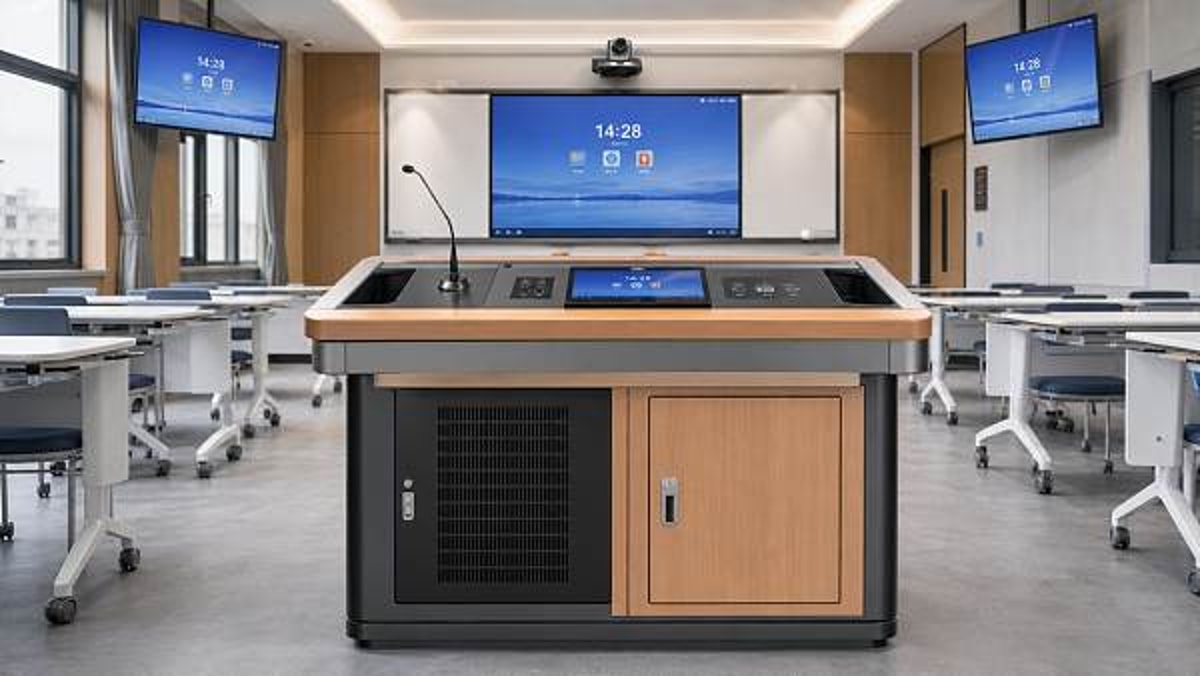
In a conventional teaching model, a classroom lectern mainly held a computer, a document camera, and basic controls. In hybrid teaching, the podium often becomes the instructor’s operational hub. It may need to manage 5 to 8 device categories at once, including a classroom PC, HDMI guest input, USB-C laptop input, touch panel, wireless microphone receiver, camera control, audio DSP interface, and power management.
This expanded role changes the specification standard. Smart podiums for classrooms now need to support faster session transitions, cleaner signal routing, and reliable operation for classes that may run 6 to 10 hours per day. In higher-traffic institutions, podium hardware can face continuous use across 30 to 40 teaching weeks per year, making durability and serviceability critical selection factors.
The operational pressures project teams face
- Multiple users per room, often with different device preferences and limited training time
- Need for consistent room logic across buildings, floors, and departments
- Pressure to reduce IT support calls during class hours
- Higher expectations for secure equipment storage and cable management
- Demand for scalable deployment across phased campus renovation projects
What changes when teaching is partly remote
Once remote participants are added, the instructor can no longer work around inconvenient hardware. A podium that requires 4 or 5 manual steps to switch sources, adjust audio, or start recording increases failure risk. In practical deployment, engineering teams usually aim for no more than 2 to 3 steps for common actions such as start class, share laptop content, or switch between presentation and camera view.
User simplicity has direct cost implications. If one classroom generates even 2 avoidable support incidents per month, a campus-wide rollout of 100 rooms can create 200 unnecessary service events over a single month. For project managers, this is where interface design and hardware accessibility become procurement issues, not just technical preferences.
The table below outlines how the role of smart podiums for classrooms has evolved from legacy lecterns to hybrid-ready teaching stations.
The key takeaway is that hybrid-ready podiums should be treated as infrastructure, not accessories. Their value comes from workflow support, standardization, and reduced friction over a 5 to 8 year use cycle.
Core specifications project managers should evaluate before sourcing
When comparing smart podiums for classrooms, teams should avoid buying based only on appearance or a basic feature sheet. The right specification framework should cover physical build, technology integration, user ergonomics, and long-term maintenance. In most projects, 6 evaluation categories provide a practical decision baseline.
1. Device integration and port planning
A smart podium should support the actual mix of classroom devices, not an idealized version of it. At minimum, many hybrid rooms now require 1 resident PC connection, 1 guest laptop input, 1 USB data path for conferencing, 1 network interface, and 2 to 4 accessible power outlets. If USB-C is expected, confirm whether the podium supports data only, charging only, or full AV plus charging workflow.
2. Internal space, ventilation, and equipment access
Internal capacity matters more than many buyers expect. A podium may need to house mini PCs, switchers, amplifiers, control processors, wireless microphone receivers, and cable slack. Insufficient airflow can shorten component life, especially when equipment runs continuously for 6 to 8 hours daily. Ventilated compartments, separated power and signal routing, and service access panels should be considered standard requirements rather than upgrades.
3. Ergonomics and teaching usability
Lecturers need a stable work surface, sightlines to students and displays, and intuitive control placement. If the podium height is fixed, verify that it suits the majority of users. If adjustable, confirm the adjustment range, speed, and maintenance complexity. In large lecture spaces, a difference of even 80 to 120 mm in working height can affect comfort during sessions lasting 90 minutes or longer.
4. Security and durability
Smart podiums for classrooms are public-use assets. Lockable doors, tamper-resistant hardware, and impact-resistant finishes are important where rooms are used by multiple departments or external groups. For heavily booked rooms, project teams should ask about edge protection, hinge performance, caster strength if mobile, and expected wear points after 3 to 5 years of use.
5. Standardization across room types
A campus may include seminar rooms, general classrooms, labs, and lecture halls. Instead of sourcing 4 completely different podium concepts, many institutions benefit from a modular family with 2 or 3 standardized variants. This reduces training complexity, spare parts diversity, and design approval time.
6. Installation and service model
A product that looks strong on paper may still fail the project if installation takes too long. Ask how the podium arrives: fully assembled, partially assembled, or flat-packed. A difference of 1.5 hours versus 4 hours per room becomes significant in a 60-room rollout. Likewise, confirm whether maintenance can be done from the front, rear, or side, especially when wall clearance is limited.
The following comparison matrix can help engineering leads evaluate proposals more objectively during vendor screening.
Using a structured matrix helps procurement teams compare podiums on project outcomes rather than marketing language. It also makes approval discussions easier with IT, facilities, and academic stakeholders.
How to match podium design to different classroom project types
Not every learning space needs the same podium configuration. Smart podiums for classrooms should be selected according to room size, teaching mode, device density, and furniture layout. In practice, three broad deployment types cover most educational projects.
Small and medium classrooms
Rooms for 20 to 50 students often benefit from compact podiums with integrated controls, a single display interface, and simple guest connectivity. The main requirement is ease of use. Overengineering can increase cost and maintenance without adding teaching value. In these spaces, a cleaner top surface and fast source switching are usually more important than large internal rack capacity.
Lecture halls and high-capacity rooms
Large rooms for 80 to 300 users often require more robust smart podiums for classrooms with expanded AV integration, better microphone management, and a stronger operator layout. Instructors may need simultaneous control of room audio, projection, recording, and remote participation. Equipment density is typically higher, so cable segregation and thermal planning become more important.
Flexible or multipurpose teaching spaces
In reconfigurable rooms, mobile or semi-mobile podiums may be preferred. Here, caster performance, locking stability, and power/data routing must be carefully planned. A mobile unit that saves layout time but causes unstable connections is not a net improvement. Consider whether floor boxes, wall plates, or overhead cable management will be used to support room flexibility safely.
A practical room-matching checklist
- Define expected teaching mode in each room for the next 3 to 5 years.
- List all instructor-facing devices and student-facing outputs.
- Confirm whether rooms require recording, streaming, or only live hybrid sessions.
- Check infrastructure limits such as floor boxes, wall clearances, and power circuits.
- Standardize 2 to 3 podium variants before requesting final quotations.
This approach prevents a common sourcing mistake: selecting a single podium model first and then forcing every room type to adapt around it.
Implementation, risk control, and procurement planning
A successful podium project depends as much on process as on product. Even strong smart podiums for classrooms can underperform if lead times, room readiness, or integration responsibilities are unclear. For engineering leads, the most preventable failures usually happen during the transition from specification to installation.
Common project risks
- Podium dimensions conflict with room circulation or sightlines
- Insufficient coordination between furniture supplier and AV integrator
- Late-stage changes to input standards such as HDMI versus USB-C
- Inadequate power and network termination at the final install point
- No defined spare parts or post-install service workflow
A practical 5-step sourcing and delivery process
For medium and large education projects, a 5-step process often reduces rework. Step 1 is room audit and use-case mapping. Step 2 is podium standard definition. Step 3 is technical drawing review with AV and facilities teams. Step 4 is pilot installation in 1 to 3 rooms. Step 5 is phased rollout with acceptance criteria and service documentation.
Pilot rooms are especially valuable. Testing a podium in real teaching conditions for 2 to 4 weeks can reveal usability and maintenance issues that may not appear in specification documents. This is often where teams catch details such as poor cable exit placement, limited device charging access, or awkward monitor angles.
The table below shows a practical way to align procurement, technical review, and delivery expectations.
This structure is particularly useful for cross-border sourcing, where production, shipping, customs timing, and site readiness may affect overall project sequencing by several weeks.
Questions buyers should ask suppliers before final approval
Before issuing a purchase order, project teams should move beyond brochures and request details that affect delivery performance. Smart podiums for classrooms should be reviewed as installed systems, not as standalone catalog items.
Technical and commercial questions
- What is the recommended device load and internal equipment layout?
- How are power and low-voltage cables separated inside the unit?
- Can the podium be customized for left-hand, right-hand, or center teaching positions?
- What is the usual production lead time for standard and customized orders?
- Which components are most likely to require replacement during the first 3 years?
- Is on-site assembly required, and how many technicians are typically needed per unit?
Why these questions matter
Each question helps expose hidden cost or risk. For example, a podium that requires two installers for 3 hours may still be viable, but only if rollout sequencing and labor planning reflect that reality. Likewise, a customized finish or hardware layout may add 2 to 6 weeks to lead time, which can affect semester readiness.
For buyers working through sourcing platforms and international supplier networks, it is also important to verify drawing responsiveness, packaging method, and after-sales communication speed. A visually strong product loses value quickly if replacement parts or technical clarification take too long.
Building a future-ready classroom standard
The best smart podiums for classrooms do not simply add more ports or a better finish. They help institutions create a repeatable classroom standard that supports teaching continuity, technical reliability, and manageable service overhead. For project managers, the goal should be a solution that performs consistently across many rooms, many users, and many academic cycles.
In practical terms, that means selecting podiums that align with 3 priorities: predictable user experience, maintainable integration, and scalable sourcing. When those priorities are built into the procurement brief early, the classroom becomes easier to operate today and easier to upgrade tomorrow.
Global Commercial Trade supports commercial buyers, campus planners, and sourcing teams with structured market insight across office and educational supply solutions. If you are evaluating smart podiums for classrooms for a new build, renovation, or phased hybrid learning rollout, contact us to discuss sourcing options, request a tailored specification framework, or explore more solution-ready products for modern educational spaces.
Search News
Hot Articles
Popular Tags
Need ExpertConsultation?
Connect with our specialized leisureengineering team for procurementstrategies.
Recommended News
 May 06, 2026Tablet charging carts with locking doors still need these checksTablet charging carts with locking doors still need key checks. Learn how to evaluate ventilation, power safety, mobility, and compatibility before you buy.● Institutional Buyer
 May 06, 2026Document cameras for teachers: image quality or software first?Document cameras for teachers: should you prioritize image quality or software? Explore a practical checklist to compare clarity, workflow, compatibility, and long-term value.● Institutional Buyer
 May 06, 2026Smart podiums for classrooms that fit hybrid teaching betterSmart podiums for classrooms designed for hybrid teaching: compare integration, durability, ergonomics, and serviceability to choose scalable solutions that cut support issues and improve teaching efficiency.● Institutional Buyer
 May 06, 2026Chromebook charging stations and the airflow issue many missChromebook charging stations often look efficient, but airflow is the hidden factor that impacts battery life, safety, and charging performance. Learn what smart buyers should inspect before choosing.● Institutional Buyer
 May 06, 2026Language lab equipment features that improve speaking practiceLanguage lab equipment features can dramatically improve speaking practice. Discover which tools best fit schools, universities, exam centers, and training programs.● Institutional Buyer
 May 06, 2026Wireless presentation systems that solve lag in larger roomsWireless presentation systems for larger rooms: discover how to reduce lag, improve stability, strengthen security, and ensure smooth sharing across enterprise AV and IT environments.● Institutional Buyer
 May 06, 2026Tablet charging carts and the hidden issue of cable wearTablet charging carts face a hidden reliability risk: cable wear. Learn how smarter evaluation can reduce downtime, lower maintenance costs, and improve long-term device performance.● Institutional Buyer
 May 06, 2026Scientific calculators wholesale: when cheaper models cost moreScientific calculators wholesale is not just about the lowest quote. Learn how defects, compliance, batch consistency, and supplier reliability affect true cost—and how smarter sourcing protects margin.● Institutional Buyer
 May 06, 2026IOC Selects Chinese University’s Athlete Support Model as Global Procurement BenchmarkIOC adopts Chinese university's AI psychological coaching + wearable load monitoring model as global procurement benchmark — a strategic opportunity for edtech, sports health tech, and data security providers.● Institutional Buyer
 May 05, 2026Liaoning Tieren Appoints Korean Coach Xu Zhengyuan, Signals Shift in K-League Equipment ProcurementLiaoning Tieren appoints Korean coach Xu Zhengyuan — sparking interest in K-League equipment procurement and KFA 2026-certified smart training tech.● Institutional Buyer
 May 05, 2026Physics lab apparatus: where low-cost kits usually fall shortPhysics lab apparatus buying on price alone often leads to poor accuracy, weak durability, and higher lifecycle costs. Learn what low-cost kits miss and how to source safer, better-value solutions.● Institutional Buyer
 May 05, 2026School laboratory equipment: what should be replaced firstSchool laboratory equipment replacement starts with safety-critical assets. Learn what to replace first to improve compliance, reduce downtime, and maximize tight budgets.● Institutional Buyer
 May 05, 2026Thermal receipt printers: hidden upkeep costs before large rolloutThermal receipt printers may look affordable, but hidden upkeep costs can erode rollout budgets. Learn how to reduce downtime, control maintenance, and choose smarter for scale.● Institutional Buyer
 May 05, 2026Human anatomy models that improve hands-on teaching, not storageHuman anatomy models built for hands-on teaching, not storage. Discover durable, classroom-ready options that improve engagement, simplify setup, and support smarter education sourcing.● Institutional Buyer
 May 05, 2026Ceiling mount projector brackets: where installation mistakes happenCeiling mount projector brackets: discover where installation mistakes happen, how to avoid safety and alignment issues, and the checklist that helps teams deliver smoother AV projects.● Institutional Buyer
 May 05, 2026Barcode scanners for library: common issues with older systemsBarcode scanners for library upgrades can solve slow checkouts, read errors, and compatibility issues in older systems. Learn what fails first and how to choose a reliable replacement.● Institutional Buyer
 May 05, 2026What to check before ordering wholesale projector screensWholesale projector screens buyers should check material, gain, aspect ratio, installation, and supplier consistency before ordering. Reduce sourcing risk and choose reliable commercial solutions.● Institutional Buyer
 May 05, 2026Geography globes wholesale: what makes one model classroom-readyGeography globes wholesale buyers: discover what makes a model truly classroom-ready, from durability and readability to safety, compliance, and reliable bulk supply.● Institutional Buyer
 May 05, 2026Microscope slides wholesale: where quality gaps usually show upMicroscope slides wholesale buyers should watch for hidden quality gaps in flatness, edge finishing, cleanliness, and batch consistency—learn how to reduce waste and choose reliable suppliers.● Institutional Buyer
 May 05, 2026POS touch screens: what affects response speed and lifespanPOS touch screens directly impact checkout speed, uptime, and total cost. Learn what affects response speed and lifespan to choose the right solution for every business scenario.● Institutional Buyer
 May 04, 2026Kindergarten Furniture Bulk Orders and the Safety Details MissedKindergarten furniture bulk buyers: discover the hidden safety checks suppliers often miss, from emissions and stability to ergonomics and compliance, before placing large orders.● Institutional Buyer
 May 04, 2026School Desks and Chairs Wholesale: Matching Age to Size CorrectlySchool desks and chairs wholesale guide: learn how to match age to size correctly for better comfort, safety, compliance, and smarter school furniture purchasing.● Institutional Buyer
 May 04, 2026Library Bookshelves Wholesale: How Much Load Is Really Enough?Library bookshelves wholesale guide: learn how much load is truly enough for safety, durability, and compliance. Compare ratings, avoid costly mistakes, and choose the right shelving with confidence.● Institutional Buyer
 May 04, 2026Smart Interactive Whiteboards: Which Features Get Used Daily?Smart interactive whiteboards: discover which features teams and teachers actually use daily, from touch accuracy and wireless casting to easy collaboration, ROI, and smarter buying decisions.● Institutional Buyer