Ceiling mount projector brackets: where installation mistakes happen
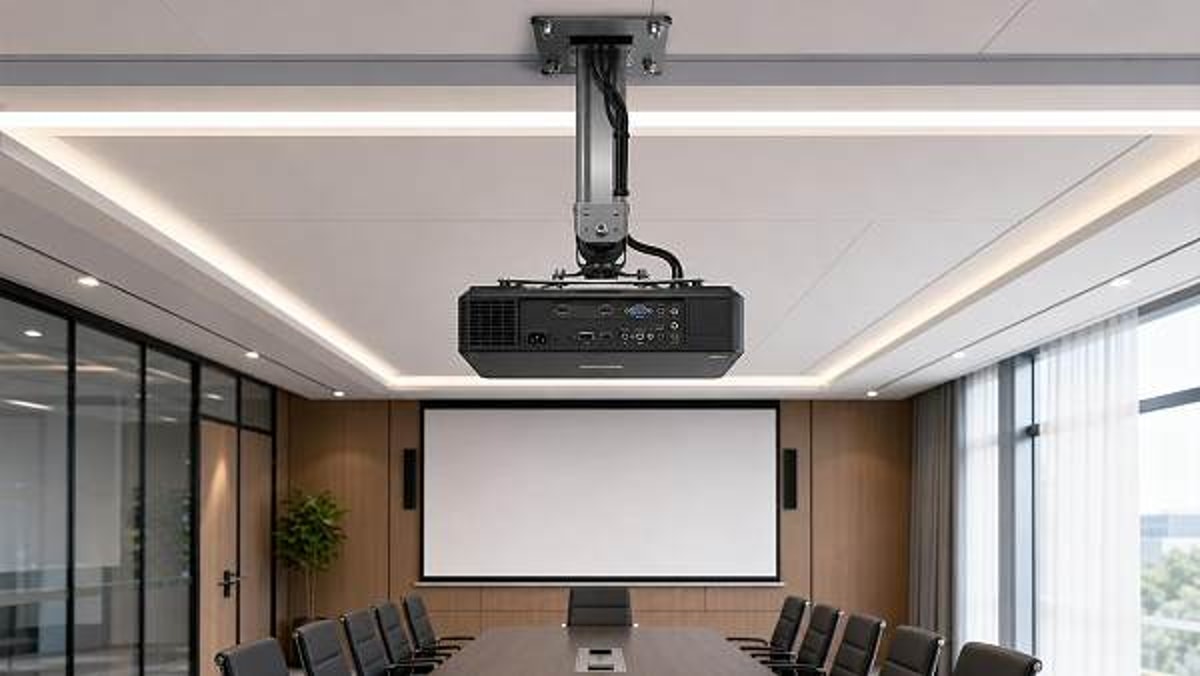
Ceiling mount projector brackets can make or break AV performance, yet many installation failures start with small planning oversights. For project managers and engineering leads, understanding where these mistakes happen is essential to avoiding safety risks, alignment issues, rework, and budget delays. This guide highlights the most common installation problems and the practical checkpoints that help ensure a secure, compliant, and efficient projector mounting project.
Why a checklist-first approach matters before installing ceiling mount projector brackets
For project-based environments, projector mounting is rarely just a hardware task. It sits at the intersection of structural safety, AV performance, room design, maintenance access, and compliance. A bracket that looks suitable on paper may still fail in practice if ceiling conditions, projector dimensions, cable routing, or service clearances were not verified in advance. That is why ceiling mount projector brackets should be evaluated through a structured checklist rather than a last-minute site decision.
This is especially important in commercial settings such as hotels, training centers, universities, meeting suites, museums, and multi-purpose venues. In these spaces, mistakes create more than inconvenience. They can interrupt commissioning schedules, trigger variation orders, reduce image quality, and in severe cases expose operators to liability. A checklist helps engineering teams identify what must be confirmed first, what can be adapted later, and where hidden risk typically appears.
The core pre-installation checklist for ceiling mount projector brackets
Before procurement or installation approval, project managers should confirm the following points. These checks reduce the most common causes of failure and improve coordination between AV contractors, MEP teams, interior fit-out teams, and facility operators.
- Load compatibility: Confirm the projector weight, the bracket’s rated load, and the ceiling’s actual support capacity. Never assume that a generic bracket rating guarantees a safe installation on every ceiling type.
- Mounting interface match: Verify that the ceiling mount projector brackets fit the projector’s bolt pattern, chassis shape, and center-of-gravity requirements.
- Throw distance and lens position: Confirm projection geometry before selecting the exact mounting point. A perfectly fixed bracket in the wrong position still produces a failed installation.
- Ceiling condition: Identify whether the bracket will attach to concrete, steel, timber, suspended ceiling systems, or custom framing. Support methods vary significantly.
- Adjustment range: Check whether tilt, yaw, roll, and extension adjustments are adequate for final alignment without forcing digital keystone correction.
- Cable pathway: Plan power, HDMI, HDBaseT, control, and network routes before fixing the bracket. Cable stress and visible runs are common avoidable defects.
- Maintenance access: Leave enough clearance for lamp replacement, filter cleaning, lens service, and future projector swap-outs.
- Code and safety compliance: Confirm seismic restraint, fire stopping, grounding, and any site-specific regulations that apply to overhead equipment.
Where installation mistakes happen most often
1. The ceiling structure is assumed, not verified
One of the biggest errors is treating suspended ceilings as structural support. In many commercial interiors, the visible ceiling finish is only a cover, not a load-bearing surface. Ceiling mount projector brackets must be anchored to suitable structural members or approved support systems above the finish line. If installers rely on tile grids, light framing, or incomplete structural review, the result may be vibration, gradual loosening, or immediate safety failure.
The practical check is simple: request documentation on substrate type, fixing method, anchor specification, and approved load path. If the site has undergone redesign, re-verify because reflected ceiling plans often lag behind field conditions.
2. The bracket is chosen by price, not by application
Low-cost ceiling mount projector brackets may appear interchangeable, but commercial projects often need more than a basic hanging solution. Conference rooms may require fine image alignment, education environments may need anti-theft features, and hospitality spaces may prioritize discreet appearance and service speed. When the bracket lacks sufficient micro-adjustment or uses weak locking points, technicians spend extra time compensating during commissioning.
A better selection process compares bracket type against use case: flush mount for low ceilings, extension pole for high ceilings, heavy-duty support for large venue projectors, and security models for public-access sites. This avoids rework driven by poor fit between bracket design and room function.
3. Projection geometry is checked too late
A common field issue is that the physical mount is installed before final screen position, projector model, or lens specification is frozen. That sequence creates avoidable conflict. Even high-quality ceiling mount projector brackets cannot correct a badly placed mounting location if the projector falls outside the required throw range or vertical offset. Teams then resort to digital keystone, which reduces image fidelity and undermines the purpose of a professional AV system.
Project leads should insist on one coordination checkpoint: confirm screen size, screen elevation, lens ratio, projector orientation, and mounting centerline together before drilling or anchor installation begins.
4. Cable routing is treated as a secondary task
Many projector mounting problems are actually cable planning problems. If conduit routes, slack allowance, connector bend radius, and service loops are not considered early, installers may pull cables under tension or expose visible wiring around the bracket. This not only looks poor in premium commercial spaces, but can also affect signal integrity and maintenance efficiency.
For ceiling mount projector brackets, the checklist should include cable entry direction, strain relief, access hatch locations, separation from electrical interference, and future replacement paths. Hidden cable difficulty becomes expensive when ceilings are already closed.
5. Service clearance is overlooked
A bracket may be structurally correct and visually neat, yet still be operationally poor if technicians cannot reach filters, lens controls, or maintenance panels. This happens often in compact meeting rooms and decorative ceiling designs. Ceiling mount projector brackets should not trap the projector in a position that blocks air intake, service doors, or quick-release mechanisms.
A strong rule for project managers is to ask not only, “Can it be installed?” but also, “Can it be serviced without dismantling adjacent finishes or closing the room for half a day?”
Decision standards for different project scenarios
Not all installations carry the same risk profile. The right decision criteria change depending on the room type, ceiling construction, and operational expectations.
Often-missed risk items that deserve a second review
Even experienced teams overlook several details when timelines are tight. These are the items worth reviewing before sign-off:
- Anchor specification is generic: The fixing detail names a bracket but not the exact anchor type, embedment depth, or torque requirement.
- Ceiling void conflicts are unresolved: Ducts, cable trays, sprinkler lines, and lighting positions interfere with the ideal mount point.
- Environmental conditions are ignored: Heat accumulation, humidity, dust, or vibration can shorten equipment life and destabilize image performance.
- Future equipment change is not considered: The bracket works for today’s projector but has limited adjustment or adapter compatibility for later upgrades.
- Final alignment responsibility is unclear: AV vendor, electrical contractor, and fit-out team each assume another party will complete the precision setup.
Execution advice for project managers and engineering leads
To keep ceiling mount projector brackets from becoming a small issue with large consequences, establish a practical execution sequence. First, freeze the projector model, lens requirement, screen geometry, and intended viewing use. Second, verify substrate and support method through site inspection rather than drawings alone. Third, require shop drawings or installation details showing bracket type, drop length, fixings, cable path, and maintenance clearance. Fourth, schedule coordination with AV, electrical, and interior teams before ceiling closure. Fifth, include testing in the handover scope: level check, alignment check, image stability, cable strain review, and access confirmation.
Where procurement spans multiple countries or suppliers, consistency becomes even more important. Product datasheets should clearly state load rating, material finish, adjustment range, security options, and applicable standards. In international commercial sourcing, these details support better comparison, reduce substitution risk, and create stronger trust signals for buyers evaluating alternative manufacturers.
A practical approval checklist before final sign-off
- The selected ceiling mount projector brackets match projector weight, fixing pattern, and room function.
- The ceiling support method has been verified against actual site conditions.
- Projection distance, image position, and lens alignment have been confirmed before drilling.
- Cable routing, access panels, and service loops are documented.
- Maintenance clearance and ventilation are sufficient for long-term operation.
- Required compliance items, including safety retention if needed, are included in scope.
- Final testing responsibilities and acceptance criteria are assigned.
FAQ: quick answers on ceiling mount projector brackets
Can a suspended ceiling support projector brackets by itself?
In most commercial situations, no. Suspended ceiling systems usually require connection to structural support above or to a properly engineered reinforcement system.
What is the most common cause of rework?
Incorrect mount position caused by late confirmation of throw distance, screen placement, or ceiling obstructions is one of the most frequent causes of costly rework.
Are universal brackets always a safe choice?
Not always. Universal ceiling mount projector brackets may fit many projectors, but they can still be unsuitable for weight distribution, fine adjustment, security, or maintenance needs.
What to prepare before moving forward
If your team is evaluating ceiling mount projector brackets for a commercial project, the fastest way to reduce risk is to prepare a short decision pack: projector model, weight, lens data, screen dimensions, ceiling type, room height, cable requirements, maintenance expectations, and applicable safety standards. With those details ready, suppliers and integrators can provide a more accurate bracket recommendation, installation method, lead time, and budget assessment.
For complex projects or global sourcing programs, it is also worth clarifying whether you need OEM or branded solutions, anti-theft features, finish customization, documentation support, or multi-site deployment consistency. Early communication around these points helps prevent specification gaps, keeps installation quality predictable, and ensures the chosen ceiling mount projector brackets support both performance and long-term operational value.
Search News
Hot Articles
Popular Tags
Need ExpertConsultation?
Connect with our specialized leisureengineering team for procurementstrategies.
Recommended News
 May 05, 2026Physics lab apparatus: where low-cost kits usually fall shortPhysics lab apparatus buying on price alone often leads to poor accuracy, weak durability, and higher lifecycle costs. Learn what low-cost kits miss and how to source safer, better-value solutions.● Institutional Buyer
 May 05, 2026School laboratory equipment: what should be replaced firstSchool laboratory equipment replacement starts with safety-critical assets. Learn what to replace first to improve compliance, reduce downtime, and maximize tight budgets.● Institutional Buyer
 May 05, 2026Thermal receipt printers: hidden upkeep costs before large rolloutThermal receipt printers may look affordable, but hidden upkeep costs can erode rollout budgets. Learn how to reduce downtime, control maintenance, and choose smarter for scale.● Institutional Buyer
 May 05, 2026Human anatomy models that improve hands-on teaching, not storageHuman anatomy models built for hands-on teaching, not storage. Discover durable, classroom-ready options that improve engagement, simplify setup, and support smarter education sourcing.● Institutional Buyer
 May 05, 2026Ceiling mount projector brackets: where installation mistakes happenCeiling mount projector brackets: discover where installation mistakes happen, how to avoid safety and alignment issues, and the checklist that helps teams deliver smoother AV projects.● Institutional Buyer
 May 05, 2026Barcode scanners for library: common issues with older systemsBarcode scanners for library upgrades can solve slow checkouts, read errors, and compatibility issues in older systems. Learn what fails first and how to choose a reliable replacement.● Institutional Buyer
 May 05, 2026What to check before ordering wholesale projector screensWholesale projector screens buyers should check material, gain, aspect ratio, installation, and supplier consistency before ordering. Reduce sourcing risk and choose reliable commercial solutions.● Institutional Buyer
 May 05, 2026Geography globes wholesale: what makes one model classroom-readyGeography globes wholesale buyers: discover what makes a model truly classroom-ready, from durability and readability to safety, compliance, and reliable bulk supply.● Institutional Buyer
 May 05, 2026Microscope slides wholesale: where quality gaps usually show upMicroscope slides wholesale buyers should watch for hidden quality gaps in flatness, edge finishing, cleanliness, and batch consistency—learn how to reduce waste and choose reliable suppliers.● Institutional Buyer
 May 05, 2026POS touch screens: what affects response speed and lifespanPOS touch screens directly impact checkout speed, uptime, and total cost. Learn what affects response speed and lifespan to choose the right solution for every business scenario.● Institutional Buyer
 May 04, 2026Kindergarten Furniture Bulk Orders and the Safety Details MissedKindergarten furniture bulk buyers: discover the hidden safety checks suppliers often miss, from emissions and stability to ergonomics and compliance, before placing large orders.● Institutional Buyer
 May 04, 2026School Desks and Chairs Wholesale: Matching Age to Size CorrectlySchool desks and chairs wholesale guide: learn how to match age to size correctly for better comfort, safety, compliance, and smarter school furniture purchasing.● Institutional Buyer
 May 04, 2026Library Bookshelves Wholesale: How Much Load Is Really Enough?Library bookshelves wholesale guide: learn how much load is truly enough for safety, durability, and compliance. Compare ratings, avoid costly mistakes, and choose the right shelving with confidence.● Institutional Buyer
 May 04, 2026Smart Interactive Whiteboards: Which Features Get Used Daily?Smart interactive whiteboards: discover which features teams and teachers actually use daily, from touch accuracy and wireless casting to easy collaboration, ROI, and smarter buying decisions.● Institutional Buyer
 May 04, 2026Student Chairs With Writing Pad: Which Sizes Fit Best?Student chairs with writing pad: discover which sizes best support comfort, posture, room capacity, and tablet use. Compare fit options for schools, universities, and training spaces.● Institutional Buyer
 May 03, 2026Beijing Women's FC Win Spurs AI Training System Export to UKBeijing Women's FC win sparks UK demand for AI sports training systems — real-time analytics, GDPR/ISO 27001 compliance & Heathrow logistics insights revealed.● Institutional Buyer
 May 01, 2026Park Trash Cans That Cut Maintenance Instead of Adding ItPark trash cans that reduce labor, resist weather, and stay cleaner longer. Learn which designs, materials, and features help lower maintenance costs across parks and outdoor spaces.● Institutional Buyer
 May 01, 2026Park Drinking Fountains That Hold Up Better in Public SpacesPark drinking fountains built for public spaces need durability, hygiene, and low maintenance. Discover how to choose vandal-resistant models that cut long-term costs.● Institutional Buyer
 May 01, 2026Restaurant POS Systems That Reduce Training Time at the CounterRestaurant POS systems that cut counter training time: compare intuitive workflows, role-based controls, and error-reducing features to speed onboarding and improve service consistency.● Institutional Buyer
 Apr 30, 20262026 Shanghai Smart Campus Expo: VR EdTech Gains ITU & ISO/IEC 23053 Dual CertificationVR EdTech gains ITU & ISO/IEC 23053 dual certification at 2026 Shanghai Smart Campus Expo—key for global smart PE tenders in UAE, Thailand & ASEAN.● Institutional Buyer
 Apr 29, 20262026 Shanghai Smart Campus Expo: VR EdTech Gains ITU & ISO/IEC Dual CertVR EdTech gains ITU & ISO/IEC dual cert at 2026 Shanghai Smart Campus Expo—key for exporters, integrators & compliance providers.● Institutional Buyer
 Apr 28, 20262026 Shanghai Smart Campus Expo: VR Teaching Devices Gain ITU & ISO/IEC 23053 CertificationVR teaching devices certified to ITU & ISO/IEC 23053 at 2026 Shanghai Smart Campus Expo—unlock EU tenders, interoperability, and global edtech growth.● Institutional Buyer
 Apr 27, 20262026 Shanghai Smart Campus Expo: VR EdTech Gains ITU & ISO/IEC Dual CertificationVR EdTech gains ITU & ISO/IEC dual certification at 2026 Shanghai Smart Campus Expo—key for global edtech exporters, integrators, and compliance teams.● Institutional Buyer
 Apr 26, 20262026 Shanghai Smart Campus Expo: VR EdTech Devices Gain ITU & ISO/IEC 23053 CertificationVR EdTech devices certified to ITU & ISO/IEC 23053 at 2026 Shanghai Smart Campus Expo — key for GCC & SEA education exporters, integrators, and compliance teams.● Institutional Buyer