Smart Interactive Whiteboards: Which Features Get Used Daily?
When evaluating smart interactive whiteboards, the biggest question is not which features look impressive in a demo, but which ones teams and teachers actually use every day. From touch responsiveness and wireless casting to annotation, device compatibility, and remote collaboration, daily-use functions determine long-term value, adoption, and ROI. This guide examines the practical features that matter most to technical evaluators and institutional buyers.
Which smart interactive whiteboards features actually matter in daily operation?
For technical evaluation teams, the gap between showroom performance and real-world usage is often wide. In classrooms, meeting rooms, training centers, hospitality briefing spaces, and multi-purpose commercial venues, smart interactive whiteboards succeed only when routine users can operate them without friction. The features used every day are rarely the most theatrical ones. They are the ones that shorten setup time, reduce support tickets, and improve collaboration across mixed devices and software environments.
Across the commercial sectors observed by Global Commercial Trade, including office and educational supplies, hospitality projects, and experience-driven public spaces, buyers consistently prioritize usability over novelty. A board that launches slowly, struggles with wireless casting, or fails to register touch accurately will be underused regardless of its specification sheet. By contrast, a system with stable connectivity, natural writing, and simple device switching often becomes central to daily workflows.
- Low-friction startup and source switching, especially in rooms shared by many users.
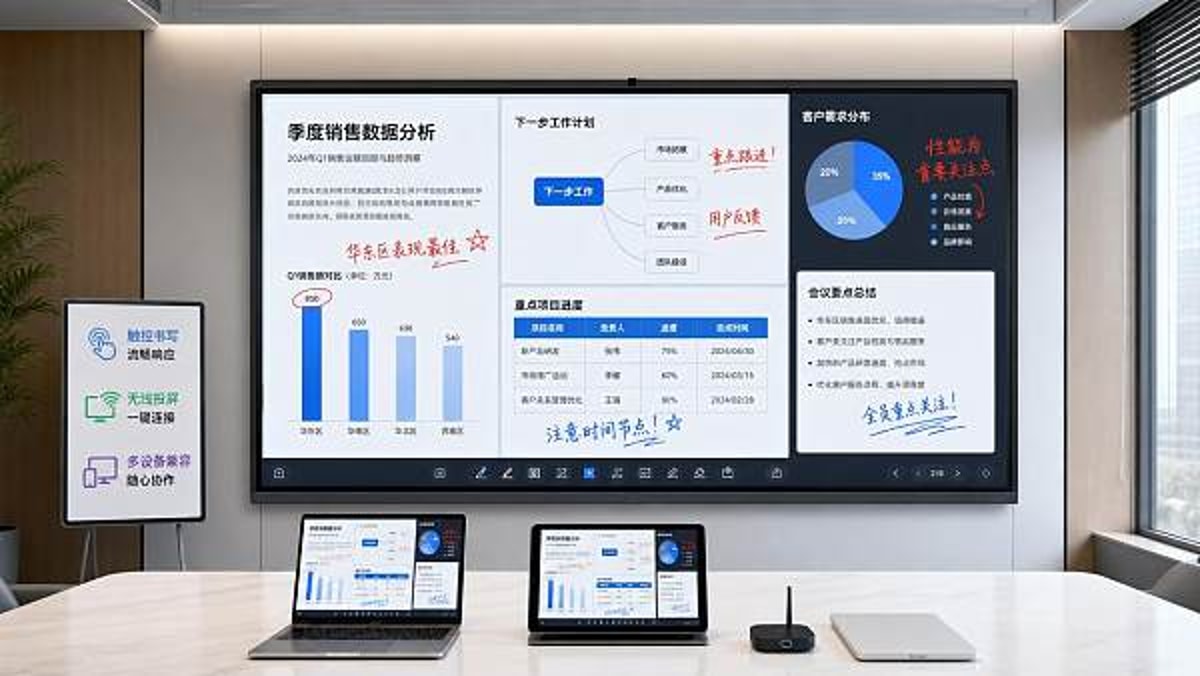
- Reliable touch and annotation for teaching, planning, and live markups.
- Consistent wireless casting from Windows, macOS, ChromeOS, Android, and iOS endpoints.
- Integration with video conferencing and collaboration platforms already approved by IT.
- Manageability, update control, and serviceability over the product lifecycle.
Daily-use features versus demo-only features
Many smart interactive whiteboards are sold with long feature lists, but daily value usually concentrates in a smaller group of functions. Technical evaluators should separate “frequently used” from “occasionally admired.” The following table helps frame that distinction in a procurement context.
The takeaway is simple: practical features drive adoption. If a smart interactive whiteboard performs core tasks smoothly, users return to it. If it demands workarounds, usage drops and ROI weakens.
What do technical evaluators check first during selection?
Technical assessment begins with reliability under mixed-use conditions. In many commercial projects, one board may serve lecturers in the morning, managers in the afternoon, and external presenters in the evening. That creates a broad compatibility burden. Evaluators need evidence that smart interactive whiteboards can handle varied operating systems, network policies, and user skill levels without requiring constant intervention from IT or facilities teams.
Core technical checks
- Touch performance: Check response time, edge accuracy, multi-touch support, and behavior when multiple users annotate simultaneously.
- Display readability: Verify brightness, glare handling, and visibility under classroom lighting, lobby daylight, or meeting-room spot lighting.
- Casting and connectivity: Test native casting, guest access, wired fallback, and how quickly users can share content without installing complex software.
- System integration: Confirm compatibility with conferencing tools, LMS platforms, cloud drives, and central device management policies.
- Maintenance path: Review firmware update procedures, spare parts availability, and support structure for multi-site deployments.
In large sourcing programs, GCT often sees technical teams move beyond raw specifications and request environment-specific validation. A board that performs well in a quiet demo room may behave differently when connected to enterprise Wi-Fi, guest VLANs, or legacy conferencing hardware. Practical testing matters more than brochure language.
Suggested technical evaluation matrix for smart interactive whiteboards
The table below can be adapted for schools, corporate training rooms, hospitality back-of-house collaboration areas, and mixed commercial spaces where smart interactive whiteboards need to satisfy both IT standards and user expectations.
A structured matrix helps compare solutions fairly. It also prevents purchasing teams from overvaluing visual design while undervaluing serviceability, network fit, and ongoing administration.
Which features get used daily in real application scenarios?
Usage patterns vary by setting, but the same theme appears across sectors: the most-used features support communication speed. In education, that means instant lesson annotation and simple content sharing. In corporate and hospitality environments, it means fast meeting startup, multiple presenter handoff, and smooth hybrid collaboration. In public or experience-led venues, it often means durability, easy wayfinding content updates, and intuitive multi-user touch.
By scenario, what rises to the top?
- Smart campuses: handwriting latency, lesson recording compatibility, split-screen annotation, and compatibility with student devices.
- Corporate training and boardrooms: one-tap conferencing launch, wireless sharing, whiteboard export to PDF or cloud storage, and user authentication control.
- Hotels and event venues: quick source switching for guest presenters, broad connector support, and simple reset functions between sessions.
- Showrooms and experience spaces: responsive touch, high legibility, and stable playback or kiosk-style interaction over long operating hours.
This scenario view matters because not all smart interactive whiteboards are optimized for the same duty cycle. A classroom may need all-day annotation. A hotel meeting suite may prioritize rapid turnover and guest usability. A technical evaluator should map the board to the room mission before comparing premium features.
What are the most overlooked procurement risks?
Several procurement risks appear repeatedly in cross-border sourcing and commercial fit-out projects. The first is assuming that all smart interactive whiteboards deliver comparable writing and casting performance. In practice, software maturity, firmware stability, and hardware tuning create meaningful differences. The second is treating the board as a standalone display rather than part of a room ecosystem with cameras, microphones, speakers, control panels, and security policies.
Common mistakes to avoid
- Selecting on diagonal size alone without checking viewing distance, room acoustics, and lighting conditions.
- Ignoring user onboarding, which leads to low adoption even when hardware is strong.
- Overlooking regional power, mounting, compliance, or import documentation requirements.
- Failing to validate lifecycle support, replacement policy, and spare-part continuity for multi-site use.
GCT’s sourcing perspective is useful here because technical performance is only one layer of a successful deployment. Institutional buyers also need supplier responsiveness, documentation discipline, and the ability to support different commercial environments without introducing unnecessary complexity.
How should buyers compare cost, value, and alternatives?
Price alone does not explain value in smart interactive whiteboards. A lower acquisition cost can become expensive if the product generates training overhead, compatibility failures, or higher support demand. Conversely, an advanced model may be unnecessary if the site mainly needs simple presentation and occasional annotation. Buyers should evaluate total cost of ownership across hardware, accessories, installation, training, and support.
Cost-sensitive selection logic
The following comparison can help technical evaluators match budget level to operational need instead of defaulting to either the cheapest or most feature-heavy option.
Alternatives also deserve attention. In some rooms, a non-interactive large format display with a separate conferencing kit may be more cost-effective. In others, smart interactive whiteboards are clearly justified because shared annotation and collaborative planning are daily tasks, not occasional extras.
What standards, compliance points, and implementation details should be reviewed?
For institutional procurement, compliance review is not optional. Smart interactive whiteboards may need to align with electrical safety requirements, EMC expectations, regional import rules, environmental restrictions, and data or network governance policies depending on the market and installation environment. Technical evaluators should request clear documentation early, especially for cross-border sourcing programs.
Key review points before order confirmation
- Confirm product documentation for the destination market, including electrical and compatibility declarations where applicable.
- Check mounting method, wall structure, ventilation clearance, and cable routing before finalizing size and placement.
- Review update policy and whether firmware management can be controlled centrally or staged by site.
- Assess whether onboard apps, cloud functions, or user login features align with organizational security rules.
Implementation should also include user segmentation. Teachers, executives, trainers, and guest presenters do not need the same interface complexity. The most successful deployments often use consistent default settings, quick-start instructions, and a small number of approved sharing workflows.
FAQ: practical buying questions about smart interactive whiteboards
How do I know whether a feature will be used daily or just occasionally?
Start with workflow observation, not product literature. If users frequently annotate, compare documents live, or switch presenters multiple times per session, features like fast touch response, save-and-share whiteboarding, and wireless casting will be used every day. If advanced 3D tools or specialized app libraries are not tied to routine tasks, they are less critical in the scoring model.
Are smart interactive whiteboards suitable for both education and commercial venues?
Yes, but only when the selection is scenario-based. Education deployments usually emphasize writing quality, student interaction, and platform compatibility. Commercial venues often emphasize presentation reliability, guest access, room integration, and ease of reset. The same product category can serve both, but the configuration priorities differ.
What should technical evaluators ask suppliers before procurement?
Request details on operating system compatibility, casting methods, port configuration, remote management tools, firmware policy, packaging for international shipment, spare-part availability, and expected support response. Also ask how the board behaves under restricted enterprise networks, because that is where many deployment issues appear.
How long does implementation usually take?
The timeline depends on project scale, mounting conditions, import lead times, and whether the deployment includes room integration or software onboarding. A single-site installation may move quickly, while multi-site commercial rollouts require longer planning for logistics, compliance review, user training, and acceptance testing.
Why work with GCT when sourcing smart interactive whiteboards?
For technical evaluators, the challenge is not finding products. It is narrowing the market to solutions that are commercially viable, operationally practical, and aligned with the destination project. Global Commercial Trade supports this process by connecting sector-specific sourcing intelligence with the realities of institutional procurement, commercial space design, and international supply coordination.
If you are reviewing smart interactive whiteboards for a smart campus, hospitality training center, corporate collaboration environment, or specialty commercial venue, GCT can help you evaluate parameters that affect real daily use rather than just promotional appeal. That includes support for product selection, feature comparison, delivery timing, customization feasibility, documentation review, sample coordination, and quotation alignment across multiple project requirements.
- Ask for side-by-side comparison support for touch, casting, I/O, and management features.
- Confirm installation environment details, from room type to user profile and network limitations.
- Discuss lead time, packaging, destination compliance expectations, and after-sales planning before final sourcing decisions.
- Request guidance on whether a full interactive solution or a lower-complexity alternative is the better fit for your budget and usage pattern.
When the goal is long-term adoption, the right question is never “Which board has the most features?” It is “Which smart interactive whiteboards features will users rely on every day?” That is the question worth bringing to your next sourcing discussion.
Search News
Hot Articles
Popular Tags
Need ExpertConsultation?
Connect with our specialized leisureengineering team for procurementstrategies.
Recommended News
 May 04, 2026Kindergarten Furniture Bulk Orders and the Safety Details MissedKindergarten furniture bulk buyers: discover the hidden safety checks suppliers often miss, from emissions and stability to ergonomics and compliance, before placing large orders.● Institutional Buyer
 May 04, 2026School Desks and Chairs Wholesale: Matching Age to Size CorrectlySchool desks and chairs wholesale guide: learn how to match age to size correctly for better comfort, safety, compliance, and smarter school furniture purchasing.● Institutional Buyer
 May 04, 2026Library Bookshelves Wholesale: How Much Load Is Really Enough?Library bookshelves wholesale guide: learn how much load is truly enough for safety, durability, and compliance. Compare ratings, avoid costly mistakes, and choose the right shelving with confidence.● Institutional Buyer
 May 04, 2026Smart Interactive Whiteboards: Which Features Get Used Daily?Smart interactive whiteboards: discover which features teams and teachers actually use daily, from touch accuracy and wireless casting to easy collaboration, ROI, and smarter buying decisions.● Institutional Buyer
 May 04, 2026Student Chairs With Writing Pad: Which Sizes Fit Best?Student chairs with writing pad: discover which sizes best support comfort, posture, room capacity, and tablet use. Compare fit options for schools, universities, and training spaces.● Institutional Buyer
 May 03, 2026Beijing Women's FC Win Spurs AI Training System Export to UKBeijing Women's FC win sparks UK demand for AI sports training systems — real-time analytics, GDPR/ISO 27001 compliance & Heathrow logistics insights revealed.● Institutional Buyer
 May 01, 2026Park Trash Cans That Cut Maintenance Instead of Adding ItPark trash cans that reduce labor, resist weather, and stay cleaner longer. Learn which designs, materials, and features help lower maintenance costs across parks and outdoor spaces.● Institutional Buyer
 May 01, 2026Park Drinking Fountains That Hold Up Better in Public SpacesPark drinking fountains built for public spaces need durability, hygiene, and low maintenance. Discover how to choose vandal-resistant models that cut long-term costs.● Institutional Buyer
 May 01, 2026Restaurant POS Systems That Reduce Training Time at the CounterRestaurant POS systems that cut counter training time: compare intuitive workflows, role-based controls, and error-reducing features to speed onboarding and improve service consistency.● Institutional Buyer
 Apr 30, 20262026 Shanghai Smart Campus Expo: VR EdTech Gains ITU & ISO/IEC 23053 Dual CertificationVR EdTech gains ITU & ISO/IEC 23053 dual certification at 2026 Shanghai Smart Campus Expo—key for global smart PE tenders in UAE, Thailand & ASEAN.● Institutional Buyer
 Apr 29, 20262026 Shanghai Smart Campus Expo: VR EdTech Gains ITU & ISO/IEC Dual CertVR EdTech gains ITU & ISO/IEC dual cert at 2026 Shanghai Smart Campus Expo—key for exporters, integrators & compliance providers.● Institutional Buyer
 Apr 28, 20262026 Shanghai Smart Campus Expo: VR Teaching Devices Gain ITU & ISO/IEC 23053 CertificationVR teaching devices certified to ITU & ISO/IEC 23053 at 2026 Shanghai Smart Campus Expo—unlock EU tenders, interoperability, and global edtech growth.● Institutional Buyer
 Apr 27, 20262026 Shanghai Smart Campus Expo: VR EdTech Gains ITU & ISO/IEC Dual CertificationVR EdTech gains ITU & ISO/IEC dual certification at 2026 Shanghai Smart Campus Expo—key for global edtech exporters, integrators, and compliance teams.● Institutional Buyer
 Apr 26, 20262026 Shanghai Smart Campus Expo: VR EdTech Devices Gain ITU & ISO/IEC 23053 CertificationVR EdTech devices certified to ITU & ISO/IEC 23053 at 2026 Shanghai Smart Campus Expo — key for GCC & SEA education exporters, integrators, and compliance teams.● Institutional Buyer
 Apr 25, 20262026 Shanghai Smart Campus Expo: VR EdTech Gains ITU & ISO/IEC 23053 Dual CertificationVR EdTech gains ITU & ISO/IEC 23053 dual certification at 2026 Shanghai Smart Campus Expo—key for EU/UAE edtech tenders. Act now.● Institutional Buyer
 Apr 24, 20262026 Shanghai Smart Campus Expo: VR EdTech Gains ITU & ISO/IEC 23053 Dual CertificationVR EdTech gains ITU & ISO/IEC 23053 dual certification at 2026 Shanghai Smart Campus Expo—key for global edtech tenders. Discover impact & compliance insights.● Institutional Buyer
 Apr 23, 20262026 Shanghai Smart Campus Expo: VR EdTech Gains ITU & ISO/IEC Dual CertificationVR EdTech gains ITU & ISO/IEC dual certification at 2026 Shanghai Smart Campus Expo — a must-see milestone for global edtech exporters, LMS integrators, and STEM hardware providers.● Institutional Buyer
 Apr 22, 20262026 Shanghai Smart Campus Expo: VR EdTech Gains ITU & ISO/IEC Dual CertificationVR EdTech gains ITU & ISO/IEC dual certification at 2026 Shanghai Smart Campus Expo—unlock B2G opportunities in UAE, Chile & Indonesia now.● Institutional Buyer
 Apr 21, 2026FSAE China 2026: Domestic Timing System Gains ITU CertificationFSAE China 2026: Domestic timing system wins ITU certification — first education-level motorsport solution compliant with ITU-T G.9972. Discover implications for timing tech, AI integration & standards adoption.● Institutional Buyer
 Apr 21, 20262026 Shanghai Smart Campus Expo: VR EdTech Gains ITU & ISO/IEC 23053 Dual CertificationVR EdTech gains ITU & ISO/IEC 23053 dual certification at 2026 Shanghai Smart Campus Expo—key for exporters, integrators & procurement pros.● Institutional Buyer
 Apr 20, 20262026 Shanghai Smart Campus Expo: VR EdTech Gains ITU & ISO/IEC Dual CertificationVR EdTech gains ITU & ISO/IEC dual certification at 2026 Shanghai Smart Campus Expo—key for global edtech exporters, procurement agencies & VR integrators.● Institutional Buyer
 Apr 19, 20262026 Shanghai Smart Campus Expo: VR EdTech Gains ITU & ISO/IEC Dual CertificationVR EdTech hits a milestone: 2026 Shanghai Smart Campus Expo unveils ITU & ISO/IEC dual-certified haptic teaching devices—game-changing for global edtech exporters, OEMs, and procurement agencies.● Institutional Buyer
 Apr 18, 20262026 Shanghai Smart Campus Expo: VR Teaching Devices Gain ITU & ISO/IEC Dual CertificationVR teaching devices gain ITU & ISO/IEC dual certification at 2026 Shanghai Smart Campus Expo — a must-have for edtech exporters targeting Saudi, Mexico & Poland.● Institutional Buyer
 Apr 17, 20262026 Shanghai Smart Campus Expo: VR Teaching Devices Gain ITU & ISO/IEC Dual CertificationVR teaching devices with ITU & ISO/IEC dual certification headline the 2026 Shanghai Smart Campus Expo—unlock global edtech tenders now.● Institutional Buyer