POS touch screens: what affects response speed and lifespan
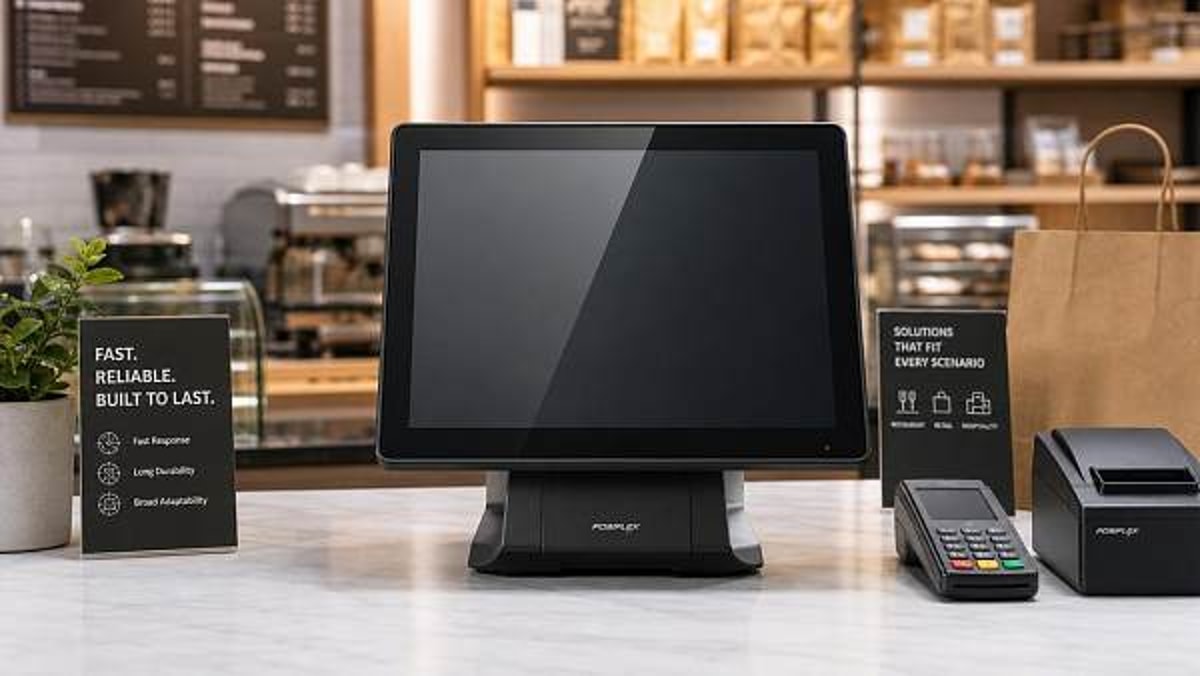
For technical evaluators, POS touch screens are more than user interfaces—they directly affect checkout efficiency, maintenance cycles, and total cost of ownership. Understanding what influences response speed and lifespan, from touch technology and controller quality to environmental exposure and usage intensity, helps buyers compare solutions with greater precision and reduce long-term operational risk.
Why scenario differences matter when evaluating POS touch screens
Not all POS touch screens fail for the same reason, and not all “fast” touch performance is measured in the same operating context. A touchscreen used at a luxury jewelry counter faces light traffic, high expectations for visual clarity, and close-range interaction. A touchscreen at a quick-service food outlet deals with rapid repeated tapping, grease, cleaning chemicals, and peak-hour queue pressure. In a school canteen or amusement venue, the same display may be used by many operators with inconsistent habits, which changes wear patterns and maintenance needs.
For technical assessment teams, this means response speed and lifespan should be judged against the real deployment environment, not only against a product datasheet. Controller design, panel bonding, touch sensor type, protective glass thickness, brightness, thermal management, and sealing all interact differently depending on the application. A model that performs well in a climate-controlled specialty retail store may degrade quickly in a semi-open hospitality kiosk or a high-temperature back-of-house station.
The practical goal is not simply to choose the most advanced POS touch screens, but to select the best-fit architecture for the intended duty cycle, user behavior, and environmental stress. That is where response speed and lifespan become procurement issues rather than isolated technical specifications.
Where response speed and lifespan create the biggest business impact
Across commercial environments, slow or unstable touch response creates visible friction: operators repeat inputs, customers wait longer, and transaction errors increase. Short lifespan causes a second layer of cost through downtime, technician visits, replacement parts, and inconsistent user experience across locations. For businesses managing multiple sites, even a small reliability gap in POS touch screens can scale into substantial operational loss.
Technical evaluators should therefore map the touchscreen to the business consequence. In hospitality, poor touch response often appears as order delays and staff frustration. In office or educational settings, lifespan may matter more because systems are expected to remain stable over many years with limited support resources. In luxury retail, touch precision and display quality may outweigh extreme ruggedness, but visible degradation is unacceptable because it affects brand perception.
A scenario comparison: the same POS touch screens behave differently in different environments
Before comparing suppliers, it helps to place each project into a clear usage category. The table below summarizes how the evaluation priority changes by scenario.
What affects response speed in real commercial use
Touch technology and controller quality
The first factor is the touch stack itself. Projected capacitive panels are common in modern POS touch screens because they support fast gesture recognition, good image clarity, and durable front surfaces. But actual response speed depends heavily on the controller IC, firmware tuning, signal filtering, and electromagnetic interference resistance. Two screens with the same nominal touch technology may behave very differently under fluorescent lighting, near receipt printers, or when mounted in compact metal enclosures.
Cover glass thickness and glove or moisture conditions
Thicker protective glass improves durability, yet it can reduce sensitivity if the sensor and controller are not optimized together. In restaurants and semi-industrial service counters, moisture, residue, and gloved hands often affect perceived response speed more than pure latency does. Evaluators should test whether POS touch screens maintain accurate input with wet fingers, frequent wipe-down cycles, or operator gloves where applicable.
System integration rather than panel speed alone
A touch panel can be fast, but the overall terminal can still feel slow if the CPU, OS image, I/O architecture, or application layer introduces lag. In high-throughput cashier scenarios, response speed should be validated as end-to-end interaction time: touch registration, visual feedback, application execution, and transaction step completion. This is especially relevant when comparing all-in-one terminals from different OEM or ODM suppliers.
What shortens the lifespan of POS touch screens
Usage intensity and repetitive input patterns
In many commercial sites, the same buttons on the user interface are touched thousands of times per shift. Even though capacitive touch has no mechanical pressure point in the same way as legacy resistive systems, localized wear still appears through coating degradation, surface scratching, and repeated contamination. The higher the daily transaction count, the more important it becomes to validate touch endurance under concentrated use rather than relying on general lifespan claims.
Heat buildup and poor enclosure design
Thermal stress is a frequent hidden cause of shortened lifespan. POS touch screens installed in sealed housings, near kitchen equipment, under direct solar exposure, or in fanless systems with inadequate heat dissipation often suffer from drifting touch accuracy, backlight decline, adhesive fatigue, and premature controller failure. Technical buyers should review operating temperature ranges, internal layout, and long-run temperature stability, not just ambient specifications.
Cleaning chemicals, dust, liquids, and UV exposure
Commercial cleaning practices are harsher than many suppliers assume. Alcohol-based solutions, disinfectants, and frequent cloth abrasion can damage coatings and edge seals over time. In leisure or semi-outdoor environments, dust ingress and sunlight accelerate aging. If POS touch screens are exposed to these conditions, surface hardness, optical bonding quality, ingress protection level, and material compatibility should move up the evaluation checklist.
How priorities change by application scenario
Restaurant and fast-turnover hospitality counters
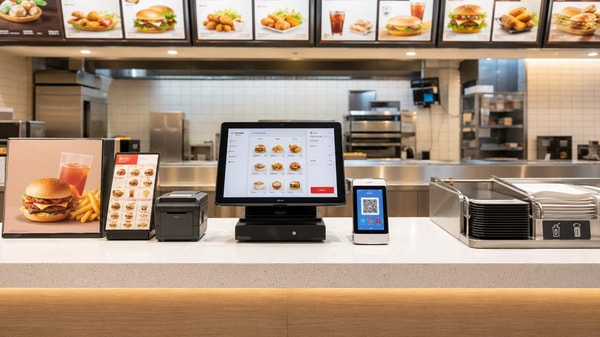
This is the most demanding environment for both response speed and lifespan. Operators need instant input recognition during rush periods, while screens must survive splashes, grease, heat, and nonstop cleaning. Here, technical evaluators should prioritize responsive capacitive technology, strong controller stability, anti-false-touch performance, sealed front surfaces, and proven endurance under heavy daily use.
Hotels, lounges, and premium service environments
In these spaces, the touchscreen is part of the guest-facing experience. Smooth response matters, but so do appearance, display brightness uniformity, low reflectivity, and long-term cosmetic durability. POS touch screens for premium hospitality should be assessed for fit and finish, edge bonding quality, and whether the touch surface remains visually clean after extended operation.
Luxury retail and jewelry counters
At luxury counters, transaction speed is important, yet visual elegance and stable precision usually matter more than extreme ruggedness. Evaluators should focus on accurate touch mapping, premium front glass, high optical clarity, and low visible wear over time. Because customer-facing devices influence brand image, minor issues such as haze, edge yellowing, or touch inconsistency can have outsized commercial impact.
Institutional dining and campus service points
These deployments often emphasize longevity, maintainability, and standardized fleet management. The best POS touch screens for this scenario are not necessarily the most visually refined, but the ones with stable long-term supply, consistent component revisions, straightforward replacement policies, and broad compatibility with operating systems and peripheral ecosystems.
A practical checklist for technical evaluators
When comparing POS touch screens across suppliers, technical teams should move beyond headline specs and ask for evidence linked to their own scenario. The most useful review framework includes:
- Touch latency and accuracy under actual software load
- Performance with wet fingers, gloves, or contaminated surfaces if relevant
- Front-surface durability, coating stability, and scratch resistance
- Operating temperature stability and enclosure heat behavior
- Cleaning-agent compatibility and sealing quality
- Lifecycle management, spare parts availability, and component continuity
- EMI resilience in dense POS hardware environments
Common misjudgments when selecting POS touch screens
One common mistake is assuming that faster advertised touch sampling always means better field performance. In reality, unstable input, poor firmware tuning, or software lag often hurts usability more than raw latency. Another mistake is over-prioritizing rugged glass without checking whether thicker glass compromises sensitivity in the actual interface layout.
Buyers also underestimate maintenance conditions. A screen that survives laboratory tests may still age quickly under aggressive cleaning routines or heat accumulation. Finally, some organizations assess single-unit quality but ignore fleet consistency. For multisite rollouts, the lifespan of POS touch screens depends not only on original design, but also on revision control, replacement availability, and supplier discipline over time.
How to match the right screen to the right business environment
The best evaluation method is to start with the scenario, define the operator behavior, and then work backward to the hardware. If the site has intense throughput and harsh cleaning, prioritize durability and stable responsiveness under contamination. If the site is premium retail or hospitality, balance touch performance with optical quality and long-term appearance. If the deployment is institutional and large-scale, give extra weight to support continuity and maintenance efficiency.
For sourcing teams and technical evaluators, POS touch screens should be shortlisted only after environmental conditions, transaction density, cleaning practices, expected service life, and integration requirements are clearly documented. That approach produces better comparisons, lowers failure risk, and aligns hardware selection with real commercial outcomes. In short, response speed and lifespan are not isolated product attributes—they are scenario-dependent performance results that should be validated where the screen will actually work.
Search News
Hot Articles
Popular Tags
Need ExpertConsultation?
Connect with our specialized leisureengineering team for procurementstrategies.
Recommended News
 May 05, 2026Physics lab apparatus: where low-cost kits usually fall shortPhysics lab apparatus buying on price alone often leads to poor accuracy, weak durability, and higher lifecycle costs. Learn what low-cost kits miss and how to source safer, better-value solutions.● Institutional Buyer
 May 05, 2026School laboratory equipment: what should be replaced firstSchool laboratory equipment replacement starts with safety-critical assets. Learn what to replace first to improve compliance, reduce downtime, and maximize tight budgets.● Institutional Buyer
 May 05, 2026Thermal receipt printers: hidden upkeep costs before large rolloutThermal receipt printers may look affordable, but hidden upkeep costs can erode rollout budgets. Learn how to reduce downtime, control maintenance, and choose smarter for scale.● Institutional Buyer
 May 05, 2026Human anatomy models that improve hands-on teaching, not storageHuman anatomy models built for hands-on teaching, not storage. Discover durable, classroom-ready options that improve engagement, simplify setup, and support smarter education sourcing.● Institutional Buyer
 May 05, 2026Ceiling mount projector brackets: where installation mistakes happenCeiling mount projector brackets: discover where installation mistakes happen, how to avoid safety and alignment issues, and the checklist that helps teams deliver smoother AV projects.● Institutional Buyer
 May 05, 2026Barcode scanners for library: common issues with older systemsBarcode scanners for library upgrades can solve slow checkouts, read errors, and compatibility issues in older systems. Learn what fails first and how to choose a reliable replacement.● Institutional Buyer
 May 05, 2026What to check before ordering wholesale projector screensWholesale projector screens buyers should check material, gain, aspect ratio, installation, and supplier consistency before ordering. Reduce sourcing risk and choose reliable commercial solutions.● Institutional Buyer
 May 05, 2026Geography globes wholesale: what makes one model classroom-readyGeography globes wholesale buyers: discover what makes a model truly classroom-ready, from durability and readability to safety, compliance, and reliable bulk supply.● Institutional Buyer
 May 05, 2026Microscope slides wholesale: where quality gaps usually show upMicroscope slides wholesale buyers should watch for hidden quality gaps in flatness, edge finishing, cleanliness, and batch consistency—learn how to reduce waste and choose reliable suppliers.● Institutional Buyer
 May 05, 2026POS touch screens: what affects response speed and lifespanPOS touch screens directly impact checkout speed, uptime, and total cost. Learn what affects response speed and lifespan to choose the right solution for every business scenario.● Institutional Buyer
 May 04, 2026Kindergarten Furniture Bulk Orders and the Safety Details MissedKindergarten furniture bulk buyers: discover the hidden safety checks suppliers often miss, from emissions and stability to ergonomics and compliance, before placing large orders.● Institutional Buyer
 May 04, 2026School Desks and Chairs Wholesale: Matching Age to Size CorrectlySchool desks and chairs wholesale guide: learn how to match age to size correctly for better comfort, safety, compliance, and smarter school furniture purchasing.● Institutional Buyer
 May 04, 2026Library Bookshelves Wholesale: How Much Load Is Really Enough?Library bookshelves wholesale guide: learn how much load is truly enough for safety, durability, and compliance. Compare ratings, avoid costly mistakes, and choose the right shelving with confidence.● Institutional Buyer
 May 04, 2026Smart Interactive Whiteboards: Which Features Get Used Daily?Smart interactive whiteboards: discover which features teams and teachers actually use daily, from touch accuracy and wireless casting to easy collaboration, ROI, and smarter buying decisions.● Institutional Buyer
 May 04, 2026Student Chairs With Writing Pad: Which Sizes Fit Best?Student chairs with writing pad: discover which sizes best support comfort, posture, room capacity, and tablet use. Compare fit options for schools, universities, and training spaces.● Institutional Buyer
 May 03, 2026Beijing Women's FC Win Spurs AI Training System Export to UKBeijing Women's FC win sparks UK demand for AI sports training systems — real-time analytics, GDPR/ISO 27001 compliance & Heathrow logistics insights revealed.● Institutional Buyer
 May 01, 2026Park Trash Cans That Cut Maintenance Instead of Adding ItPark trash cans that reduce labor, resist weather, and stay cleaner longer. Learn which designs, materials, and features help lower maintenance costs across parks and outdoor spaces.● Institutional Buyer
 May 01, 2026Park Drinking Fountains That Hold Up Better in Public SpacesPark drinking fountains built for public spaces need durability, hygiene, and low maintenance. Discover how to choose vandal-resistant models that cut long-term costs.● Institutional Buyer
 May 01, 2026Restaurant POS Systems That Reduce Training Time at the CounterRestaurant POS systems that cut counter training time: compare intuitive workflows, role-based controls, and error-reducing features to speed onboarding and improve service consistency.● Institutional Buyer
 Apr 30, 20262026 Shanghai Smart Campus Expo: VR EdTech Gains ITU & ISO/IEC 23053 Dual CertificationVR EdTech gains ITU & ISO/IEC 23053 dual certification at 2026 Shanghai Smart Campus Expo—key for global smart PE tenders in UAE, Thailand & ASEAN.● Institutional Buyer
 Apr 29, 20262026 Shanghai Smart Campus Expo: VR EdTech Gains ITU & ISO/IEC Dual CertVR EdTech gains ITU & ISO/IEC dual cert at 2026 Shanghai Smart Campus Expo—key for exporters, integrators & compliance providers.● Institutional Buyer
 Apr 28, 20262026 Shanghai Smart Campus Expo: VR Teaching Devices Gain ITU & ISO/IEC 23053 CertificationVR teaching devices certified to ITU & ISO/IEC 23053 at 2026 Shanghai Smart Campus Expo—unlock EU tenders, interoperability, and global edtech growth.● Institutional Buyer
 Apr 27, 20262026 Shanghai Smart Campus Expo: VR EdTech Gains ITU & ISO/IEC Dual CertificationVR EdTech gains ITU & ISO/IEC dual certification at 2026 Shanghai Smart Campus Expo—key for global edtech exporters, integrators, and compliance teams.● Institutional Buyer
 Apr 26, 20262026 Shanghai Smart Campus Expo: VR EdTech Devices Gain ITU & ISO/IEC 23053 CertificationVR EdTech devices certified to ITU & ISO/IEC 23053 at 2026 Shanghai Smart Campus Expo — key for GCC & SEA education exporters, integrators, and compliance teams.● Institutional Buyer