Choosing a 16-Channel Digital Audio Mixer for Live Sound: Key Features
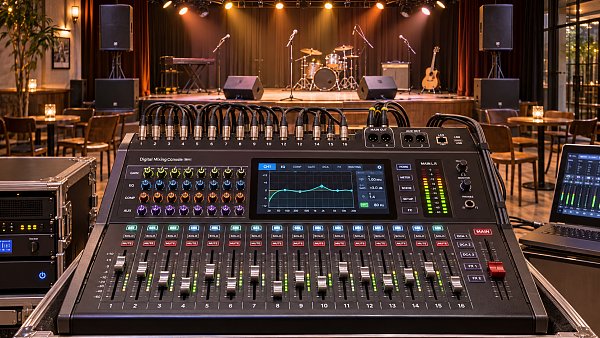
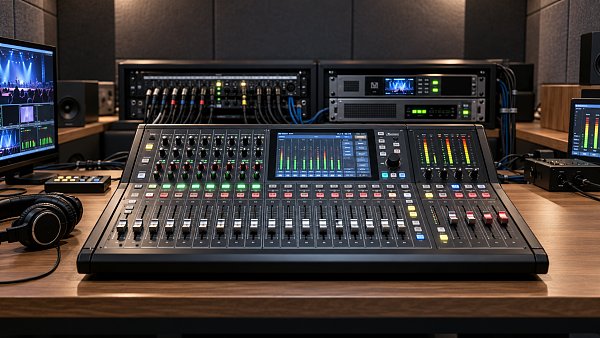
A 16-channel digital mixer can be a strong fit for a small venue, hotel event space, house of worship, or mobile sound rig when its inputs, monitor mixes, and control surface match the way the system will actually be used. The channel count alone is a poor guide: two mixers described as 16-channel may offer very different numbers of microphone preamps, physical outputs, processing resources, and expansion options.
Start with a representative event and map every source and destination. Then assess whether the mixer can handle that event with enough operating room for changes, accessible controls for the available crew, and a dependable recovery path if a device or network connection fails. Sound quality matters, but a mixer that forces compromises in monitor routing or slows down the operator may be the weaker choice for live work.
Check what “16 channels” actually buys you
Manufacturers may use channel counts to describe physical inputs, processing channels, or a combination of microphone, line, USB, and stereo sources. A mixer advertised as 16-channel might have fewer than 16 microphone preamps, or it may require an optional stage box to bring all available processing channels into use. A stereo input can also consume two processing channels, depending on the architecture.
Build an input list before comparing specifications. For a live band, count each vocal microphone, drum microphone, direct input, instrument amplifier microphone, and playback feed separately. For a conference, include lectern and panel microphones, a presentation computer, video playback, and any remote contribution. Mark stereo sources as two channels unless the proposed mixer handles them differently.
Then check the physical connectors and gain controls against that list. A venue with several wireless microphone receivers may need more line-level inputs than a specification sheet’s microphone count suggests. Conversely, a band with many microphones needs sufficient preamps and appropriate connectors at the stage. Confirm whether phantom power can be switched in the groups required by the microphone inventory and whether applying it affects other connected equipment.
Leave room for the inputs that are easy to overlook: a spare wireless receiver, an announcement microphone, or a guest’s playback device. If the normal event already fills every channel, the system may work on paper while leaving the operator no practical way to accommodate a change. A larger console or an expandable system can be the more economical choice when that limitation affects frequent events.
Distinguish channel capacity from stage connectivity
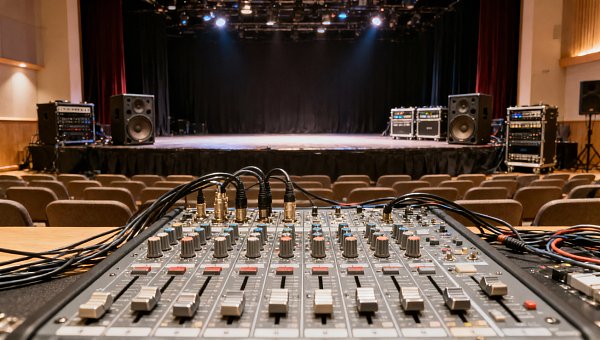
A mixer can have enough processing channels but too few convenient input sockets where sources are located. A digital stage box may reduce the need for long analog cable runs and put preamps close to the stage, but only if the mixer supports the required connection and channel count. Check whether expansion hardware is included, optional, or unavailable, and whether adding it replaces any local inputs or other functionality.
Also verify gain ownership when a stage box is shared. If two consoles use the same remote preamps, the system may restrict which operator controls analog gain or require a gain-compensation arrangement. That detail matters when front-of-house and monitor engineers need independent workflows.
Map outputs and processing to the show
Inputs describe only half the job. A live mixer also has to feed the main loudspeakers, monitors, recording system, and sometimes a separate room or stream. Count the required mixes, then check how many independent buses and physical outputs can deliver them. A bus is a mixing resource; an output socket is a connection. Having enough of one does not guarantee enough of the other.
Consider a compact band setup with stereo main speakers, several independent performer monitor mixes, and an effects send. A mixer may have enough inputs for every instrument but too few auxiliary buses to provide each performer with a separate mix. If stereo in-ear mixes are required, each one may consume two buses and two output channels. The exact allocation depends on the mixer, so trace the proposed routing rather than relying on the total bus count.
For a conference or hospitality venue, the problem may be different: one mix for the room, another for a video feed, and a third for an overflow space. Ask whether each destination needs independent level control, equalization, or different content. A recording or stream often needs a deliberate mix because audience microphones, playback, and spoken voices do not necessarily balance the same way as they do in the room.
Check these routing details in the manual or a hands-on demonstration:
- Pre- and post-fader sends: Monitor mixes often need to stay stable when the front-of-house operator changes a channel fader. Effects and other feeds may need to follow it. Confirm where each send can be tapped and whether that choice is global or per channel.
- Output processing: Determine whether the required equalization, delay, and limiting are available on the buses or outputs that feed loudspeakers and monitors. Do not assume every output has the same tools.
- Groups, matrices, and mute groups: These can simplify control of related sources and destinations, but their availability and routing differ. A matrix is useful only if it can receive the signals the design requires.
- Effects resources: Check how many effects can run simultaneously, which buses they consume, and how their returns enter the mix. A reverb used on vocals and a delay used on an instrument may require separate resources.
- Recording and playback: Confirm whether USB or network audio supports the required number of channels, whether recordings are taken before or after processing, and how playback returns are assigned. A stereo recording feed and multitrack recording serve different purposes.
Onboard processing should support the engineer’s workflow without creating hidden trade-offs. Per-channel filters, parametric equalization, gates, and compressors are valuable when they are available on the channels that need them. Some designs share processing resources or impose limits at particular sample rates. Inspect the full routing and processing specifications, especially if the intended configuration uses many dynamics processors, effects, and outputs at once.
Evaluate sound quality in the complete signal path
Microphone preamps should provide suitable gain, low enough noise for quiet sources, and enough headroom for loud ones. Specification figures can help screen candidates, but compare them under equivalent measurement conditions. A noise figure without the associated gain setting, bandwidth, and source conditions is difficult to compare fairly with another published figure.
Assess gain range against the actual microphone and source. A quiet speaker using a low-output dynamic microphone may need substantially more gain than a wireless receiver delivering a strong line-level signal. At the other extreme, a high-level source can overload an input before a channel fader has any effect. Check whether the input accepts the expected level and whether a pad or suitable line input is available.
Digital headroom and metering matter too. The operator needs to see where clipping occurs: at the preamp, within a processing stage, or at an output. Confirm that channel and output meters are visible during normal operation and that the mixer provides a practical way to identify overloads quickly. Good sound also depends on gain staging, microphone placement, loudspeakers, and the room, so a preamp specification should not carry the entire purchase decision.
Pay attention to latency where performers hear themselves
All digital signal paths introduce some delay. Whether it matters depends on the complete route from microphone to monitor, including conversion, internal processing, network transport, and any external plug-ins. A front-of-house path may tolerate delay differently from an in-ear monitor path, where a performer hears both the direct sound of their voice and the amplified signal.
Compare latency using the same input-to-output route and processing conditions. A figure for the mixer’s internal processing alone may exclude converters or external software. If the design uses a computer for plug-ins, include its audio interface, buffer settings, and return path in the evaluation. For a monitor-heavy application, try the intended signal chain with representative performers before committing to it.
Choose controls that fit the crew and the room
A touchscreen, motorized faders, dedicated encoders, and remote applications can all be useful, but their value depends on who operates the system. An experienced engineer may prefer quick access to channel processing and sends. A multipurpose venue staffed by occasional operators may place more value on clearly labeled controls, protected settings, and a simple way to recall a known starting configuration.
Check how many actions are needed to perform common tasks: mute a microphone that is feeding back, adjust a monitor send, find a channel’s high-pass filter, or lower playback during an announcement. Layered faders can make a compact mixer workable, but they also require the operator to keep track of which layer is active. A small screen may be adequate for setup while slowing down adjustments during a busy show.
Scene recall deserves the same scrutiny. Determine which settings are stored, which can be protected from recall, and whether a scene can change routing, head amplifier gain, or output levels. In a shared venue, an unrestricted recall can disrupt another user’s microphone or monitor configuration. Save and restore procedures should be understandable to the staff who will use them, and show files should be backed up outside the console.
Remote control adds flexibility, especially when the mix position changes between events. It also introduces dependencies on a tablet, software version, wireless network, and user permissions. Check whether remote control is optional or essential, what functions remain available at the mixer if the connection drops, and whether multiple devices can make conflicting changes. For performer-controlled monitors, look for permissions that restrict users to their own mixes if the workflow requires them.
Test expansion and failure recovery before specifying the system
Expansion is useful only when it addresses a plausible need. A network audio port, expansion slot, or stage-box connector may add inputs and outputs, support recording, or connect another console, but those functions are not interchangeable. Verify the supported protocol, channel limits, compatible hardware, clocking requirements, and any licenses or accessories needed for the proposed configuration.
If the mixer must connect to an existing audio network, confirm interoperability at the level of the actual devices and configuration. Matching protocol names alone does not establish that every desired control function, sample rate, or routing option will work. Audio transport, remote preamp control, and device management can have different compatibility requirements. A test with the intended endpoints is more useful than assuming that a shared network connection resolves them all.
Reliability also depends on the operating model. For a self-contained mixer, ask what happens after a power interruption and how quickly the last usable configuration can be restored. For a rack mixer controlled by a tablet, identify how an operator can regain control if the tablet, access point, or application fails. A spare control device may be useful, but only if it is already configured and staff know how to connect it.
Before purchasing, compare shortlisted mixers against the same event sheet: every source, every destination, required processing, physical cable locations, and the people responsible for operation. Run through setup, a live adjustment, scene recall, and a simulated loss of remote control. The best choice is the one that completes that workflow with usable capacity left for the changes the venue expects to handle.
Search News
Hot Articles
Popular Tags
Need ExpertConsultation?
Connect with our specialized leisureengineering team for procurementstrategies.
Recommended News
 Nov 18, 2026Choosing a 16-Channel Digital Audio Mixer for Live Sound: Key FeaturesCompare 16 channel digital audio mixers for live sound. Discover essential inputs, routing, controls, and reliability features to find the right fit for your venue.● Pro Audio Engineer
 Nov 14, 2026Choosing a Speaker Parts Supplier: Quality, Compatibility and Lead TimesChoose a speaker parts supplier with confidence. Learn how to verify quality, compatibility and lead times while controlling costs and reducing sourcing risks.● Pro Audio Engineer
 Nov 10, 2026Music Production Tools for Podcasts: Choosing Software for Your WorkflowChoose music production tools for podcasts with confidence. Compare editing, mixing, collaboration, and export features to find the right fit for your workflow.● Pro Audio Engineer
 Nov 03, 20262027 NAMM Show to Debut TEC Tracks Live Sound Summit2027 NAMM Show debuts the TEC Tracks Live Sound Summit on January 27. Explore what it could mean for touring technology and production workflows.● Pro Audio Engineer
 Oct 24, 2026RME Launches ADI-2/4 PRO EX Audio Converter with Integrated ProcessingExplore the RME ADI-2/4 PRO EX audio converter with AD/DA conversion, dual headphone amps and integrated processing. Discover its potential for studio, live sound and broadcast workflows.● Pro Audio Engineer
 Oct 22, 2026Audio Production for Streaming: How to Build a Dedicated Live Event MixMaster audio production for streaming with a dedicated live event mix. Learn routing, loudness control, and monitoring techniques to deliver clear, balanced sound your online audience will love.● Pro Audio Engineer
 Oct 15, 2026Designing Theater Sound Systems for Clear Dialogue and Even Audience CoverageOptimize stage sound for theaters with practical tips on acoustics, speaker placement, and tuning. Discover how to deliver clear dialogue and consistent coverage across audience seating.● Pro Audio Engineer
 Oct 22, 2026Which Professional Sound System Specs Matter Most for Live Venues?Discover what professional sound system specs matter most for live venues. Compare SPL, coverage, frequency response, and headroom to choose a PA that delivers clear, powerful sound.● Pro Audio Engineer
 Oct 20, 2026Should You Prioritize Stage Sound or Audience Coverage?Should I prioritize stage sound or audience coverage first? Discover how to balance clear audience audio, reliable monitoring, and smarter sound-system upgrades for your venue.● Pro Audio Engineer
 Oct 18, 2026How Much Does Studio Acoustic Treatment Cost per Square Meter?How much does studio acoustic treatment cost per square meter? Learn how to compare panel prices, installation fees, and complete budgets to choose the right treatment without overspending.● Pro Audio Engineer
 Oct 17, 2026How Do Line Array and Point Source Sound Systems Differ?What is the difference between line array and point source systems? Compare coverage, costs, and venue fit to find the right solution for clearer sound.● Pro Audio Engineer
 Oct 16, 2026Are Standard Acoustic Panels Enough for Performance Venues?Are standard acoustic panels enough for performance venues? Discover their limits, explore bass control and diffusion, and learn how to choose treatments that improve sound without wasting budget.● Pro Audio Engineer
 Sep 30, 2026How to Choose an Aluminum Projector Ceiling Mount for Load, Drop, and Ceiling TypeChoose an aluminum projector ceiling mount with confidence. Learn how load capacity, drop length, ceiling structure, safety retention, and service access shape a reliable commercial AV installation.● Pro Audio Engineer
 Sep 26, 2026How to Choose Dynamic Microphones for Vocals in Live Stage SettingsDynamic microphones for vocals: learn how to match polar patterns, feedback control, durability, and clarity to live stage needs for reliable, professional sound.● Pro Audio Engineer
 Sep 07, 2026How to Choose Wall Mount Speakers for Clear Audio in Commercial SpacesWall mount speakers for commercial spaces: learn how to optimize coverage, SPL, directivity, installation, and system design for clear, reliable audio.● Pro Audio Engineer
 Sep 03, 2026How to Choose Locking Speakon Speaker Cables for Reliable Live Sound ConnectionsLocking Speakon speaker cables: learn how to select the right gauge, connector pinout, strain relief, and durable construction for reliable live sound connections.● Pro Audio Engineer
 Sep 08, 2026Is It Worth Upgrading a Stage Sound System Mid-Project?Is it worth upgrading stage sound systems mid-project? Discover how to assess performance gaps, costs, compatibility, and long-term venue value.● Pro Audio Engineer
 Sep 04, 2026Can AV Systems Be Retrofitted Into Older Commercial Buildings?Can AV integration be retrofitted into older commercial buildings? Discover practical strategies for reliable, code-aware AV upgrades with minimal disruption.● Pro Audio Engineer
 Jul 17, 2026How to Choose a Crossover Networks Supplier: Key Specs, Quality Checks, and OEM FactorsFind the right crossover networks supplier with this practical guide to key specs, quality checks, OEM factors, and supply chain risks for better audio performance and sourcing confidence.● Pro Audio Engineer
 Jul 16, 2026How to Evaluate ODM Services for Pro Audio: Design, Certification, and Production CapabilitiesODM services for pro audio: learn how to assess design depth, certification readiness, and production strength to choose a reliable partner and launch better audio products with less risk.● Pro Audio Engineer
 Jul 15, 2026JETRO Flags Modular, Low-Power Shift in Pro Stage AudioPro Stage Audio buyers in Japan are shifting fast: JETRO flags modular amplifiers, IP65 line arrays, low standby power, and JIS compliance as key to channel entry.● Pro Audio Engineer
 Jul 15, 2026Paper Speaker Cones Explained: How Cone Weight and Stiffness Affect SoundPaper speaker cones explained: discover how cone weight and stiffness shape sensitivity, clarity, breakup control, and real-world speaker performance for smarter audio sourcing.● Pro Audio Engineer
 Jul 15, 2026Performance Venues Compliance Checklist: Fire Safety, Accessibility, and Crowd RulesPerformance venues compliance checklist covering fire safety, accessibility, and crowd rules. Learn how to reduce delays, improve approvals, and open safer, more resilient venues.● Pro Audio Engineer
 Jul 14, 2026Japan Adds EMC Immunity Test for Stage AmplifiersJapan Adds EMC Immunity Test for Stage Amplifiers: learn how Japan’s 2026 JIS update affects EMC testing, JIS marking, certification timing, and market access for exporters.● Pro Audio Engineer