Music production tools that actually speed up a home studio
Finding the right music production tools can make the difference between a slow, frustrating workflow and a productive home studio setup. For researchers comparing options, this guide highlights practical tools that genuinely save time, improve recording and editing efficiency, and help creators build a smoother production process without unnecessary complexity or overspending.
Why a checklist approach works better when comparing music production tools
Many buyers begin with long feature lists, brand hype, or influencer recommendations, but that approach often leads to mismatched purchases. In a home studio, speed usually depends less on “more features” and more on how well your music production tools reduce repeated actions across recording, editing, arranging, mixing, and file management. A checklist method keeps the research focused on workflow impact instead of marketing noise.
For most researchers, the first 3 questions should be simple: what task currently wastes the most time, how many times per session does that problem happen, and which tool category solves it directly. If an issue appears 10 to 30 times in a 2-hour session, even a small improvement can save meaningful time over a month. This is especially relevant for solo creators, remote producers, educational studios, and compact commercial content rooms.
A practical buying process also matters in broader commercial sourcing. The same discipline used by hospitality, education, and pro audio procurement teams applies here: define the task, compare compatibility, confirm reliability, and then review cost over a 12- to 24-month use period. For music production tools, that means evaluating setup friction, learning curve, hardware stability, and long-term software support before paying for extra functions you may never use.
The first screening checklist
- Identify the top 2 workflow bottlenecks, such as slow editing, poor monitoring, inconsistent recording levels, or confusing file organization.
- Separate essentials from extras by asking whether the tool saves time every session, every week, or only in rare projects.
- Check compatibility with your current computer, DAW, operating system, audio interface, and plugin format before comparing advanced features.
- Set a realistic budget range for each category, because a balanced setup often performs better than overspending on one component.
This checklist prevents a common mistake: upgrading the wrong part of the studio. A faster laptop will not fix poor monitor translation, and premium microphones will not solve messy arrangement decisions. Good research into music production tools starts by matching each tool to a measurable time-saving outcome.
Core music production tools that usually deliver the biggest workflow gains
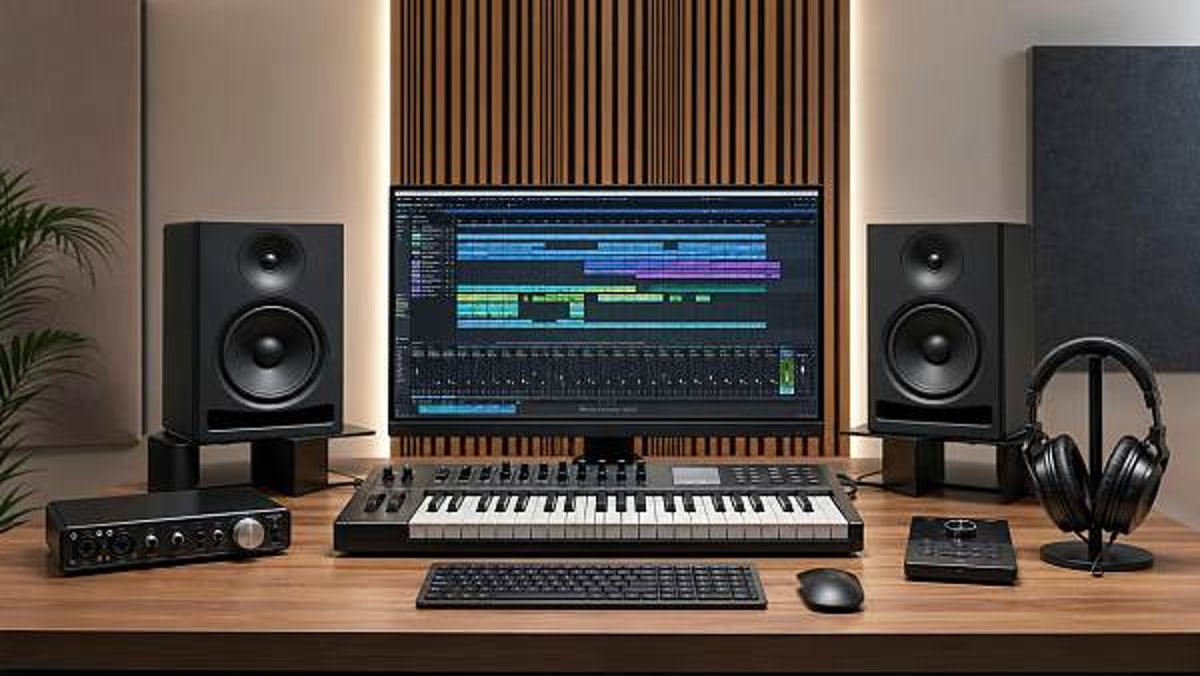
Not every category speeds up production equally. In most home studios, the largest gains come from five areas: DAW workflow, audio interface stability, monitoring accuracy, control surfaces or shortcut devices, and plugin management. These do not always look glamorous, but they reduce delays in hundreds of small decisions. That matters more than isolated headline features.
Researchers should also consider whether the tool helps at the start, middle, or end of a project. Some music production tools save 15 minutes at session setup. Others save 20 to 40 minutes during editing or mix revision. The best investment often depends on where project delays happen most often, not on where the gear appears most impressive.
The table below provides a decision-oriented comparison of tool categories commonly linked with faster home studio output.
The strongest pattern here is that speed comes from fewer interruptions. The right music production tools reduce setup steps, technical errors, and second-guessing. That is why interfaces, monitoring, and templates often deliver better real-world value than adding a large number of new plugins too early.
Priority order for most home studios
If budget is limited, prioritize tools in the order that removes the most frequent friction. In many cases, the first layer is a stable computer plus DAW optimization. The second layer is a reliable interface and accurate monitoring. The third layer is speed-oriented accessories such as controllers, sample organizers, and editing utilities. Only after those are in place should researchers heavily expand software collections.
Quick priority checklist
- Fix system stability first: crashes and latency ruin every stage of production.
- Improve monitoring second: faster judgment reduces unnecessary revisions by a noticeable margin.
- Add control tools third: keyboard shortcuts, macros, and transport control improve editing pace.
- Expand plugin inventory last: too many choices often slow creative work rather than speed it.
For commercial buyers supporting content rooms, training facilities, or compact production suites, this order also simplifies procurement. It reduces support burden and shortens onboarding time for users with different experience levels.
What to check by workflow stage before choosing music production tools
A useful way to evaluate music production tools is to divide them by workflow stage. Recording, editing, arranging, mixing, and delivery each have different bottlenecks. This helps researchers avoid buying a tool that is excellent in one stage but irrelevant to the actual problem.
In recording, speed usually depends on low-latency monitoring, fast gain staging, simple input routing, and quick session recall. In editing, time savings come from batch actions, waveform visibility, hotkeys, and noise cleanup. In arranging, it is often about sample organization, template tracks, and MIDI input convenience. In mixing, reliable reference monitoring and repeatable plugin chains matter more than collecting endless processors.
The following table turns those stages into a practical research checklist with common decision points.
This stage-based review makes procurement smarter. Instead of asking, “Which product is best?” ask, “Which product shortens the longest delay in my workflow?” That question produces much clearer decisions, especially when comparing similar music production tools across multiple suppliers or product tiers.
Scenario-based checks for different users
A vocalist working mainly with 1 to 2 channels needs different priorities than a beatmaker using heavy virtual instruments, or a content team producing podcasts, music beds, and branded audio in the same space. The tool list should reflect project type, track count, and whether recording is live, overdubbed, or mostly in-the-box.
For educational or multi-user environments, consistency becomes even more important. Fewer tool variations can reduce setup errors, shorten training, and improve handoff between users. In these situations, music production tools with clear interfaces and stable software support may be more valuable than highly specialized options with steeper learning curves.
A practical benchmark is whether a new user can understand core operation within the first 30 to 60 minutes. If not, the tool may be powerful, but it may not be the fastest choice for a shared studio or a commercial content production room.
Common mistakes that slow down a home studio
The most expensive mistake is assuming that more software equals faster production. In reality, too many choices can slow browsing, increase CPU load, and create inconsistency between projects. A smaller, well-organized toolset often works better than 200 plugins that overlap in function.
Another common issue is ignoring the full signal chain. Researchers may focus on microphones or instruments while overlooking cable quality, interface drivers, monitor placement, or acoustic treatment. Yet these supporting elements strongly influence whether music production tools perform efficiently. Even a 5-inch monitor pair can become misleading in a poor room if placement and reflections are not addressed.
The third mistake is failing to plan for integration. Some buyers mix different software ecosystems, controller mappings, and connection standards without checking how they work together. This adds hidden setup time across every session. In commercial sourcing terms, interoperability is a core buying criterion, not a secondary detail.
Risk reminder checklist
- Do not judge music production tools only by demo videos; test real workflow steps such as session loading, routing, and export speed.
- Avoid buying multiple overlapping plugins before building a consistent default chain for EQ, compression, reverb, and limiting.
- Check update policies and operating system compatibility, especially if you plan to keep the studio stable for 12 months or longer.
- Confirm physical connection standards in advance, including USB generation, monitor outputs, headphone feeds, and MIDI requirements.
These checks are especially useful for buyers comparing products from international suppliers. Clear compatibility notes, support expectations, and deployment requirements can prevent delays after delivery.
A practical buying and setup plan for researchers and sourcing teams
When comparing music production tools, a phased plan usually produces better results than one large purchase. Start with an audit of the current setup, then rank needs by workflow impact, and only then compare specific products. This method works for independent creators and for commercial buyers sourcing small studio packages, educational labs, or branded content production rooms.
A useful 3-step structure is: first, identify the slowest stage; second, shortlist 2 to 4 solutions per category; third, evaluate total setup effort, not just purchase price. If a lower-cost device takes 6 extra hours to configure and still causes driver issues, it may not be the cheaper option in practice. Time has procurement value too.
Researchers should prepare a simple comparison file covering budget, compatibility, expected time savings, support needs, and delivery timeline. For imported or project-based sourcing, it is also sensible to confirm packaging, voltage or power standards where relevant, after-sales communication, and sample or demonstration availability before final selection.
Information to prepare before requesting recommendations
- Current computer specifications, operating system version, and main DAW.
- Typical project type, track count range, and recording channel needs.
- Room size, monitor placement limitations, and whether acoustic treatment is already installed.
- Budget range by category, such as interface, monitoring, controller, or software bundle.
- Target delivery timing, especially if the studio supports business launches, training schedules, or project deadlines within 4 to 8 weeks.
With this information ready, recommendations become more accurate and sourcing conversations move faster. That is the real value of a checklist-driven approach: fewer assumptions, fewer unsuitable options, and better alignment between budget and workflow improvement.
Why work with us when researching music production tools
For buyers, researchers, and commercial project teams, selecting music production tools is rarely just about a single product. It often involves balancing performance, compatibility, lead time, support expectations, and long-term usability across a wider professional environment. Global Commercial Trade supports that process by connecting product research with practical sourcing logic across pro audio and related commercial applications.
If you are comparing home studio packages, compact content production rooms, educational music labs, or pro audio sourcing options, we can help you narrow the field based on actual use case. That includes guidance around parameter confirmation, product selection priorities, expected delivery windows, custom package planning, and supplier communication points that are easy to overlook during early research.
Contact us if you want support with music production tools selection, workflow-based sourcing advice, quotation discussion, sample evaluation, compatibility review, or a customized equipment list for your project scope. The more clearly you define your recording needs, room conditions, budget range, and timeline, the faster we can help you identify practical options that truly improve studio efficiency.
Search News
Hot Articles
Popular Tags
Need ExpertConsultation?
Connect with our specialized leisureengineering team for procurementstrategies.
Recommended News
 Apr 30, 2026How to vet a musical instruments exporter before first ordersmusical instruments exporter vetting guide: learn how to assess quality control, compliance, lead times, and supplier reliability before first orders.● Pro Audio Engineer
 Apr 30, 2026Instrument cables that reduce noise without overspendingInstrument cables that cut noise without inflating costs. Discover how buyers can choose durable, low-noise options for hospitality, schools, events, and commercial venues.● Pro Audio Engineer
 Apr 30, 2026Music accessories people replace too often and whyMusic accessories are often replaced too soon. Learn which items truly wear out, how to spot real failure signs, and how smarter buying can cut costs and improve reliability.● Pro Audio Engineer
 Apr 30, 2026Music production tools that actually speed up a home studioMusic production tools that truly speed up a home studio: compare workflow-saving gear, avoid costly mistakes, and build a faster, smarter setup with confidence.● Pro Audio Engineer
 Apr 29, 2026String Instruments Compared: What Really Affects Tone and DurabilityString instruments compared for tone and durability: learn how materials, construction, hardware, and setup affect long-term performance for schools, venues, rentals, and sourcing teams.● Pro Audio Engineer
 Apr 29, 2026Wind Instruments Maintenance Tips That Prevent Costly RepairsWind instruments maintenance tips that help teams prevent leaks, corrosion, and pad failure. Learn practical care steps to reduce repair costs and keep instruments performance-ready.● Pro Audio Engineer
 Apr 29, 2026Percussion Instruments Buying Guide: Sound, Build, and ValuePercussion instruments buying guide for schools, venues, and studios—compare sound, build quality, durability, and total value to source smarter and avoid costly mistakes.● Pro Audio Engineer
 Apr 29, 2026How to Find Reliable Musical Instruments WholesaleMusical instruments wholesale made safer: learn how to vet a musical instruments manufacturer, compare suppliers, and source reliable musical instruments for schools and bands with confidence.● Pro Audio Engineer
 Apr 29, 2026Musical Instruments for Schools on BudgetMusical instruments for schools on a budget: compare musical instruments for bands, wholesale options, and how to choose a reliable musical instruments manufacturer for lasting value.● Pro Audio Engineer
 Apr 29, 2026OEM or ODM Musical Instruments ManufacturerFind the right musical instruments manufacturer for bands, schools, and wholesale buyers. Compare OEM vs ODM options, customization, quality control, and sourcing strategies.● Pro Audio Engineer
 Apr 29, 2026Which Musical Instruments Fit Small BandsMusical instruments for bands: explore smart lineups for schools, venues, and buyers comparing musical instruments wholesale and a trusted musical instruments manufacturer.● Pro Audio Engineer
 Apr 29, 2026Musical Instruments Wholesale Buying GuideMusical instruments wholesale guide for bands, schools, and distributors: compare musical instruments manufacturers, MOQ, quality, compliance, and sourcing strategies for smarter bulk buying.● Pro Audio Engineer
 Apr 29, 2026How to Source Musical Instruments for SchoolsMusical instruments for schools: learn how to compare musical instruments wholesale options, choose a trusted musical instruments manufacturer, and source durable musical instruments for bands with confidence.● Pro Audio Engineer
 Apr 29, 2026How to Choose a Musical Instruments ManufacturerFind the right musical instruments manufacturer for bands, schools, and wholesale buyers. Compare quality, OEM/ODM options, compliance, and lead times to source with confidence.● Pro Audio Engineer
 Apr 29, 2026How to Choose Musical Instruments for BandsMusical instruments for bands guide: compare musical instruments manufacturer options, wholesale terms, and musical instruments for schools to source durable, high-value solutions.● Pro Audio Engineer
 Apr 26, 2026Musical instruments manufacturer compliance: EU RoHS vs. US CPSIA documentation gapsMusical instruments manufacturer? Close EU RoHS vs. US CPSIA documentation gaps—critical for bands, schools & trampoline park suppliers. Avoid disqualification.● Pro Audio Engineer
 Apr 26, 2026High-quality musical instruments: why serial number verification matters for resale valueHigh-quality musical instruments for bands and schools rely on serial number verification to protect resale value, authenticity, and compliance—trusted by top suppliers worldwide.● Pro Audio Engineer
 Apr 26, 2026Musical instruments supplier lead times: why 8-week delivery now means ‘in stock’Musical instruments supplier lead times hit 8 weeks—now meaning 'in stock.' Compare trampoline park supplier, indoor playground manufacturer & more for assured readiness.● Pro Audio Engineer
 Apr 26, 2026Musical instruments for schools: what happens when warranty service requires shipping overseasMusical instruments for schools & bands: Avoid costly overseas warranty shipping. Discover high-quality, service-backed instruments from trusted manufacturers and suppliers.● Pro Audio Engineer
 Apr 26, 2026Musical instruments manufacturer transparency: where are your components really made?Discover how top musical instruments manufacturer & trampoline park supplier ensure component transparency—boost safety, compliance, and ROI for bands, schools, and indoor playground installations.● Pro Audio Engineer
 Apr 26, 2026Musical instruments for bands: why matching wood grain matters for live soundDiscover why matching wood grain in musical instruments for bands ensures superior live sound—key insight for schools, venues & suppliers seeking high quality musical instruments.● Pro Audio Engineer
 Apr 26, 2026Musical instruments supplier red flags—delayed shipping isn’t the worst signSpot red flags in musical instruments supplier, trampoline park supplier & indoor playground manufacturer—beyond delayed shipping. Ensure safety, compliance & quality.● Pro Audio Engineer
 Apr 26, 2026Musical instruments manufacturer vs. supplier: who handles warranty claims?Musical instruments manufacturer vs. supplier: who handles warranty claims? Discover how warranty authority impacts trampoline park safety, indoor playground installation & more.● Pro Audio Engineer
 Apr 26, 2026High-quality musical instruments: how to spot factory-refurbished units sold as newSpot high-quality musical instruments for bands & schools—avoid factory-refurbished units sold as new. Trusted insights on musical instruments manufacturer transparency, supplier accountability, and procurement safety.● Pro Audio Engineer