Workspace Furniture for Offices: What to Compare Before Planning a Hybrid Layout
Workspace Furniture for Offices: What to Compare Before Planning a Hybrid Layout
Planning a hybrid office takes more than choosing desks and chairs.
The right workspace furniture for offices must support movement, focus, meetings, and daily operational changes.
That makes early comparison essential, especially when layouts must work harder with fewer fixed seats.
In practice, hybrid planning is less about filling space and more about matching furniture performance to work patterns.
A better comparison process helps control fit-out costs, reduce rework, and keep teams comfortable over time.
It also improves procurement decisions when lead times, compliance, and supplier consistency matter.
Start with Work Modes, Not Furniture Lists
Many office projects begin with product categories.
That usually creates a layout built around items, not around real behavior.
A stronger method starts by mapping how people actually use the office each week.
For hybrid teams, the common modes are focused work, quick collaboration, scheduled meetings, touchdown tasks, and social interaction.
Once those modes are clear, workspace furniture for offices becomes easier to compare.
You can then judge whether each furniture type supports one mode or several.
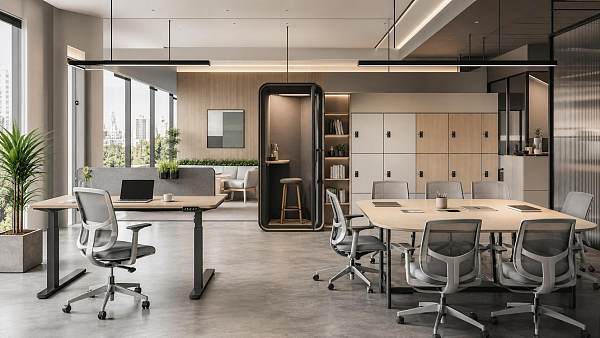
- Benching systems support density, but may reduce privacy.
- Modular tables adapt quickly, but need disciplined cable planning.
- Soft seating encourages informal meetings, but may not suit laptop-heavy work.
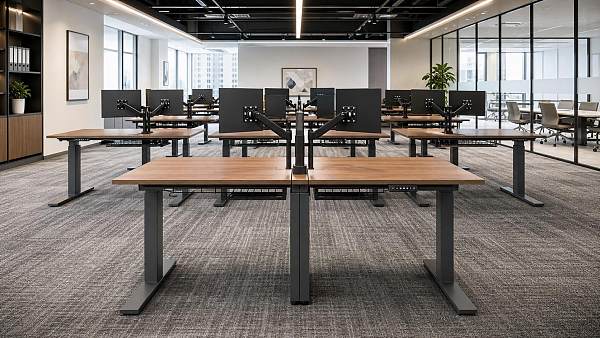
- Height-adjustable desks improve ergonomics, but increase budget pressure.
This comparison frame keeps layout decisions tied to function, not showroom appeal.
Compare Flexibility Before You Compare Finishes
From recent workplace changes, flexibility is now a core performance metric.
Hybrid attendance patterns shift by day, team, and season.
That means workspace furniture for offices should handle reconfiguration without major downtime.
When comparing options, look at how easily units move, connect, expand, or change purpose.
This is where apparently similar products often perform very differently.
Questions worth asking suppliers
- Can one table support solo work, team huddles, and training sessions?
- Do partitions attach without custom tools or specialist labor?
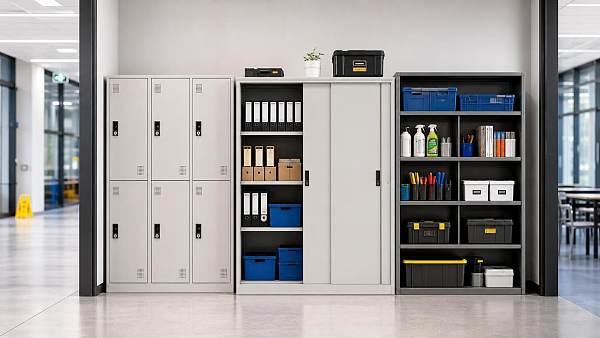
- Can storage units be relocated when departments change?
- Are replacement parts available across regions?
- Will the system remain compatible with future ranges?
A finish sample may impress during selection.
But flexible workspace furniture for offices protects value after occupancy, when real changes begin.
Measure Space Efficiency with Real Layout Ratios
Hybrid layouts usually aim to do more with the same footprint.
Still, space efficiency should never mean simply reducing desk count.
The better test is whether the layout supports circulation, booking behavior, and mixed task intensity.
When evaluating workspace furniture for offices, compare the ratio between assigned seating, shared settings, and enclosed support areas.
This also helps reveal hidden inefficiencies.
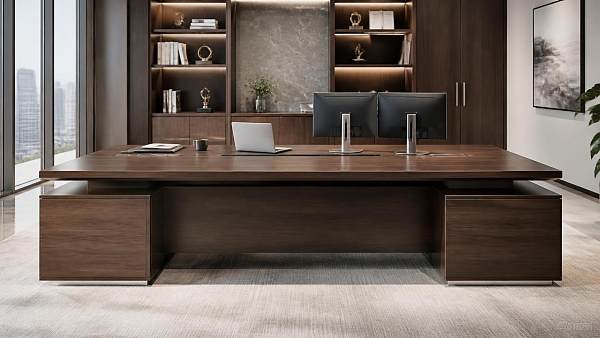
For example, oversized executive desks can weaken a flexible planning strategy across whole departments.
Prioritize Comfort That Lasts Beyond Day One
Comfort remains one of the most underestimated comparison points.
In hybrid environments, people expect office days to support focused, high-value work.
If workspace furniture for offices feels awkward or tiring, attendance quality drops quickly.
Ergonomic review should include more than chair specifications.
Desk height range, monitor support, acoustic separation, and lighting interaction all shape user comfort.
Key comfort checkpoints
- Seat adjustment range should match varied user profiles.
- Worktops should support screens, documents, and personal devices together.
- Privacy screens should reduce distraction without blocking daylight.
- Shared touchdown areas should still allow posture variation.
In actual operations, comfort complaints often show up as productivity issues first.
That is why comfort should be compared as a business metric, not a soft feature.
Check Durability, Maintenance, and Compliance Together
A hybrid office creates uneven wear patterns.
Some zones sit quiet for days, while shared desks and collaboration settings absorb constant use.
Because of that, workspace furniture for offices must be compared for durability at component level.
Surface resistance, frame stability, edging quality, castor performance, and fabric cleanability all matter.
More importantly, these factors should be reviewed alongside compliance requirements.
- Fire safety standards for upholstery and panels
- Load and stability testing for desks and storage
- Material emissions and indoor air quality criteria
- Regional certification needs for multinational projects
This is especially relevant for cross-border procurement.
A lower quote loses value fast when maintenance cycles are short or approvals stall installation.
Review Procurement Value Across the Full Project Timeline
Price comparison alone rarely leads to the best workspace furniture for offices.
The stronger view is total procurement value across design, delivery, installation, and post-occupancy support.
This also means checking how suppliers perform under real project pressure.
Compare these commercial factors carefully
- Lead times for standard and customized items
- Mock-up support before final approval
- Packaging quality for international transport
- Installation coordination and site readiness requirements
- Warranty response and spare part availability
- Consistency across multiple office locations
For phased rollouts, product continuity matters even more.
A supplier that changes finishes, dimensions, or hardware mid-program can create expensive mismatches.
Reliable workspace furniture for offices should support present needs and later expansion with minimal disruption.
Build a Comparison Matrix Before Final Layout Approval
A clear matrix keeps planning objective.
It also helps align design teams, procurement leads, and operational stakeholders around the same decision logic.
At this stage, compare each workspace furniture option against weighted project priorities.
- Define the main work modes by department.
- Set target ratios for desks, meeting areas, and support zones.
- Score furniture options for flexibility, comfort, and space efficiency.
- Check durability, standards, and maintenance implications.
- Add landed cost, lead time, and supplier support data.
- Test the shortlist through mock-ups or pilot zones.
This process makes final approval faster and more defensible.
It also reduces the risk of choosing workspace furniture for offices that looks right on paper but fails in daily use.
Final Takeaway
A successful hybrid office is built on comparison quality, not on furniture quantity.
Before locking a plan, compare workspace furniture for offices through the lens of flexibility, efficiency, comfort, durability, and procurement value.
That approach produces layouts that adapt better, perform longer, and stay aligned with operational reality.
When the comparison is disciplined from the start, the final workplace works harder for the business and the people using it.
Search News
Hot Articles
- Outdoor RidesHow to Select Leisure Park Equipment for Safe, High-Throughput Visitor AreasOct 03, 2026
- Fashion & Gem JewelryDiamond Tester Wholesale: How to Vet Accuracy, Calibration, and MOQ Before OrderingOct 02, 2026
- Hotel Room AmenitiesHow Hotels Can Choose Amenity Bottles That Balance Brand Image and Refill CostsOct 01, 2026
Popular Tags
Need ExpertConsultation?
Connect with our specialized leisureengineering team for procurementstrategies.
Recommended News
 Sep 02, 2026How to Choose a Glass Acoustic Office Pod for Open-Plan Workplace PrivacyGlass acoustic pod office buying guide: compare privacy, ventilation, safety glass, power, site fit, and supplier support to choose a productive open-plan workspace solution.● Institutional Buyer
 Sep 01, 2026Is CE Marking Enough for Commercial Products Sold in the US?Is CE marking enough for commercial products sold in the US? Learn the key US safety, FCC, listing, and inspection requirements before you buy.● Institutional Buyer
 Sep 04, 2026B2B Office Supplies Procurement: Building a Cost-Controlled Replenishment ProgramB2B office supplies procurement made smarter: build a cost-controlled replenishment program that reduces spend, prevents stockouts, and improves supplier performance.● Institutional Buyer
 Aug 26, 2026How to Choose Automatic Office Coffee Machines for Team Size, Usage, and MaintenanceAutomatic office coffee machines: learn how to choose the right model for team size, daily demand, drink preferences, and maintenance needs to reduce downtime and improve workplace satisfaction.● Institutional Buyer
 Aug 13, 2026What to Look for When Choosing a Wood Executive Office Desk for Daily UseWood executive office desks should do more than look premium. Learn how to compare durability, ergonomics, cable management, and finish quality before you buy.● Institutional Buyer
 Jul 31, 2026How to Choose Institutional Storage Furniture for Schools, Offices, and Public FacilitiesInstitutional storage furniture buying guide for schools, offices, and public facilities—learn how to assess safety, durability, cleaning, locks, and lifecycle cost before you buy.● Institutional Buyer
 Jul 14, 2026Commercial Carpet Tile Price Guide: Cost Factors, Wear Ratings, and Installation ScopeCommercial carpet tile price explained: compare cost factors, wear ratings, and installation scope to choose durable, budget-smart flooring for offices, schools, hotels, and retail.● Institutional Buyer
 Jul 11, 2026How to Compare Motorized, Fixed Frame, and Portable Wholesale Projector ScreensWholesale projector screens compared: discover how motorized, fixed frame, and portable options differ in image quality, flexibility, and sourcing value for commercial projects.● Institutional Buyer
 Jul 10, 2026Desktop Hole Punches Wholesale: What Buyers Should Check Before Placing a Bulk OrderDesktop hole punches wholesale buyers should check quality, accuracy, compliance, total cost, and supplier reliability before placing a bulk order. Read the key checkpoints now.● Institutional Buyer
 Jul 09, 2026Library Bookshelves Wholesale Buying Guide: Materials, Load Capacity, and Layout CostsLibrary bookshelves wholesale guide covering materials, load capacity, and layout costs. Compare options, reduce procurement risk, and choose durable shelving for long-term value.● Institutional Buyer
 Jul 08, 2026Height Adjustable Desks Bulk: Key Specs to Compare for Office Fit-Out ProjectsHeight adjustable desks bulk: compare load, range, stability, noise, compliance, and rollout factors to choose reliable desks for office fit-out projects with less risk.● Institutional Buyer
 Jul 06, 2026FBX Drops 18% as Asia-Europe Furniture Rates FallFBX drops 18% as Asia-Europe furniture rates fall to $1,186/FEU, reshaping office furniture import margins, restocking timing, and shipping plans. See what buyers and exporters should do next.● Institutional Buyer
 Jul 06, 2026Training Chairs With Writing Tablet: What to Check for Classroom Layout and DurabilityTraining chairs with writing tablet: learn how to compare classroom layout, tablet size, frame durability, and maintenance needs to choose smarter, longer-lasting seating.● Institutional Buyer
 Jul 05, 2026Indonesia Tightens Wood Proof for Office Furniture ImportsIndonesia tightens wood proof for office furniture imports from July 3, 2026. Learn FLEGT, certification, customs risks, and how exporters can avoid delays and extra fees.● Institutional Buyer
 Jul 04, 2026How to Choose Educational Furniture for Schools by Age Group, Layout, and DurabilityEducational furniture for schools should match age groups, room layouts, and durability needs. Discover practical buying tips to improve safety, flexibility, and long-term value.● Institutional Buyer
 Jul 03, 2026Europe 40HQ Rates Climb to $6,920 for Large Furniture ShipmentsEurope 40HQ rates climb to $6,920, reshaping large furniture shipments with 9–12 week delays and higher consolidation costs. See what exporters and buyers should do now.● Institutional Buyer
 Jul 03, 2026Adjustable Library Shelves: Load Capacity, Material, and Layout Tips for Smarter Space PlanningAdjustable library shelves: learn how to compare load capacity, materials, and layout options to create safer, more flexible spaces with lower long-term costs.● Institutional Buyer
 Jul 02, 2026Vietnam Tightens Proof Rules for Wood Office FurnitureVietnam tightens proof rules for wood office furniture from July 1, 2026. Learn how FSC-CoC, VPA-FLEGT, and customs delays could impact exporters, sourcing, and delivery plans.● Institutional Buyer
 Jun 29, 2026Workspace Furniture for Offices: What to Compare Before Planning a Hybrid LayoutWorkspace furniture for offices should be compared by flexibility, comfort, space efficiency, and procurement value before planning a hybrid layout. Learn what to review for smarter office decisions.● Institutional Buyer
 Jun 28, 2026How to Evaluate an Institutional Furniture Manufacturer for Schools, Hospitals, and Public SpacesInstitutional furniture manufacturer evaluation guide for schools, hospitals, and public spaces. Learn how to compare compliance, durability, customization, and supply reliability.● Institutional Buyer
 Jun 23, 2026Educational Furniture for Universities: What to Compare Before Buying for Labs and Lecture RoomsEducational furniture for universities: compare lab and lecture room safety, durability, flexibility, and lifecycle cost before buying. Make smarter campus sourcing decisions.● Institutional Buyer
 Jun 22, 2026How to Choose Educational Furniture for Libraries by Age Group, Layout, and UseEducational furniture for libraries should match age groups, layout, and daily use. Discover practical tips to choose safer, flexible, durable solutions that improve learning spaces.● Institutional Buyer
 Jun 18, 2026Wholesale Projector Screens: How to Choose Size, Gain, and Mounting for Each SpaceWholesale projector screens guide: learn how to choose the right size, gain, and mounting for classrooms, boardrooms, hotels, and event spaces for clearer images and smarter sourcing.● Institutional Buyer
 Jun 17, 2026Mobile Pedestals Wholesale Buying Guide: Locking Systems, Sizes, and Bulk PricingMobile pedestals wholesale guide covering locking systems, size options, durability, and bulk pricing to help buyers compare suppliers, cut risk, and secure better-value orders.● Institutional Buyer