Chromebook Charging Stations for Schools: Cart vs Cabinet vs Wall-Mount Options
Chromebook Charging Stations for Schools: Cart vs Cabinet vs Wall-Mount Options
Choosing the right chromebook charging stations for schools affects security, workflow, and budget control.
For buyers comparing carts, cabinets, and wall-mounted systems, the best fit depends on scale, space, device routines, and maintenance pressure.
A school with shared devices has different needs from a one-to-one campus.
That is why product shape matters almost as much as charging capacity.
This guide looks at chromebook charging stations from a sourcing and ownership perspective, with practical criteria for school procurement decisions.
What Schools Need From Chromebook Charging Stations
Before comparing formats, define the operating model behind the devices.
In real school environments, charging is tied to supervision, storage, movement, and turnaround time.
The strongest purchasing decisions usually balance five points:
- Device count per classroom, grade level, or campus building.
- Available floor space and wall space.
- Daily movement between classrooms, labs, and testing areas.
- Security expectations for after-hours storage.
- Cable management and labor needed for support staff.
More schools now want chromebook charging stations that reduce teacher handling time, not just charge more devices.
That shift changes the value equation.
Cart Systems: Best for Mobility and Shared Device Programs
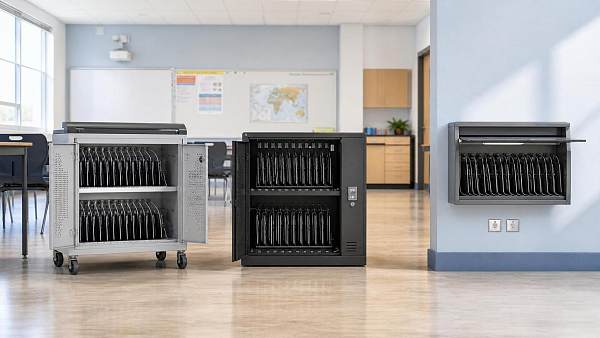
Charging carts remain one of the most common chromebook charging stations in K-12 procurement.
The reason is simple.
They combine charging, storage, and transport in one unit.
Where carts work well
- Shared Chromebook pools across multiple classrooms.
- Testing weeks that require temporary device deployment.
- Campuses with flexible room scheduling.
- Schools without fixed charging points in every room.
Main advantages
Mobility is the clear advantage.
A cart can support changing class needs without adding fixed infrastructure.
Many models also include lockable doors, numbered slots, and power sequencing to avoid circuit overload.
Common drawbacks
Carts take up floor space.
They can also become heavy, especially with 30 or 40 devices loaded.
If wheel quality is poor, long-term movement causes maintenance issues and safety concerns.
For this reason, mobility claims should be checked against caster rating and frame strength.
Cabinet Systems: Stronger Security and Cleaner Storage
Cabinets are often chosen when schools want chromebook charging stations with a more permanent footprint.
Compared with carts, they usually place more emphasis on secure storage and structured access.
Where cabinets fit best
- Media centers and IT rooms.
- Classrooms with fixed device assignments.
- Schools with higher after-hours security requirements.
- Campuses wanting a tidier, less mobile storage solution.
Main advantages
Cabinets usually offer stronger physical presence and better access control.
They also tend to look cleaner in permanent learning spaces.
For campuses standardizing storage across buildings, cabinet-based chromebook charging stations often support easier asset organization.
Common drawbacks
The tradeoff is reduced flexibility.
Once installed, cabinets are not ideal for constant room-to-room movement.
They may also cost more per location if many rooms need separate units.
Wall-Mount Systems: Space Saving but More Specialized
Wall-mounted chromebook charging stations answer a different problem.
They are designed for schools where floor space is limited and fixed placement is acceptable.
Where wall-mount options make sense
- Compact classrooms.
- Hallway learning zones or supervised labs.
- Schools trying to keep devices off the floor.
- Projects where space optimization has higher priority than mobility.
Main advantages
The biggest benefit is space efficiency.
Wall systems free up circulation paths and can simplify room layout.
For some schools, this improves classroom safety and visual order.
Common drawbacks
Installation is more dependent on wall condition, mounting standards, and electrical access.
Capacity is often lower than larger carts or cabinets.
That makes wall-mount systems better for targeted use than district-wide bulk deployment.
Cost Comparison Beyond Unit Price
When sourcing chromebook charging stations, unit price alone gives an incomplete picture.
A lower purchase price can create higher operating costs later.
A more useful method is cost per managed device over three to five years.
That approach makes different chromebook charging stations easier to compare fairly.
What to Check Before Placing an Order
Specification sheets can look similar, but field performance often differs.
Before final selection, verify these points:
- Slot size fits Chromebook models with protective cases.
- Power system supports safe simultaneous charging.
- Locking method matches school security policy.
- Cable routing is simple enough for daily student use.
- Ventilation design prevents heat buildup during overnight charging.
- Warranty coverage includes electrical parts and moving components.
- Compliance documents are available for local safety review.
This is also where supplier quality matters.
Reliable sourcing depends on consistent manufacturing, export documentation, and support responsiveness after delivery.
Which Chromebook Charging Stations Fit Each School Scenario
The right answer usually becomes clearer when matched to the use case.
- For rotating shared devices: carts are often the most practical option.
- For secure fixed storage: cabinets usually deliver better control.
- For limited floor area: wall-mount chromebook charging stations can be the best fit.
- For mixed-use campuses: a combination strategy often works better than standardizing one format everywhere.
That last point is becoming more important.
Many schools no longer buy one universal charging solution for every building.
They split procurement by function, which usually improves both utilization and budget efficiency.
Final Sourcing View
Chromebook charging stations should be evaluated as infrastructure, not accessories.
Carts deliver mobility, cabinets improve storage discipline, and wall-mount options save space.
The best procurement outcome comes from matching the format to device flow, room conditions, and support capacity.
Before issuing a purchase order, compare total ownership cost, installation needs, compliance records, and service reliability side by side.
That sourcing discipline helps schools choose chromebook charging stations that stay useful long after the first delivery.
Search News
Hot Articles
- Outdoor RidesHow to Select Leisure Park Equipment for Safe, High-Throughput Visitor AreasOct 03, 2026
- Fashion & Gem JewelryDiamond Tester Wholesale: How to Vet Accuracy, Calibration, and MOQ Before OrderingOct 02, 2026
- Hotel Room AmenitiesHow Hotels Can Choose Amenity Bottles That Balance Brand Image and Refill CostsOct 01, 2026
Popular Tags
Need ExpertConsultation?
Connect with our specialized leisureengineering team for procurementstrategies.
Recommended News
 Sep 28, 2026How U.S. Schools Can Choose Laboratory Equipment for Safe, Compliant Science LabsSchool laboratory equipment USA: learn how to select safe, compliant lab furniture, ventilation, emergency systems, and durable tools for K–12 science labs.● Institutional Buyer
 Sep 16, 2026How to Source Educational Furniture Worldwide for Safe, Flexible Learning SpacesEducational furniture worldwide: learn how to source safe, flexible, durable learning-space solutions while controlling compliance, logistics, and lifecycle costs.● Institutional Buyer
 Aug 31, 2026How to Plan Smart Classroom Solutions That Improve Learning and IT ManageabilitySmart classroom solutions: learn how to plan secure, scalable teaching spaces that improve learning, simplify IT management, and reduce lifecycle costs.● Institutional Buyer
 Aug 01, 2026How to Specify an EN54 School PA System for Safe, Compliant Campus Voice EvacuationEN54 school PA system specification guide for safer, compliant campus voice evacuation. Learn zoning, intelligibility, monitoring, tender tips, and handover checks.● Institutional Buyer
 Jul 15, 2026Vietnam Tightens Import Rules for Smart Campus TechVietnam Tightens Import Rules for Smart Campus Tech: learn how MOIT’s 2026 data hosting and NEP connection rules may reshape import approval, sourcing timelines, and delivery planning.● Institutional Buyer
 Jul 14, 2026Thailand TISI Tightens Rules for Smart Campus TerminalsThailand TISI tightens rules for smart campus terminals, requiring Thai speech recognition and local biometric data storage. Learn the compliance impact, timeline risks, and what exporters must do now.● Institutional Buyer
 Jul 13, 2026Red Sea Rerouting Lifts Smart Campus Tech Shipping CostsRed Sea rerouting lifts Smart Campus Tech shipping costs, extends Asia-Europe booking lead times, and delays delivery. See what exporters, buyers, and logistics teams should do now.● Institutional Buyer
 Jul 12, 2026Event Technology for Live Venues: What Systems Matter Most for Seamless Operations?Event technology defines how live venues handle ticketing, AV, access, and monitoring. Discover which systems matter most for seamless operations, higher uptime, and better guest experiences.● Institutional Buyer
 Jul 11, 2026What Is a Campus Procurement Platform and How Does It Improve School Purchasing Workflows?Campus procurement platform explained: learn how it streamlines school purchasing workflows, improves approval control, boosts spend visibility, and reduces delays across campus buying.● Institutional Buyer
 Jul 10, 2026Vietnam Raises Smart Campus Tech Import Tariff to 12%Vietnam Raises Smart Campus Tech Import Tariff to 12%: explore how the new Vietnam smart campus tech tariff impacts pricing, sourcing, and local assembly strategies across Southeast Asia.● Institutional Buyer
 Jul 10, 2026Interactive Document Camera vs Webcam: Which Works Better for Smart Classrooms?Interactive document camera vs webcam: discover which delivers clearer content sharing, faster lesson flow, and better hybrid teaching performance for smart classrooms.● Institutional Buyer
 Jul 09, 2026RCEP Rule Adds Carbon Footprint Filings for Smart Campus Tech ExportsRCEP Rule reshapes Smart Campus Tech exports: learn how new carbon footprint filings for Singapore, Thailand, and Vietnam affect customs clearance, lead times, and compliance planning before October 1, 2026.● Institutional Buyer
 Jul 09, 2026Basketball Hoops for Campuses: Which Backboard, Rim, and Mounting Type Fits Your Site?Basketball hoops for campuses: compare backboard, rim, and mounting options by site needs. Learn how to choose safer, longer-lasting systems for outdoor courts, gyms, and multipurpose halls.● Institutional Buyer
 Jul 09, 2026Modular Educational Furniture: What to Check Before Planning Flexible ClassroomsModular educational furniture: learn what to check before planning flexible classrooms, from safety and durability to teaching fit, supplier quality, and long-term value.● Institutional Buyer
 Jul 08, 2026Shenzhen-Yokohama Port Delays Fall to 2.1 DaysShenzhen-Yokohama Port Delays fall to 2.1 days, cutting shipment cycles by 5–7 days for smart campus equipment. See how faster port efficiency can ease Q3 school delivery pressure.● Institutional Buyer
 Jul 07, 2026FBX Slide Pushes Smart Campus Freight Below $980/FEUFBX Slide Pushes Smart Campus Freight Below $980/FEU as Asia-Europe rates tumble. Discover what this means for smart campus shipments, booking risks, and cost-saving opportunities.● Institutional Buyer
 Jul 07, 2026Math Manipulatives Bulk Price Guide: Cost Drivers, Pack Sizes, and School Budget PlanningMath manipulatives bulk price explained: compare cost drivers, pack sizes, landed costs, and school budget planning tips to source smarter and avoid hidden expenses.● Institutional Buyer
 Jul 04, 2026RCEP Update Expands Indonesia Duty-Free Quota for Edu DevicesRCEP Update Expands Indonesia Duty-Free Quota for Edu Devices: learn how the new 80,000-unit quota reshapes export costs, compliance, and school procurement opportunities in Indonesia.● Institutional Buyer
 Jul 03, 2026Indonesia Enforces ID-SNI Labels on Smart Campus ImportsIndonesia Enforces ID-SNI Labels on Smart Campus Imports: learn how the new rule affects labeling, customs clearance, certification, and delivery readiness for compliant market entry.● Institutional Buyer
 Jul 03, 2026How to Choose Indoor School Sports Equipment for Age Groups, Space, and Safety NeedsIndoor school sports equipment buying guide for schools: learn how to match age groups, space limits, and safety standards to choose durable, efficient solutions.● Institutional Buyer
 Jul 02, 2026Chromebook Charging Stations for Schools: Cart vs Cabinet vs Wall-Mount OptionsChromebook charging stations for schools compared: cart, cabinet, and wall-mount options. Discover the best fit for security, space, mobility, and budget before you buy.● Institutional Buyer
 Jul 01, 2026Indonesia Opens RCEP Fast Track for Smart Campus IoTIndonesia opens an RCEP fast track for Smart Campus IoT, cutting Jakarta customs clearance to 12 hours for eligible HS 8517.62 devices. See who qualifies and how to prepare.● Institutional Buyer
 Jun 30, 2026Flexible Learning Spaces for K-12 and Higher Ed: Layout Ideas, Furniture, and Tech NeedsFlexible learning spaces for K-12 and higher ed: explore practical layout ideas, durable furniture, and smart tech strategies that improve teaching, flexibility, and long-term campus value.● Institutional Buyer
 Jun 30, 2026Campus Equipment Procurement Checklist: How to Compare Specs, Warranties, and Total CostCampus equipment procurement made practical: compare specs, warranty terms, supplier reliability, and total cost to avoid hidden expenses and make smarter campus buying decisions.● Institutional Buyer