Interactive Document Camera vs Webcam: Which Works Better for Smart Classrooms?
Smart classroom planning often starts with displays, software, and network capacity, yet the capture device can shape the entire teaching experience. When comparing an interactive document camera with a webcam, the decision affects far more than picture sharpness. It influences how physical materials are shared, how quickly lessons move, and how well classroom technology fits into a reliable long-term deployment. In education procurement and system design, that difference now matters because campuses are investing in hybrid learning, flexible room standards, and equipment that must serve both live and recorded instruction.
Why this comparison matters now
Schools are no longer evaluating cameras as isolated accessories. They are part of broader classroom ecosystems that include interactive flat panels, lecture capture platforms, USB switching, audio reinforcement, and cloud collaboration tools.
That is where the interactive document camera gains attention. It is designed for instructional visibility, especially when lessons depend on textbooks, handwriting, printed diagrams, lab samples, maps, prototypes, or detailed objects.
A webcam serves a different purpose. It is optimized for face framing, conferencing, and speaker presence. In many rooms, that is useful, but it does not automatically make it the better classroom imaging tool.
From a sourcing perspective, this is also a commercial decision. Global Commercial Trade tracks how institutional buyers increasingly favor equipment with clear interoperability, documented compliance, and dependable supply continuity, especially in office and educational supplies.
The core difference in practical terms
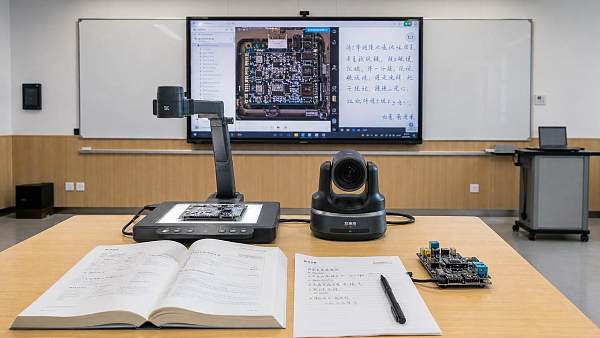
An interactive document camera is built to capture content on a desk or demonstration surface. It usually includes an adjustable arm, close-focus optics, and controls for zoom, annotation, freeze, or image rotation.
A webcam is built to capture people. Its field of view, autofocus behavior, and mounting style are typically designed for a monitor, laptop, or front-facing conferencing position.
That distinction sounds simple, but it changes real classroom performance. One device is centered on instructional material. The other is centered on the presenter.
How that plays out during lessons
When a teacher writes on paper, shows a circuit board, or turns pages in a workbook, an interactive document camera generally keeps the content readable and stable.
A webcam can show the same material, but often with awkward angle control, inconsistent focus, limited zoom, and more setup friction. That slows instruction and reduces clarity for remote viewers.
A side-by-side view of classroom priorities
For technical evaluation, the most useful comparison is not consumer-grade image quality. It is teaching suitability under daily use conditions.
In many classrooms, the best result is not choosing one category as universally better. It is deciding which visual task matters most in that room standard.
Where an interactive document camera creates clearer value
The interactive document camera stands out when teaching depends on physical source material. This includes early education, science labs, design courses, engineering sketches, language instruction, and assessment review.
It also supports lesson variety. A single session may move from a worksheet to a specimen slide, then to handwritten correction. That flexibility is difficult to match with a fixed webcam workflow.
Another advantage is student visibility. Learners in the back of the room, or connected remotely, can see details that would otherwise be lost in a physical demonstration.
For institutions standardizing smart campuses, this matters because equipment has to serve different teaching styles without forcing instructors into complicated setup routines.
Useful classroom scenarios
- Displaying textbook pages with legible margins and notes
- Showing math problem solving in real time on paper
- Presenting biological samples, components, fabrics, or small tools
- Capturing student work for group critique or assessment review
- Recording lesson content for replay without rebuilding the demonstration
Where webcams still make sense
A webcam remains the better fit when the main goal is instructor presence during video meetings, distance tutoring, or lecture capture centered on the speaker rather than desk content.
It can also be a cost-conscious option in lighter-use rooms, especially where printed content is rarely shared and conferencing is the primary requirement.
Some campuses use both. A webcam handles participant-facing communication, while an interactive document camera handles close-up teaching materials. That dual-device model often delivers the best hybrid learning experience.
What evaluators should check beyond resolution
Specification sheets can hide practical weaknesses. Resolution alone does not guarantee readable content, smooth switching, or durable classroom use.
Performance details that affect real deployment
- Autofocus speed on paper, glossy surfaces, and small objects
- Minimum focus distance and optical zoom behavior
- Frame rate stability during live annotation or movement
- USB, HDMI, or network compatibility with existing room systems
- Driver requirements for Windows, ChromeOS, or mixed-device environments
- Physical durability of hinges, arms, cables, and touch points
- Availability of firmware updates, service support, and replacement units
Compliance and sourcing reliability also deserve attention. In institutional procurement, a technically capable device can still be the wrong choice if certifications, warranty terms, or supply consistency are weak.
That broader view reflects how GCT approaches educational equipment analysis. Product suitability is tied not only to function, but also to commercial readiness, international standards, and long-term operational fit.
How to match the device to room type
A practical selection model starts with the room’s dominant teaching behavior. The right answer in a seminar room may be the wrong answer in a STEM lab or primary classroom.
A better decision framework
The question is not whether an interactive document camera is more advanced than a webcam in abstract terms. The question is whether the device supports the visual workflow the classroom actually needs.
If teaching depends on showing physical content clearly and repeatedly, the interactive document camera is usually the stronger choice. If instruction depends on presenter-centered communication, a webcam may be enough.
For larger rollouts, the next step is straightforward. Map room types, list key teaching tasks, test device behavior with real materials, and compare integration requirements before standardizing. That process produces a more defensible decision than buying on price or headline resolution alone.
Search News
Hot Articles
- Indoor PlaygroundHow to Choose Animatronic Haunted House Props for High-Throughput AttractionsOct 08, 2026
- Fashion & Gem JewelryThermal Diamond Testers: How They Work and When They Can Misidentify StonesOct 07, 2026
- Commercial KitchenWhat Is Driving Demand for Commercial Hospitality Projects Across the GCC?Oct 06, 2026
Popular Tags
Need ExpertConsultation?
Connect with our specialized leisureengineering team for procurementstrategies.
Recommended News
 Sep 28, 2026How U.S. Schools Can Choose Laboratory Equipment for Safe, Compliant Science LabsSchool laboratory equipment USA: learn how to select safe, compliant lab furniture, ventilation, emergency systems, and durable tools for K–12 science labs.● Institutional Buyer
 Sep 16, 2026How to Source Educational Furniture Worldwide for Safe, Flexible Learning SpacesEducational furniture worldwide: learn how to source safe, flexible, durable learning-space solutions while controlling compliance, logistics, and lifecycle costs.● Institutional Buyer
 Aug 31, 2026How to Plan Smart Classroom Solutions That Improve Learning and IT ManageabilitySmart classroom solutions: learn how to plan secure, scalable teaching spaces that improve learning, simplify IT management, and reduce lifecycle costs.● Institutional Buyer
 Aug 01, 2026How to Specify an EN54 School PA System for Safe, Compliant Campus Voice EvacuationEN54 school PA system specification guide for safer, compliant campus voice evacuation. Learn zoning, intelligibility, monitoring, tender tips, and handover checks.● Institutional Buyer
 Jul 15, 2026Vietnam Tightens Import Rules for Smart Campus TechVietnam Tightens Import Rules for Smart Campus Tech: learn how MOIT’s 2026 data hosting and NEP connection rules may reshape import approval, sourcing timelines, and delivery planning.● Institutional Buyer
 Jul 14, 2026Thailand TISI Tightens Rules for Smart Campus TerminalsThailand TISI tightens rules for smart campus terminals, requiring Thai speech recognition and local biometric data storage. Learn the compliance impact, timeline risks, and what exporters must do now.● Institutional Buyer
 Jul 13, 2026Red Sea Rerouting Lifts Smart Campus Tech Shipping CostsRed Sea rerouting lifts Smart Campus Tech shipping costs, extends Asia-Europe booking lead times, and delays delivery. See what exporters, buyers, and logistics teams should do now.● Institutional Buyer
 Jul 12, 2026Event Technology for Live Venues: What Systems Matter Most for Seamless Operations?Event technology defines how live venues handle ticketing, AV, access, and monitoring. Discover which systems matter most for seamless operations, higher uptime, and better guest experiences.● Institutional Buyer
 Jul 11, 2026What Is a Campus Procurement Platform and How Does It Improve School Purchasing Workflows?Campus procurement platform explained: learn how it streamlines school purchasing workflows, improves approval control, boosts spend visibility, and reduces delays across campus buying.● Institutional Buyer
 Jul 10, 2026Vietnam Raises Smart Campus Tech Import Tariff to 12%Vietnam Raises Smart Campus Tech Import Tariff to 12%: explore how the new Vietnam smart campus tech tariff impacts pricing, sourcing, and local assembly strategies across Southeast Asia.● Institutional Buyer
 Jul 10, 2026Interactive Document Camera vs Webcam: Which Works Better for Smart Classrooms?Interactive document camera vs webcam: discover which delivers clearer content sharing, faster lesson flow, and better hybrid teaching performance for smart classrooms.● Institutional Buyer
 Jul 09, 2026RCEP Rule Adds Carbon Footprint Filings for Smart Campus Tech ExportsRCEP Rule reshapes Smart Campus Tech exports: learn how new carbon footprint filings for Singapore, Thailand, and Vietnam affect customs clearance, lead times, and compliance planning before October 1, 2026.● Institutional Buyer
 Jul 09, 2026Basketball Hoops for Campuses: Which Backboard, Rim, and Mounting Type Fits Your Site?Basketball hoops for campuses: compare backboard, rim, and mounting options by site needs. Learn how to choose safer, longer-lasting systems for outdoor courts, gyms, and multipurpose halls.● Institutional Buyer
 Jul 09, 2026Modular Educational Furniture: What to Check Before Planning Flexible ClassroomsModular educational furniture: learn what to check before planning flexible classrooms, from safety and durability to teaching fit, supplier quality, and long-term value.● Institutional Buyer
 Jul 08, 2026Shenzhen-Yokohama Port Delays Fall to 2.1 DaysShenzhen-Yokohama Port Delays fall to 2.1 days, cutting shipment cycles by 5–7 days for smart campus equipment. See how faster port efficiency can ease Q3 school delivery pressure.● Institutional Buyer
 Jul 07, 2026FBX Slide Pushes Smart Campus Freight Below $980/FEUFBX Slide Pushes Smart Campus Freight Below $980/FEU as Asia-Europe rates tumble. Discover what this means for smart campus shipments, booking risks, and cost-saving opportunities.● Institutional Buyer
 Jul 07, 2026Math Manipulatives Bulk Price Guide: Cost Drivers, Pack Sizes, and School Budget PlanningMath manipulatives bulk price explained: compare cost drivers, pack sizes, landed costs, and school budget planning tips to source smarter and avoid hidden expenses.● Institutional Buyer
 Jul 04, 2026RCEP Update Expands Indonesia Duty-Free Quota for Edu DevicesRCEP Update Expands Indonesia Duty-Free Quota for Edu Devices: learn how the new 80,000-unit quota reshapes export costs, compliance, and school procurement opportunities in Indonesia.● Institutional Buyer
 Jul 03, 2026Indonesia Enforces ID-SNI Labels on Smart Campus ImportsIndonesia Enforces ID-SNI Labels on Smart Campus Imports: learn how the new rule affects labeling, customs clearance, certification, and delivery readiness for compliant market entry.● Institutional Buyer
 Jul 03, 2026How to Choose Indoor School Sports Equipment for Age Groups, Space, and Safety NeedsIndoor school sports equipment buying guide for schools: learn how to match age groups, space limits, and safety standards to choose durable, efficient solutions.● Institutional Buyer
 Jul 02, 2026Chromebook Charging Stations for Schools: Cart vs Cabinet vs Wall-Mount OptionsChromebook charging stations for schools compared: cart, cabinet, and wall-mount options. Discover the best fit for security, space, mobility, and budget before you buy.● Institutional Buyer
 Jul 01, 2026Indonesia Opens RCEP Fast Track for Smart Campus IoTIndonesia opens an RCEP fast track for Smart Campus IoT, cutting Jakarta customs clearance to 12 hours for eligible HS 8517.62 devices. See who qualifies and how to prepare.● Institutional Buyer
 Jun 30, 2026Flexible Learning Spaces for K-12 and Higher Ed: Layout Ideas, Furniture, and Tech NeedsFlexible learning spaces for K-12 and higher ed: explore practical layout ideas, durable furniture, and smart tech strategies that improve teaching, flexibility, and long-term campus value.● Institutional Buyer
 Jun 30, 2026Campus Equipment Procurement Checklist: How to Compare Specs, Warranties, and Total CostCampus equipment procurement made practical: compare specs, warranty terms, supplier reliability, and total cost to avoid hidden expenses and make smarter campus buying decisions.● Institutional Buyer