Smart Classroom Equipment Problems: Why Devices Fail to Work Together
Why smart classroom equipment often breaks down in real teaching environments
Smart classroom equipment is usually sold as a seamless upgrade. Real classrooms are rarely that simple.
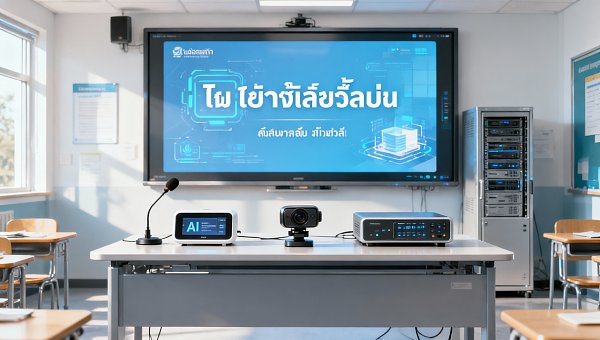
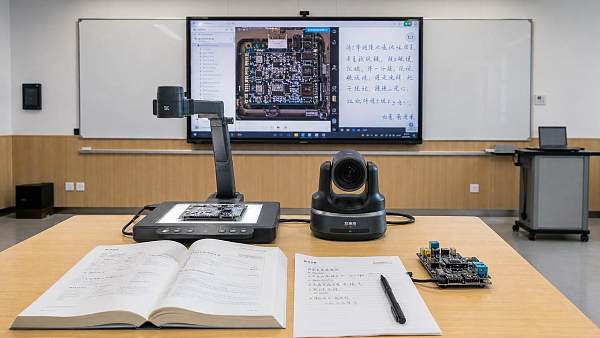
A display may support wireless casting, yet the campus network blocks discovery. A camera may work well alone, yet fail inside a lecture capture platform.
In practice, the problem is not one bad device. It is the gap between hardware, software, control logic, and daily teaching behavior.
That is why smart classroom equipment deserves the same sourcing discipline seen across modern commercial spaces.
Within GCT’s broader view of office and educational supplies, integration matters as much as specification sheets, safety compliance, and supplier reliability.
When devices fail to work together, lessons slow down, support tickets rise, and replacement cycles become expensive long before equipment reaches end of life.
Actual usage conditions shape different integration risks
Not every smart classroom equipment project fails for the same reason. The weak point usually depends on how the room is used.
A small seminar room often stresses ease of switching and quick startup. A lecture hall stresses audio coverage, camera tracking, and stable control across many endpoints.
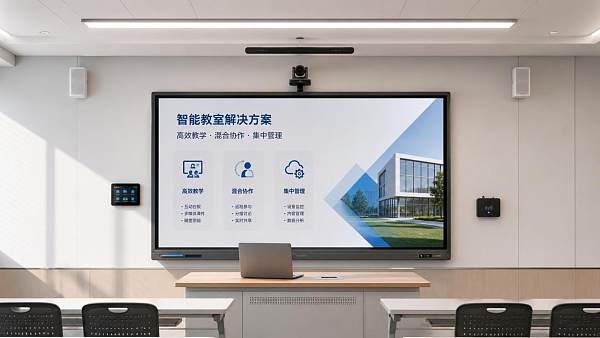
Hybrid teaching adds another layer. The classroom must support in-room interaction and remote participation at the same time, without forcing teachers to manage five interfaces.
This is where many purchasing decisions go wrong. Similar-looking rooms are treated as identical, even though occupancy, teaching format, and support capacity differ sharply.
The better approach is to judge smart classroom equipment by workflow fit, control compatibility, network dependence, and maintenance reality.
Rooms with frequent turnover need fast and forgiving systems
In general classrooms, the most common failure is not dramatic. It is lost time at the beginning of every class.
If a teacher needs extra adapters, multiple logins, or manual source switching, smart classroom equipment becomes a friction point rather than a productivity tool.
These spaces usually benefit from fewer control layers, stable wired fallback, and interfaces that behave consistently across different laptops and operating systems.
Large teaching spaces fail when subsystems are designed separately
In auditoriums or tiered lecture rooms, isolated device quality means little if the room acts like several disconnected systems.
A strong projector cannot compensate for weak DSP tuning. Good microphones cannot solve latency between presentation audio and recording output.
Here, smart classroom equipment should be reviewed as a complete signal chain. Video, audio, control, recording, and network traffic must be tested together.
Where smart classroom equipment problems usually start
Most compatibility issues appear long before installation. They begin during specification, brand selection, and scope definition.
- Different communication protocols prevent displays, switchers, cameras, and control panels from responding predictably.
- Firmware updates improve one device but break interoperability with older peripherals or classroom management platforms.
- Wireless presentation tools rely on network permissions that are rarely confirmed early enough.
- USB peripherals work in direct connections but fail through extenders, hubs, or dock-based teaching setups.
- Cloud-based features look attractive, yet local policy, data security, or unstable internet access limit daily use.
In real projects, smart classroom equipment problems are often caused by a mismatch between promised features and the school’s operating environment.
Different classroom settings do not ask for the same priorities
A useful comparison helps separate essential requirements from features that only add cost or complexity.
The table shows why smart classroom equipment cannot be evaluated by display size or camera resolution alone.
What works in a compact room may create unnecessary failure points in a larger or more specialized teaching space.
The most expensive mistakes usually look reasonable at first
One common misjudgment is choosing smart classroom equipment by isolated performance metrics.
A brighter screen, a higher resolution camera, or a more advanced control panel does not guarantee a better classroom outcome.
Another mistake is assuming future flexibility comes from adding more brands and more modules. Often it creates more dependencies and slower troubleshooting.
Long-term costs are also underestimated. Smart classroom equipment with weak local support, limited spare parts, or unclear firmware policy can become difficult to maintain.
There is also a hidden operational issue. If staff training is light, advanced features remain unused, while simpler systems deliver better daily consistency.
Compatibility should include standards, not just connectors
Many projects confirm HDMI, USB, or network ports, then assume everything else will work.
Real compatibility means checking control protocols, codec behavior, EDID handling, security policies, and interoperability with campus platforms.
For internationally sourced smart classroom equipment, certification, electrical standards, and software localization can also affect deployment speed.
How to assess smart classroom equipment before rollout
The most reliable approach is to reduce assumptions and test complete teaching workflows.
- Map the room by real use patterns, not by floor plan alone.
- Define mandatory integrations with LMS, conferencing tools, recording systems, and network controls.
- Request proof of interoperability in similar classroom types, not just generic demonstration videos.
- Test startup time, source switching, wireless casting, and recovery after connection failure.
- Confirm firmware management, spare part availability, and on-site service response.
- Check whether one interface can support daily teaching without expert intervention.
In sourcing terms, this mirrors broader commercial fit-out practice. The best solution is rarely the device with the longest feature list.
It is the one that performs reliably under the actual constraints of the site, the network, and the users.
A practical way to move from specification to classroom fit
Smart classroom equipment works best when decisions start with teaching conditions, then move to integration architecture, then to brand and model selection.
That sequence sounds obvious, yet many projects reverse it and spend months solving avoidable compatibility problems.
A stronger next step is to sort classrooms by usage intensity, hybrid demand, control complexity, and support capacity.
Then compare smart classroom equipment against those conditions with a clear checklist for interoperability, maintenance, compliance, and lifecycle cost.
For organizations tracking educational spaces alongside other commercial environments, this method creates more resilient sourcing decisions and fewer operational surprises.
Before expanding deployment, validate one representative room, document failure points, and refine the adaptation standard for the next rollout phase.
Search News
Hot Articles
- Commercial KitchenHow Restaurant Buyers Can Source Hospitality Supplies Without OverorderingSep 23, 2026
- Commercial KitchenCommercial Kitchen Design Price: Budgeting by Layout, Equipment, and MEP ScopeSep 22, 2026
- Stationery & UniformsHow Schools Can Cut Printing Costs When Buying Ink Cartridges in BulkSep 21, 2026
Popular Tags
Need ExpertConsultation?
Connect with our specialized leisureengineering team for procurementstrategies.
Recommended News
 Sep 16, 2026How to Source Educational Furniture Worldwide for Safe, Flexible Learning SpacesEducational furniture worldwide: learn how to source safe, flexible, durable learning-space solutions while controlling compliance, logistics, and lifecycle costs.● Institutional Buyer
 Aug 31, 2026How to Plan Smart Classroom Solutions That Improve Learning and IT ManageabilitySmart classroom solutions: learn how to plan secure, scalable teaching spaces that improve learning, simplify IT management, and reduce lifecycle costs.● Institutional Buyer
 Aug 01, 2026How to Specify an EN54 School PA System for Safe, Compliant Campus Voice EvacuationEN54 school PA system specification guide for safer, compliant campus voice evacuation. Learn zoning, intelligibility, monitoring, tender tips, and handover checks.● Institutional Buyer
 Jul 15, 2026Vietnam Tightens Import Rules for Smart Campus TechVietnam Tightens Import Rules for Smart Campus Tech: learn how MOIT’s 2026 data hosting and NEP connection rules may reshape import approval, sourcing timelines, and delivery planning.● Institutional Buyer
 Jul 14, 2026Thailand TISI Tightens Rules for Smart Campus TerminalsThailand TISI tightens rules for smart campus terminals, requiring Thai speech recognition and local biometric data storage. Learn the compliance impact, timeline risks, and what exporters must do now.● Institutional Buyer
 Jul 13, 2026Red Sea Rerouting Lifts Smart Campus Tech Shipping CostsRed Sea rerouting lifts Smart Campus Tech shipping costs, extends Asia-Europe booking lead times, and delays delivery. See what exporters, buyers, and logistics teams should do now.● Institutional Buyer
 Jul 12, 2026Event Technology for Live Venues: What Systems Matter Most for Seamless Operations?Event technology defines how live venues handle ticketing, AV, access, and monitoring. Discover which systems matter most for seamless operations, higher uptime, and better guest experiences.● Institutional Buyer
 Jul 11, 2026What Is a Campus Procurement Platform and How Does It Improve School Purchasing Workflows?Campus procurement platform explained: learn how it streamlines school purchasing workflows, improves approval control, boosts spend visibility, and reduces delays across campus buying.● Institutional Buyer
 Jul 10, 2026Vietnam Raises Smart Campus Tech Import Tariff to 12%Vietnam Raises Smart Campus Tech Import Tariff to 12%: explore how the new Vietnam smart campus tech tariff impacts pricing, sourcing, and local assembly strategies across Southeast Asia.● Institutional Buyer
 Jul 10, 2026Interactive Document Camera vs Webcam: Which Works Better for Smart Classrooms?Interactive document camera vs webcam: discover which delivers clearer content sharing, faster lesson flow, and better hybrid teaching performance for smart classrooms.● Institutional Buyer
 Jul 09, 2026RCEP Rule Adds Carbon Footprint Filings for Smart Campus Tech ExportsRCEP Rule reshapes Smart Campus Tech exports: learn how new carbon footprint filings for Singapore, Thailand, and Vietnam affect customs clearance, lead times, and compliance planning before October 1, 2026.● Institutional Buyer
 Jul 09, 2026Basketball Hoops for Campuses: Which Backboard, Rim, and Mounting Type Fits Your Site?Basketball hoops for campuses: compare backboard, rim, and mounting options by site needs. Learn how to choose safer, longer-lasting systems for outdoor courts, gyms, and multipurpose halls.● Institutional Buyer
 Jul 09, 2026Modular Educational Furniture: What to Check Before Planning Flexible ClassroomsModular educational furniture: learn what to check before planning flexible classrooms, from safety and durability to teaching fit, supplier quality, and long-term value.● Institutional Buyer
 Jul 08, 2026Shenzhen-Yokohama Port Delays Fall to 2.1 DaysShenzhen-Yokohama Port Delays fall to 2.1 days, cutting shipment cycles by 5–7 days for smart campus equipment. See how faster port efficiency can ease Q3 school delivery pressure.● Institutional Buyer
 Jul 07, 2026FBX Slide Pushes Smart Campus Freight Below $980/FEUFBX Slide Pushes Smart Campus Freight Below $980/FEU as Asia-Europe rates tumble. Discover what this means for smart campus shipments, booking risks, and cost-saving opportunities.● Institutional Buyer
 Jul 07, 2026Math Manipulatives Bulk Price Guide: Cost Drivers, Pack Sizes, and School Budget PlanningMath manipulatives bulk price explained: compare cost drivers, pack sizes, landed costs, and school budget planning tips to source smarter and avoid hidden expenses.● Institutional Buyer
 Jul 04, 2026RCEP Update Expands Indonesia Duty-Free Quota for Edu DevicesRCEP Update Expands Indonesia Duty-Free Quota for Edu Devices: learn how the new 80,000-unit quota reshapes export costs, compliance, and school procurement opportunities in Indonesia.● Institutional Buyer
 Jul 03, 2026Indonesia Enforces ID-SNI Labels on Smart Campus ImportsIndonesia Enforces ID-SNI Labels on Smart Campus Imports: learn how the new rule affects labeling, customs clearance, certification, and delivery readiness for compliant market entry.● Institutional Buyer
 Jul 03, 2026How to Choose Indoor School Sports Equipment for Age Groups, Space, and Safety NeedsIndoor school sports equipment buying guide for schools: learn how to match age groups, space limits, and safety standards to choose durable, efficient solutions.● Institutional Buyer
 Jul 02, 2026Chromebook Charging Stations for Schools: Cart vs Cabinet vs Wall-Mount OptionsChromebook charging stations for schools compared: cart, cabinet, and wall-mount options. Discover the best fit for security, space, mobility, and budget before you buy.● Institutional Buyer
 Jul 01, 2026Indonesia Opens RCEP Fast Track for Smart Campus IoTIndonesia opens an RCEP fast track for Smart Campus IoT, cutting Jakarta customs clearance to 12 hours for eligible HS 8517.62 devices. See who qualifies and how to prepare.● Institutional Buyer
 Jun 30, 2026Flexible Learning Spaces for K-12 and Higher Ed: Layout Ideas, Furniture, and Tech NeedsFlexible learning spaces for K-12 and higher ed: explore practical layout ideas, durable furniture, and smart tech strategies that improve teaching, flexibility, and long-term campus value.● Institutional Buyer
 Jun 30, 2026Campus Equipment Procurement Checklist: How to Compare Specs, Warranties, and Total CostCampus equipment procurement made practical: compare specs, warranty terms, supplier reliability, and total cost to avoid hidden expenses and make smarter campus buying decisions.● Institutional Buyer
 Jun 26, 2026Learning Environments: What Design Elements Improve Focus and Engagement?Learning environments shape focus and engagement through smarter layout, acoustics, lighting, and furniture. Discover practical design elements that improve performance and create better learning outcomes.● Institutional Buyer