Flight Simulator Chairs: Comfort Specs That Affect Session Time
When evaluating flight simulator chairs, comfort is not a soft metric—it directly affects session time, operator focus, and training consistency. For technical assessment teams, key factors such as lumbar support, seat density, adjustability, vibration isolation, and material durability can determine whether a simulator setup sustains long, high-performance use. This guide outlines the comfort specifications that matter most in commercial and professional environments.
What Technical Evaluators Actually Need to Know First
For technical assessment teams, the central question is not whether a chair feels good for five minutes. It is whether the seat can support repeatable performance over long simulator sessions without introducing fatigue, posture drift, hot spots, or maintenance issues. In professional installations, comfort becomes a measurable operational factor.
That matters because session time is closely linked to seating quality. If users begin shifting constantly after 40 or 60 minutes, the issue is rarely just preference. It often points to inadequate pressure distribution, poor lumbar geometry, weak adjustability, or excessive vibration transfer from the simulator platform. These flaws reduce concentration and can compromise training quality.
So the overall judgment is straightforward: the best flight simulator chairs are those that maintain neutral posture, distribute load evenly, isolate unwanted vibration, and remain stable under repeated use. A technically sound chair should extend usable session time, reduce user complaints, and perform consistently across a range of body types.
Why Comfort Specs Directly Affect Session Time
Session time is limited by cumulative discomfort more than by dramatic failure. Most users do not stop because a chair is unusable. They stop because low-grade discomfort builds gradually in the lower back, thighs, shoulders, or neck. In a simulator environment, that accumulation is accelerated by static posture, repetitive control inputs, and immersion demands.
A poorly specified chair can create several predictable problems. If the seat pan is too soft, users sink and lose pelvic stability. If it is too firm, pressure points develop under the thighs and ischial bones. If lumbar support is fixed in the wrong location, the spine compensates, often leading to slouching or overextension. Each issue shortens effective training time.
For evaluators, this means comfort should be treated as a performance envelope. The goal is not maximum softness or a consumer-style “luxury” feel. The goal is sustained usability through one-hour, two-hour, or multi-session cycles with minimal degradation in focus. Chairs that appear impressive in a showroom may fail this test quickly in actual simulator use.
The Comfort Specifications That Matter Most
Not every seating feature has equal value. Technical buyers should prioritize specifications that have a direct relationship with posture control, pressure management, and fatigue reduction. Marketing language such as ergonomic styling or premium finish is far less useful than measurable dimensions and support behavior.
1. Lumbar Support Geometry
Lumbar support is one of the strongest predictors of long-session comfort. What matters is not merely whether lumbar support exists, but whether its height, firmness, and curve shape align with the natural inward curve of the lower spine. If the support sits too low, it pushes the pelvis forward incorrectly. If it sits too high, it can create spinal extension and discomfort.
For mixed-user environments, adjustable lumbar support is strongly preferred. Height adjustment is especially valuable because users vary significantly in torso length. Depth or firmness adjustment also helps, as some users need subtle reinforcement while others benefit from stronger support during longer sessions.
Evaluators should check whether lumbar support maintains contact when the user is actively operating controls. A support structure that feels acceptable at rest may lose effectiveness once the operator leans, turns, or braces during simulated maneuvers.
2. Seat Foam Density and Pressure Distribution
Foam density is often misunderstood. Higher density does not always mean a harder feel, and softer foam does not always mean better comfort. In flight simulator chairs, the key issue is whether the cushion maintains structural support over time while spreading pressure across a broad contact area.
Low-quality foam tends to compress too quickly, causing bottoming out and uneven loading. This increases fatigue in the hips and thighs and reduces seated stability. Overly rigid cushions, on the other hand, can create concentrated pressure and numbness during long sessions.
Technical teams should look for medium-to-high resilience foam with documented compression durability. If available, ask suppliers about compression set performance, rebound characteristics, and expected deformation under prolonged commercial use. In high-hour simulator settings, these details matter more than surface softness during first contact.
3. Seat Pan Dimensions and Waterfall Edge Design
The seat pan affects circulation, pelvic alignment, and leg comfort. A pan that is too long can press into the back of the knees, restricting circulation and increasing lower-leg fatigue. A pan that is too short may reduce thigh support and shift too much load into the hips.
For technical evaluation, check usable seat depth rather than only overall chair dimensions. If the seat depth is adjustable, that is a substantial advantage for multi-user environments. Also examine the front edge profile. A waterfall edge reduces pressure under the thighs and supports longer sitting periods.
These details are especially important where simulator chairs are shared by operators of different sizes. A fixed seat pan may work well for one body type and poorly for another, leading to inconsistent training conditions.
4. Backrest Angle and Recline Control
In a flight simulation environment, recline should support task posture rather than lounging. Excessive recline may reduce active control precision, while an overly upright backrest can create lumbar strain and shoulder fatigue. The useful range is typically a controlled, moderate recline that lets users maintain visual alignment with displays and stable access to controls.
Look for smooth, lockable backrest adjustment with minimal play. Unwanted movement in the backrest can become distracting during precise maneuvers or motion-platform use. Chairs intended for gaming may offer dramatic recline angles, but these are often irrelevant or counterproductive in professional simulator applications.
5. Armrest Design and Clearance
Armrests can either support endurance or interfere with operation. If they are too high, shoulders elevate and fatigue increases. If too low, they provide little benefit. If too wide or too fixed, they may conflict with side sticks, throttles, consoles, or cockpit framing.
For many simulator layouts, adjustable armrests are preferred, but removability is equally important. Technical teams should assess whether armrests help users during standby periods without obstructing active control inputs. In some cockpit-style configurations, the best option may be a chair with no armrests or highly compact armrests.
6. Head and Neck Support
Headrests are not always essential, but in longer sessions they can reduce neck strain during pauses, checklist review, or reduced-motion phases. Their usefulness depends on the simulator type and the seated posture required by the control layout.
However, a poorly positioned headrest can push the head forward and create cervical discomfort. The correct approach is to treat head support as secondary to spinal alignment. If included, it should be height-adjustable and should not force forward head posture.
Why Adjustability Often Matters More Than Premium Materials
One of the most common procurement mistakes is overvaluing finish quality and undervaluing adjustment range. Premium upholstery, decorative stitching, and luxury styling may support a brand image, but they do not guarantee long-session usability. For technical assessment personnel, adjustability usually has greater operational value than cosmetic upgrades.
Flight simulator chairs used in commercial, training, or demonstration environments rarely serve one user only. They must accommodate variation in height, leg length, pelvic tilt, shoulder width, and preferred control posture. Without adequate adjustment, even a well-built chair can underperform for a large portion of users.
At minimum, assess seat height range, backrest angle, lumbar position, seat depth where available, armrest adjustment, and base stability. If a chair cannot be adapted quickly and repeatably, it may create setup inefficiencies and inconsistent user experiences between sessions.
Vibration Isolation and Structural Stability in Simulator Environments
Comfort in a simulator is not just about body support. It is also about how the chair interacts with the motion and vibration profile of the platform. Unwanted vibration transmission can create fatigue, reduce perceived quality, and make long sessions more physically taxing than necessary.
Technical evaluators should distinguish between desired feedback and parasitic vibration. In some advanced simulators, certain haptic or motion cues are intentional and useful. But random frame buzz, loose fittings, rattling armrests, or amplified motor vibration degrade the experience and accelerate discomfort.
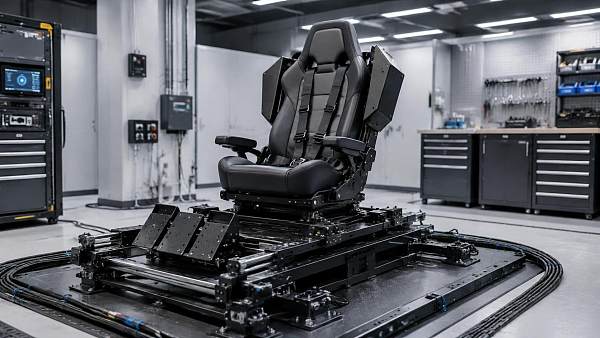
Chair frame rigidity is critical here. A chair with flex in the backrest, seat base, or mounting points may feel unstable under motion. That instability forces the user to make constant postural corrections, increasing muscular fatigue. Evaluate the chair under realistic operating conditions, not just on a static showroom floor.
If the chair is integrated into a custom cockpit or platform, assess mounting compatibility, fastener quality, and resonance behavior. A well-designed chair can improve perceived simulator refinement simply by reducing secondary vibration and mechanical noise.
Material Durability Is Part of Comfort, Not a Separate Issue
In professional environments, comfort degrades over time if materials degrade. A chair that performs well in the first month but loses foam resilience, surface tension, or structural integrity after sustained use will not support long-term session quality. That makes durability an inseparable part of comfort assessment.
Upholstery choice matters. PU surfaces may offer easy cleaning and a sleek look, but lower-grade versions can trap heat, crack, or wear quickly. Fabric options may improve breathability but require stronger stain and abrasion performance. Mesh can work in some applications, though it may not align with all cockpit aesthetics or support profiles.
For technical teams, useful durability questions include abrasion ratings, seam reinforcement, cleaning compatibility, resistance to sweat and temperature variation, and replacement part availability. In commercial sourcing, a maintainable chair with replaceable pads or covers may offer better lifecycle value than a sealed unit with premium initial appearance.
How to Evaluate Flight Simulator Chairs in a Practical Test Protocol
Procurement decisions improve when comfort is tested systematically. A brief sit test is not enough. Technical evaluators should build a protocol that measures comfort retention over time, not just first impression appeal. The most reliable evaluations combine user feedback, observational checks, and physical inspection.
Start with a 60- to 90-minute seated test that reflects actual simulator posture. Users should perform realistic tasks rather than simply sit passively. Record when discomfort begins, where it occurs, and whether it changes with minor adjustment. Common early warning zones include the lower back, hamstrings, shoulders, and neck.
Next, test the chair with multiple body types. A chair that scores highly with one operator may fail others because of fixed lumbar position, narrow shoulder contouring, or limited seat height range. Shared-use suitability is often more important than single-user optimization in commercial environments.
Inspect adjustment controls for speed, clarity, and repeatability. If users cannot quickly dial in a workable posture, the available features lose practical value. Also check for noise, looseness, rocking, armrest deflection, and upholstery heat buildup after extended use.
Finally, review post-test recovery. If users report lingering stiffness or numbness after the session, the chair may be masking weak support with temporary softness. Good flight simulator chairs should minimize residual discomfort, not just delay it.
Key Red Flags That Suggest a Chair Will Underperform
Several issues consistently predict poor long-session results. One is excessive softness in the seat base. While it may feel comfortable at first contact, it often leads to instability and fatigue as the body sinks unevenly. Another is aggressive side bolstering that restricts natural posture changes or fits only a narrow body profile.
Fixed lumbar bulges are another common problem. If their height and depth are not compatible with the user population, they create more strain than support. Non-adjustable armrests that interfere with cockpit controls are also a major functional risk.
From a build perspective, watch for frame flex, wobble in recline mechanisms, visible foam collapse, noisy joints, and surface materials that become hot or sticky quickly. In technical sourcing, these are not cosmetic concerns. They are signs that the chair may limit session time and increase support issues later.
Choosing by Use Case: Training Center, Enterprise Demo Space, or Entertainment Installation
The right comfort specification profile depends partly on the deployment scenario. In a training center, repeatability and adjustability usually matter most. Multiple operators need a chair that can be configured quickly and remain supportive across long, structured sessions.
In enterprise demo spaces or customer-facing commercial environments, appearance matters more, but it should not override ergonomic fundamentals. A visually impressive chair that causes fatigue during a one-hour demonstration can weaken the perceived quality of the entire simulator system.
In entertainment or leisure installations, durability and simplified maintenance may rank higher, especially where usage is frequent and operators vary widely. Here, easy-clean materials, robust adjustment hardware, and resistance to misuse are often just as important as refined ergonomics.
For sourcing teams, the best approach is to define the use profile before comparing models. Comfort requirements are universal, but priority weighting should reflect actual operating conditions, user turnover, and maintenance resources.
What to Ask Suppliers Before Final Approval
Before approving a chair for commercial procurement, technical teams should ask for more than product brochures. Request dimensional drawings, adjustment ranges, material specifications, foam performance details, and information about test standards where available.
It is also useful to ask whether the model was designed for prolonged seated task use or adapted from gaming or consumer office seating. The origin of the design often reveals whether the chair is likely to support extended simulator sessions effectively.
Other important questions include spare part availability, warranty coverage for high-use applications, upholstery replacement options, lead times for custom configurations, and compatibility with simulator mounting systems. These answers help translate comfort assessment into procurement confidence.
Conclusion: The Best Flight Simulator Chairs Support Performance, Not Just Posture
For technical assessment teams, the most important insight is simple: comfort specifications directly influence how long users can train, how consistently they can focus, and how credible the simulator experience feels over time. Evaluating flight simulator chairs should therefore center on sustained support rather than first-impression softness or visual style.
If lumbar geometry, foam resilience, seat pan design, adjustability, vibration behavior, and material durability are all specified well, session time usually improves. If any of these are weak, the chair may become the limiting factor in an otherwise high-quality simulator system.
In commercial and professional environments, the right chair is not an accessory. It is part of the operating platform. The best sourcing decisions come from treating seating comfort as a technical performance category—one that affects user endurance, training consistency, maintenance cost, and overall system value.
Search News
Hot Articles
- Stationery & UniformsHow Schools Can Cut Printing Costs When Buying Ink Cartridges in BulkSep 21, 2026
- Jewelry Packaging & DisplayHow to Evaluate a Luxury Retail Packaging Supplier for Premium Brand ConsistencySep 20, 2026
- Commercial KitchenHow to Select a Spiral Dough Mixer for Bakery Batch Size and Dough HydrationSep 19, 2026
Popular Tags
Need ExpertConsultation?
Connect with our specialized leisureengineering team for procurementstrategies.
Recommended News
 Sep 15, 2026How to Choose Coin-Operated Pool Tables for Bars, Hotels, and Arcade VenuesCoin operated pool tables for bars, hotels, and arcades: compare sizes, payment systems, durability, service access, and revenue potential.● Theme Park Strategist
 Sep 08, 2026What to Look for in a Flight Simulator Chair Manufacturer for Commercial VR CentersChoose a flight simulator chair manufacturer that delivers durable, safe, customizable seating for commercial VR centers. Explore key sourcing criteria now.● Theme Park Strategist
 Aug 25, 2026What to Evaluate Before Buying Commercial Self Service Photo Booths for VenuesCommercial self service photo booths for venues: learn how to evaluate durability, software stability, branding flexibility, support, and total ROI before you buy.● Theme Park Strategist
 Aug 23, 2026How to Evaluate Wholesale Vending Machines for Multi-Location Business DeploymentWholesale vending machines for multi-location deployment require more than low unit cost. Learn how to compare reliability, payments, telemetry, and supplier support to scale smarter.● Theme Park Strategist
 Aug 17, 2026U.S. CPSC Urges Bilingual Warnings for Arcade and VR MachinesU.S. CPSC urges bilingual safety warnings for Arcade & VR Machines—learn what exporters, importers, and distributors must do now to avoid delays and returns.● Theme Park Strategist
 Aug 16, 2026EU Enforces EN IEC 62368-1:2026 Certification for Arcade and VR MachinesEU Enforces EN IEC 62368-1:2026 certification for arcade and VR machines, reshaping EU market access, customs clearance, and compliance planning for exporters and distributors.● Theme Park Strategist
 Aug 13, 2026UFLPA’s new guidelines take effect: Exports of Arcade and VR equipment face full-link labor compliance requirementsUFLPA’s new guide takes effect: Arcade and VR machine exports to the U.S. now face full-chain labor compliance checks. Discover key risks and action steps.● Theme Park Strategist
 Aug 12, 2026EU PPWR takes effect, Arcade and VR packaging incorporate heavy metal and PFAS restrictionsEU PPWR now applies to Arcade and VR packaging, tightening heavy metal and PFAS compliance. Learn how exporters can avoid delays, fines, and customs risks.● Theme Park Strategist
 Aug 11, 2026CPSC Sets Bilingual Labels for Arcade and VR ImportsCPSC bilingual labels for arcade and VR imports become mandatory on October 1, 2026. Learn the new English-Spanish warning rules, customs risks, and key compliance steps now.● Theme Park Strategist
 Aug 10, 2026EU Rule Takes Effect for Arcade & VR Machine ClearanceArcade & VR Machine clearance in the EU now depends on EN IEC 62368-1:2026+A11:2026 compliance. Learn what changed, who is affected, and how to avoid customs delays.● Theme Park Strategist
 Aug 09, 2026CPSC Requires New Labels for Arcade and VR ImportsCPSC requires new labels for Arcade and VR imports starting Oct 1, 2026. Learn the multilingual warning rules, compliance risks, and key steps exporters and buyers must take now.● Theme Park Strategist
 Aug 08, 2026EU Entry Rule Tightens for Arcade & VR MachinesArcade & VR Machines entering the EU now face stricter CE compliance under EN IEC 62368-1:2026+A11:2026. Learn the new rule, risks, and what exporters must do now.● Theme Park Strategist
 Aug 07, 2026CPSC Notice Tightens U.S. Entry Rules for Arcade and VR MachinesCPSC Notice Tightens U.S. Entry Rules for Arcade and VR Machines: learn the new labeling, FCC, UN38.3, and compliance document requirements before October 1, 2026.● Theme Park Strategist
 Aug 06, 2026EU Rule Takes Effect for CE-UKCA Labels on Arcade & VR MachinesArcade & VR Machines face new CE-UKCA label and ECPD filing rules in the EU and UK. Learn what manufacturers, importers, and distributors must do now to avoid delays.● Theme Park Strategist
 Aug 05, 2026CPSC Recalls Arcade and VR Machines Over UL 62368-1CPSC recalls arcade and VR machines over UL 62368-1 non-compliance. Learn how this 2026 safety action may affect imports, distribution, customs clearance, and market access.● Theme Park Strategist
 Aug 02, 2026EU Sets New Certification Rule for Arcade and VR MachinesArcade and VR Machines face a new EU certification rule from Oct 1, 2026. Learn how EN IEC 62368-1:2026+A11:2026 affects CE marking, customs clearance, and market access.● Theme Park Strategist
 Aug 01, 2026CPSC Moves to Require Bilingual Warnings on Arcade and VR MachinesCPSC bilingual warnings for Arcade and VR Machines may reshape U.S. import compliance. Learn how English-Spanish labels affect packaging, customs risk, and shipment readiness.● Theme Park Strategist
 Jul 31, 2026EU Sets EN IEC 62368-1:2025 Rule for Arcade and VR MachinesEU Sets EN IEC 62368-1:2025 Rule for Arcade and VR Machines. Learn the new EU compliance deadlines, safety updates, and key actions for manufacturers, OEMs, and distributors.● Theme Park Strategist
 Jul 30, 2026CPSC Sets New Warning Label Rule for Arcade & VR MachinesCPSC sets a new warning label rule for Arcade & VR Machines effective August 15, 2026. Learn key compliance risks, multilingual label requirements, and shipment actions now.● Theme Park Strategist
 Jul 29, 2026EU Enforces New Safety Standard for Arcade and VR MachinesEU Enforces New Safety Standard for Arcade and VR Machines: learn how EN IEC 62368-1 affects CE compliance, customs clearance, and EU market access for exporters and buyers.● Theme Park Strategist
 Jul 28, 2026CPSC Sets ASTM F3472-26 Rule for Arcade & VR ImportsCPSC ASTM F3472-26 rule reshapes Arcade & VR imports to the U.S. Learn key compliance deadlines, certification risks, and what exporters, OEM/ODM suppliers, and buyers should do now.● Theme Park Strategist
 Jul 27, 2026EU Rule Takes Effect for Arcade & VR Machine CybersecurityEU Rule Takes Effect for Arcade & VR Machine Cybersecurity: learn how EN IEC 62443-3-3:2025 affects compliance, customs clearance, sales continuity, and supplier planning in the EU market.● Theme Park Strategist
 Jul 25, 2026CPSC Sets Bilingual Warning Rule for Arcade and VR ImportsCPSC bilingual warning rule for arcade and VR imports takes effect August 1, 2026. Learn how OEM/ODM exporters can avoid CBP delays, relabel shipments, and protect U.S. delivery timelines.● Theme Park Strategist
 Jul 24, 2026EU Enforces New Safety Standard for Arcade and VR MachinesEU Enforces New Safety Standard for Arcade and VR Machines: learn how EN IEC 62368-1:2026+A11:2026 reshapes EU compliance, CE documentation, testing timelines, and export readiness.● Theme Park Strategist